Calendly vs. Timetics AI: A to Z Appointment Scheduling Software Comparison

Calendly simplifies meeting scheduling with automated bookings, reminders, and integrations. Timetics AI takes it further with AI-powered scheduling, service bookings, payment collection, and customizable booking websites. This side-by-side comparison breaks down their features, pricing, strengths, and limitations to help you choose the right appointment scheduling software for your business.

Key Comparison Summary: Calendly vs Timetics AI

Calendly

Calendly

Key Features

  • Meeting Scheduling
  • Calendar Sync
  • Automated Reminders
  • Team Scheduling
  • Lead Routing
  • CRM Integrations

Calendly is an online appointment scheduling platform that helps individuals and teams automate meeting bookings, manage availability, and reduce back-and-forth emails. It's particularly useful for sales teams, recruiters, and businesses that rely on scheduled meetings and connected CRM workflows.

Pricing

  • Start $0 (Limited)
  • Standard $12/seat/mo (monthly)
  • Teams $20/seat/mo (monthly)

*Extra $12 will be charged for AI Agent usage with each plan.

See Calendly pricing
Timetics AI

Timetics AI

Key Features

  • AI Agent
  • Multiple Workspaces
  • Booking Page Builder
  • White-label Booking
  • Agency Dashboard
  • Facepopup

Timetics AI is an AI-powered appointment scheduling and service booking platform built for businesses of all sizes. It offers the same core scheduling features as Calendly, along with additional practical features, at a much lower price. Beyond appointment and booking links, it helps users manage multiple workspaces, build branded booking websites, collect payments, and automate scheduling tasks using an AI agent.

Pricing

  • Start $0
  • Earn $15 / 10 seat / month (monthly)
  • Small Business $132/30seat/lifetime
See all Timetics AI pricing

Calendly vs. Timetics AI: All Features Comparison

Features
Timetics AI
Calendly
Priority features
Priority features
Feature Timetics AI Calendly
Unlimited Bookings
Yes
Yes
AI Scheduling Agent
Yes
YesCallie (add-on)
AI Voice Commands
Yes
No
Sales-Driven Booking Pages
Yes
Yes
Multiple Business Workspaces
Yes
Limited
Booking Website Builder
Yes
Limited
Service-Based Scheduling
Yes
Yes
Team Scheduling
Yes
Yes
Workflows & Automation
Yes
Yes
Secret Booking Links
Yes
Yes
White-Label Booking Experience
Yes
Limited
Agency Dashboard
Yes
Limited
Facepopup
Yes
No
Progressive Web App (PWA)
Yes
No
Video Conferencing Integration
Yes
Yes
Reminder & Feedback Workflow Emails
Yes
YesReminders; feedback not established
Booking Page SEO
Yes
No
Team Invitations & Role Permissions
Yes
Yes
Advanced Coupon Logic
Yes
Yes
Custom SMTP & SMS
Yes
YesSMS workflows; custom SMTP not listed
Core scheduling features
Feature Timetics AI Calendly
One-on-One Meeting Scheduling
Yes
Yes
Unlimited Event Types
Yes
YesPaid
Private Booking Links
Yes
Yes
Multiple Consultation Types
Yes
Yes
Group Appointment Booking
Yes
Yes
Round-Robin Scheduling
Coming soon
Yes
Recurring Booking Support
Yes
Limited
Meeting Polls
No
Yes
One-Time Booking Links
YesSecret links
YesSingle-use links
Custom Booking Questions
Yes
Yes
Multiple Meeting Durations
Yes
Yes
Booking Rescheduling & Cancellation
Yes
Yes
Daily Booking Limits
Yes
Yes
Meeting Buffer Time
Yes
Yes
Automatic Timezone Detection
Yes
Yes
Multiple Calendar Connections
Yes
Yes
Two-Way Calendar Synchronization
Yes
Yes
Custom Meeting Locations
Yes
Yes
Booking Availability Rules
Yes
Yes
Booking Approval
Yes
No
Business growth & client management
Feature Timetics AI Calendly
Extra Services & Add-ons
Yes
Limited
Service Category Management
Yes
Limited
Multiple Service Locations
Yes
YesMeeting locations
Customer & Contact Management
Yes
Yes
Deposit & Advance Booking Payments
Yes
Yes
Custom Branding Options
Yes
Yes
Customizable Booking Pages
Yes
Yes
Booking Website Templates
Yes
Limited
Lead Qualification & Routing
No
Yes
CRM-Based Lead Routing
No
Yes
Meeting Packages
No
Yes
Automated Client Follow-ups
Yes
Yes
Centralized Team Booking Management
Yes
Yes
Booking Analytics & Reporting
Yes
Yes
Client Relationship History
No
Yes
Payment Links for Services
No
Yes
Availability management & customization
Feature Timetics AI Calendly
Custom Availability Management
Yes
Yes
Company Holiday Settings
No
Yes
Admin Calendar View
Yes
Yes
Calendar Conflict Prevention
Yes
Yes
Multiple Calendars
Yes
Yes
Booking Timeframe Control
Yes
Yes
Custom Booking Questions
Yes
Yes
Custom Domain for Booking Site
Yes
No
Multi-Language Booking Experience
Yes
Yes
Custom User Roles & Permissions
Yes
Yes
Website Booking Embed
Yes
Yes
Remove Platform Branding
Yes
Yes
Customized Confirmation Pages
Yes
Yes
Booking Cancellation Policies
Yes
Yes
Automatic Timezone Handling
Yes
Yes
Automated workflows
Automated workflows
Feature Timetics AI Calendly
Automated Confirmation Emails
Yes
Yes
Automated Reminder Emails
Yes
Yes
Automated Follow-up Emails
Yes
Yes
Rescheduling Notifications
Yes
Yes
Cancellation Notifications
Yes
Yes
Upcoming Booking Reminders
Yes
Yes
Booking Feedback Requests
Yes
No
Custom Email Notifications
Yes
Yes
Workflow Automation
Yes
Yes
MCP Connector
Yes
Yes
SMS Reminders
Yes
Yes
Custom SMTP Configuration
Yes
No
Outgoing Webhooks
Yes
Yes
Customer Journey Emails
Yes
YesWorkflows
Team management
Team management
Feature Timetics AI Calendly
Team Invitations
Yes
Yes
Role Assignment & Permissions
Yes
Yes
Multiple Team Members
Yes
Yes
Team Scheduling
Yes
Yes
Multiple Business Workspaces
Yes
Limited
Round-Robin Scheduling
Coming soon
Yes
Team Analytics
Yes
Yes
SAML Single Sign-On (SSO)
No
Yes
SCIM User Provisioning
No
Yes
Enterprise Domain Control
No
Yes
Payment management
Payment management
Feature Timetics AI Calendly
Stripe Payment Integration
Yes
Yes
PayPal Payment Integration
Yes
Yes
Collect Payment at Booking
Yes
Yes
Deposit & Advance Payments
Yes
Yes
Coupon & Discount Management
Yes
Yes
Advanced Coupon Rules
Yes
Yes
Refund Processing Inside Scheduling Platform
Yes
No
Manual Payment
Yes
YesCustom payment links
Invoicing for Services
No
Yes
Prepaid Meeting Packages
No
Yes
Payment Webhooks
Yes
Yes
Integrations & advanced capabilities
Feature Timetics AI Calendly
Google Calendar
Yes
Yes
Outlook Calendar
Yes
Yes
Apple Calendar
Yes
Yes
Google Meet
Yes
Yes
Zoom
Yes
Yes
Microsoft Teams
Yes
Yes
Zapier
Yes
Yes
Slack
Yes
Yes
Discord
Yes
YesThird-party
ActiveCampaign
Yes
Yes
HubSpot CRM
Yes
Yes
Zoho CRM
Yes
Yes
GoHighLevel CRM
Yes
No
Salesforce CRM
No
Yes
Microsoft Dynamics 365
No
Yes
Webhooks
Yes
Yes
WhatsApp Integration
Yes
No
Native iOS & Android Apps
No
Yes

Sources: Calendly's official feature matrix and documentation, and Timetics AI's pricing and documentation.

A Smarter Way to Save on Scheduling

Stop Paying Per User. Start Growing Without Extra Costs.

Why keep paying per user every month? Switch to Timetics AI with a one-time payment and enjoy lifetime access.

Get Lifetime Access - $69

30 days money-back · Lifetime updates included.

Calendly

Calendly Pros and Cons

Best for: Sales teams, recruiters, and enterprise meeting scheduling.

Pro
Easy, familiar booking experience for clients and teams.
Con
Per-seat subscriptions become costly as your team grows.
Pro
150+ integrations connect scheduling with existing business workflows.
Con
Building service-focused booking pages requires additional tools or customization.
Pro
Advanced lead routing helps sales teams qualify prospects faster.
Con
Limited control over fully branded, multi-section booking websites.
Pro
Native mobile apps simplify scheduling and updates on the go.
Con
Managing multiple client businesses isn't its primary workflow.
Pro
Round-robin and collective scheduling simplify complex team meetings.
Con
Advanced routing and AI capabilities require higher-tier plans.
Timetics AI

Timetics AI Pros and Cons

Best for: Service businesses, consultants, agencies, and growing teams.

Pro
Turn booking pages into sales pages without coding.
Con
Smaller integration ecosystem than Calendly's established platform.
Pro
AI Agent helps reduce manual appointment scheduling work.
Con
Native iOS and Android apps aren't available.
Pro
Manage multiple clients and brands from one agency account.
Pro
Manage more team members without traditional per-seat pricing.
Pro
Offer services, add-ons, deposits, and payments in one place.
Pro
Choose affordable monthly plans or one-time lifetime deals.

Calendly vs. Timetics AI: Detailed Pricing Plan

Calendly Pricing Overview

Calendly pricing based on per seat (only people who host meetings / connect calendars need a seat; invitees are free). Billed monthly or yearly. Enterprise is custom and annual-only. Notetaker (meeting recaps/action items) + Callie (AI assistant) are available as add-ons.

Free Cost (Yearly / Monthly billed) $0 Limitations 1 event type; 1 calendar connection Add-on Cost None
Standard Cost (Yearly / Monthly billed) $10 / seat / month (yearly) $12 / seat / month (monthly) Limitations Up to 6 calendars per user; no round-robin Add-on Cost Notetaker + Callie → Extra $12
Teams Cost (Yearly / Monthly billed) $16 / seat / month (yearly) $20 / seat / month (monthly) Limitations Up to 6 calendars; team features locked to this tier. Add-on Cost Notetaker + Callie → Extra $12
Enterprise Cost (Yearly / Monthly billed) Starts at $15,000 / year Limitations Custom (typically 50+ seats) Add-on Cost Extra cost for Notetaker/Callie

Timetics AI Pricing Overview

Timetics offers a free forever plan, monthly subscriptions, and one-time lifetime deals (pay once, keep access + updates within the tier). 30-day money-back guarantee on lifetime plans. No traditional yearly billing toggle is prominently detailed beyond the lifetime option.

Subscription / Free Plans

Start (Free Forever) Cost $0 forever Limitations 1 calendar connection; up to 10 locations Add-on Cost No add-on cost
Earn Cost $12 / 10 seat / month (yearly) $15 / 10 seat / month (monthly) Limitations Up to 30 locations Add-on Cost No add-on cost
Scale Cost $19 / 30 seat / month (yearly) $24 / 30 seat / month (monthly) Limitations 30 users; up to 30 locations Add-on Cost No add-on cost

Lifetime Deals (One-time payment)

Solo Creator Cost (+Deal) $69 $197 Limitations 3 workspace upgrades; 5 team members per workspace Add-on Cost No add-on cost
Small Business Cost (+Deal) $132 $287 Limitations 15 workspace upgrades; 30 team members per workspace Add-on Cost No add-on cost
Consultants & Agencies Cost (+Deal) $265 $497 Limitations 30 workspace upgrades; 60 team members per workspace Add-on Cost No add-on cost
Scaling Teams Cost (+Deal) $370 $997 Limitations 80 workspace upgrades; Unlimited team members per workspace Add-on Cost No add-on cost

Timetics AI Is the Clear Winner for Best Value

More Value. Less Scheduling Cost.

Lower Cost

Grow your team without per-seat pricing.

More Flexibility

Manage bookings, services, and workspaces.

Lifetime Option

Pay once for lifetime plan access.

Competitors: $5,971 over 5 years.
Timetics $69. Once.

Calculate your savings

Team size 5 users

Timetics AI plan: $69 (1–5 users)

Year 1 Savings

$1,131

5 Year Savings

$5,931

ROI

1,639%

Still Confused about Choosing between Calendly and Timetics AI?

To help you make the right decision, let's compare how both platforms perform in five practical areas, from initial setup to everyday business operations.

Both Calendly and Timetics AI simplify appointment scheduling, but the experience differs when you start managing meetings, customizing booking pages, collecting payments, and connecting business tools.

1. Calendly vs. Timetics AI: Initial Setup and User Experience

Calendly

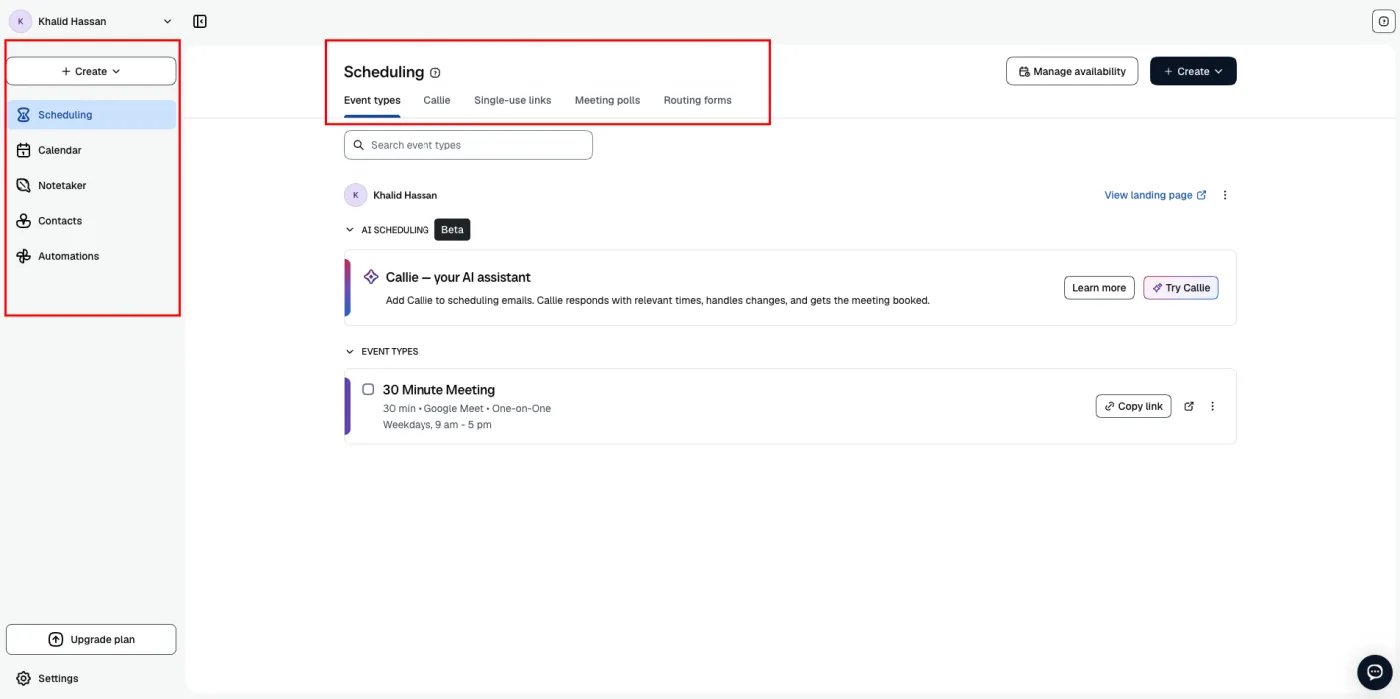
Calendly offers a clean, beginner-friendly dashboard focused on meeting scheduling. Users can quickly create event types, manage availability, share booking links, and access contacts or automations from the sidebar.

Calendly dashboard showing the scheduling page, event types, and sidebar navigation

Its straightforward interface works particularly well for individuals and teams who mainly schedule meetings. However, managing more detailed service operations or creating highly customized booking experiences may require additional tools.

Timetics AI

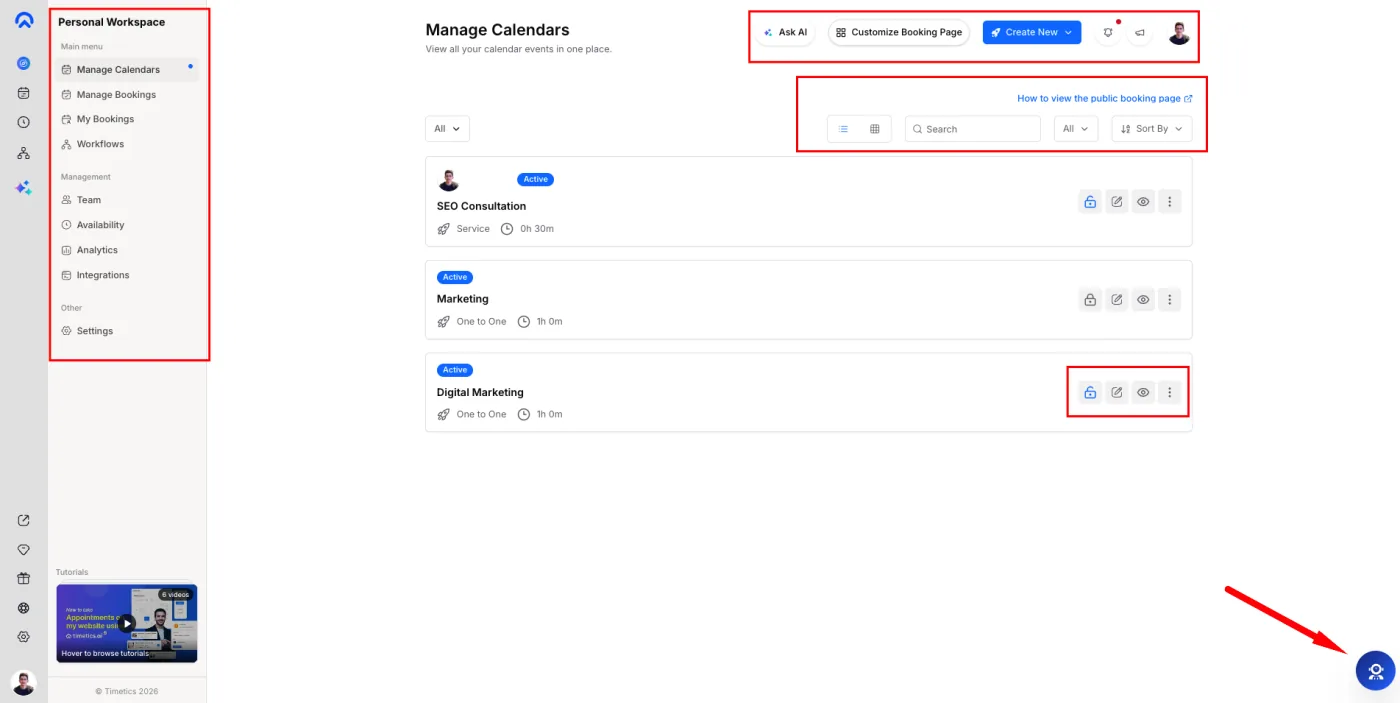
Timetics AI provides a well-organized dashboard with dedicated sections for calendars, bookings, workflows, team members, availability, analytics, and integrations.

Timetics AI dashboard showing manage calendars, bookings, workflows, team, availability, and analytics

Users can create different booking types, manage services, customize booking pages, and access AI assistance from one interface. Its navigation gives businesses more control without requiring them to switch between multiple tools.

Winner: Timetics AI

Both platforms are easy to navigate, but Timetics AI offers a more complete dashboard for managing appointments, services, teams, and daily booking operations. Calendly remains especially convenient for simple meeting scheduling.

2. Calendly vs. Timetics AI: Appointments and Meeting Workflows

Calendly

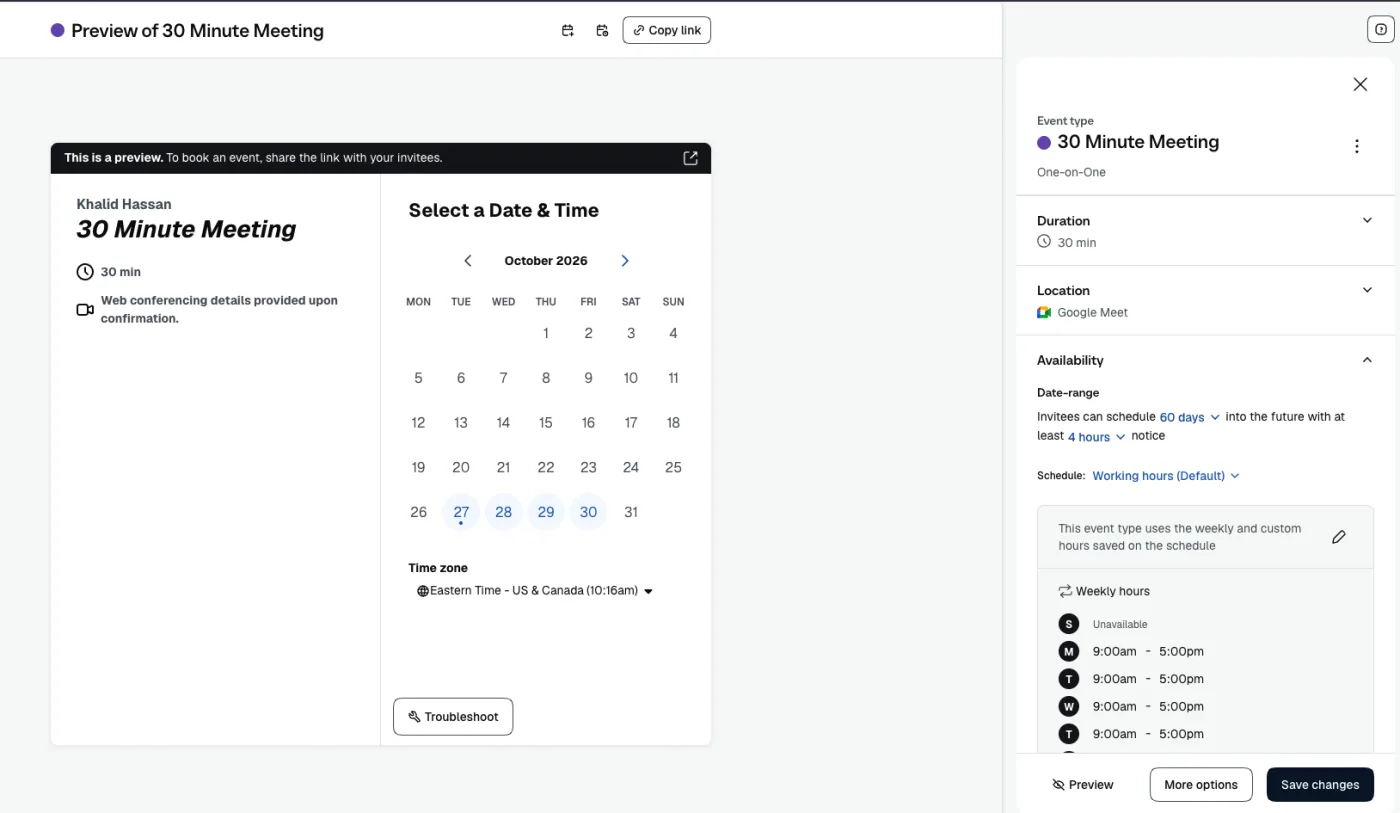
Calendly makes appointment scheduling straightforward. Users can create meeting types, configure availability, set buffer times, customize booking questions, and automate reminders.

Calendly event type preview with duration, location, and availability settings

It also excels at coordinating team meetings through round-robin scheduling, collective events, meeting polls, and routing forms. However, its standard booking-page editor offers less flexibility for creating a complete, content-rich booking website.

Timetics AI

Timetics AI combines appointment scheduling with service-based booking and visual page customization.

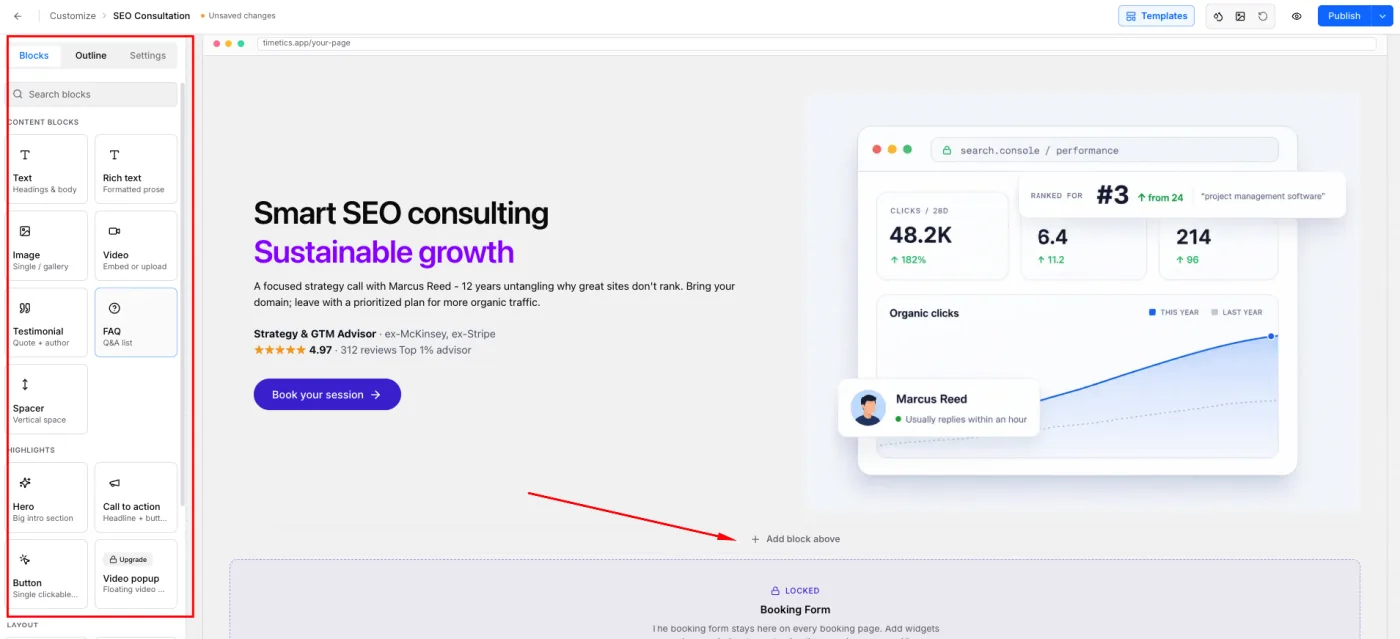
Its drag-and-drop booking page builder lets users add text, images, videos, testimonials, FAQs, and calls to action without coding. Businesses can create branded booking pages that explain their services, build customer trust, and encourage bookings.

Timetics AI drag-and-drop booking page builder with content blocks and a live page preview

Users can also manage booking rules, consultation types, availability, recurring appointments, private links, and automated reminders from the same platform.

Winner: Timetics AI

Timetics AI takes the lead for its flexible booking page builder and service-oriented scheduling experience. Calendly remains stronger for specialized team workflows such as round-robin scheduling and meeting polls.

3. Calendly vs. Timetics AI: Language Support

Calendly

Calendly supports English and seven additional languages for customer-facing booking pages and event notifications, including French, Spanish, German, Dutch, Brazilian Portuguese, Italian, and Ukrainian.

This makes it easier for international businesses to offer localized scheduling experiences. However, custom event titles, descriptions, and booking questions still require manual translation.

Timetics AI

Timetics AI supports 12+ languages, including English, for its scheduling interface and booking experience. This helps businesses serve a wider international audience with localized booking pages.

Winner: Timetics AI

Timetics AI is the better choice for businesses serving multilingual audiences because it supports 12+ languages, more than the eight languages Calendly offers.

4. Calendly vs. Timetics AI: Payments and Service Sales

Calendly

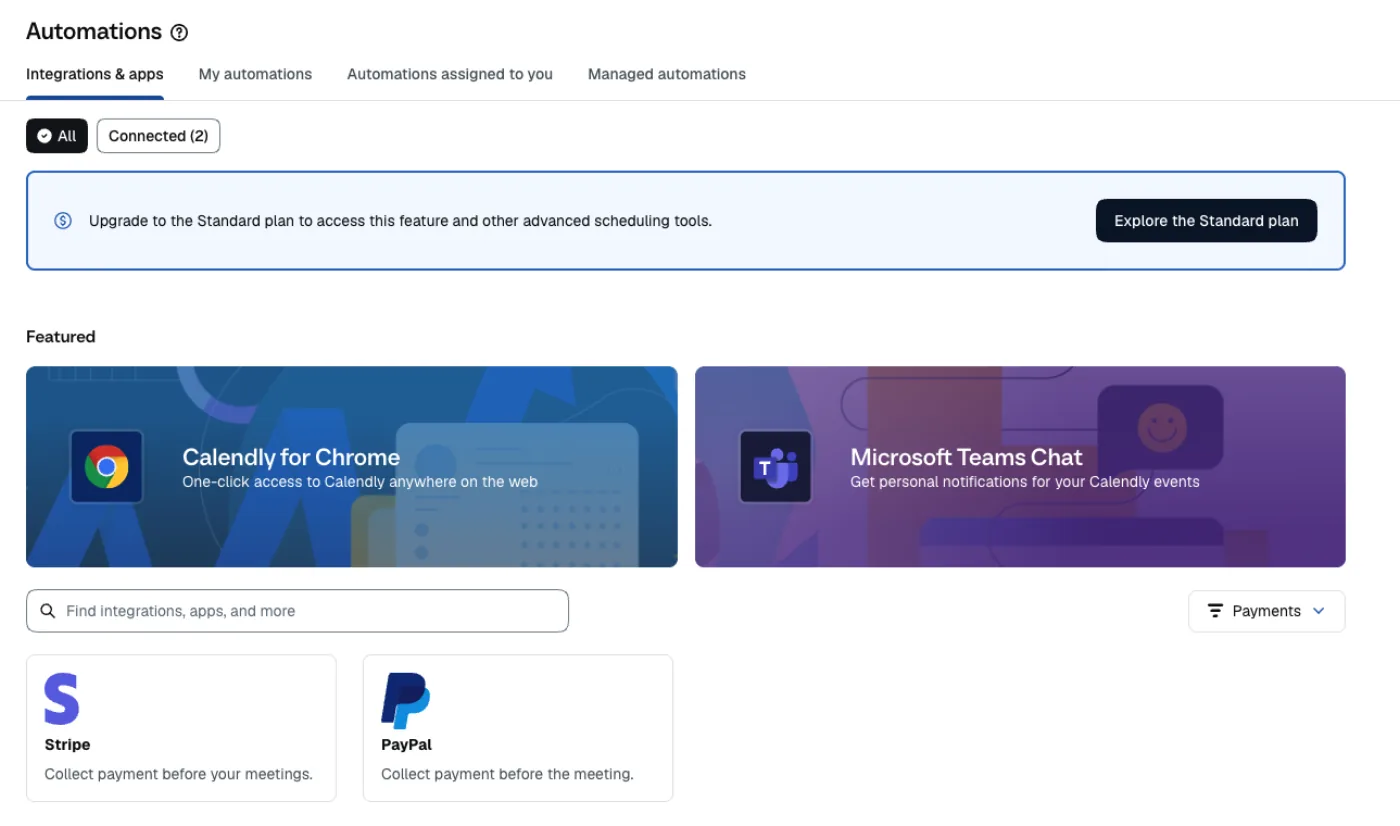
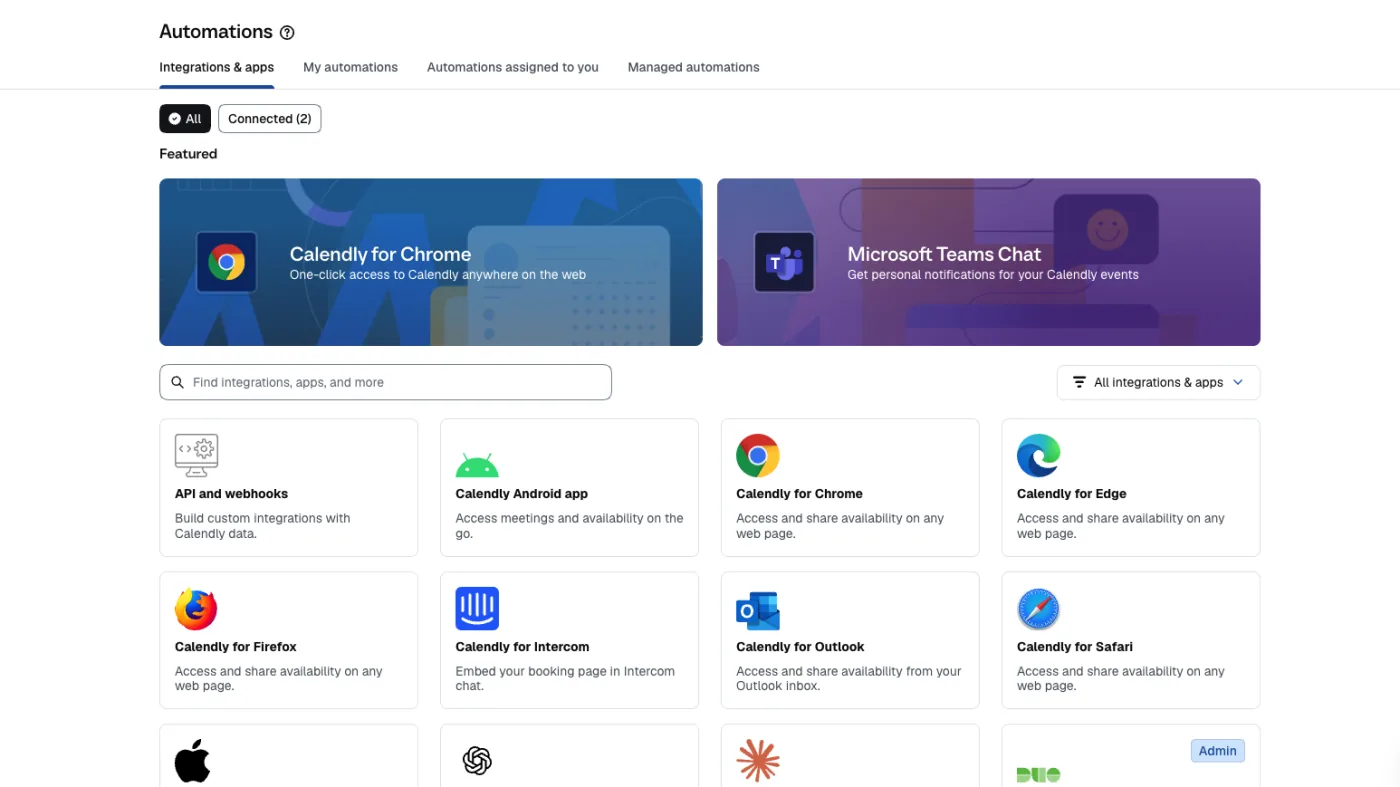
Calendly allows users to collect payments through Stripe and PayPal when clients book appointments. It also supports paid event types, coupon codes, meeting packages, payment links, and invoicing, depending on feature availability and plan eligibility.

Calendly integrations page with Stripe and PayPal payment options

These capabilities make Calendly useful for consultants, coaches, and professionals selling paid meetings or sessions.

Timetics AI

Timetics AI provides more detailed pricing controls within its service booking workflow.

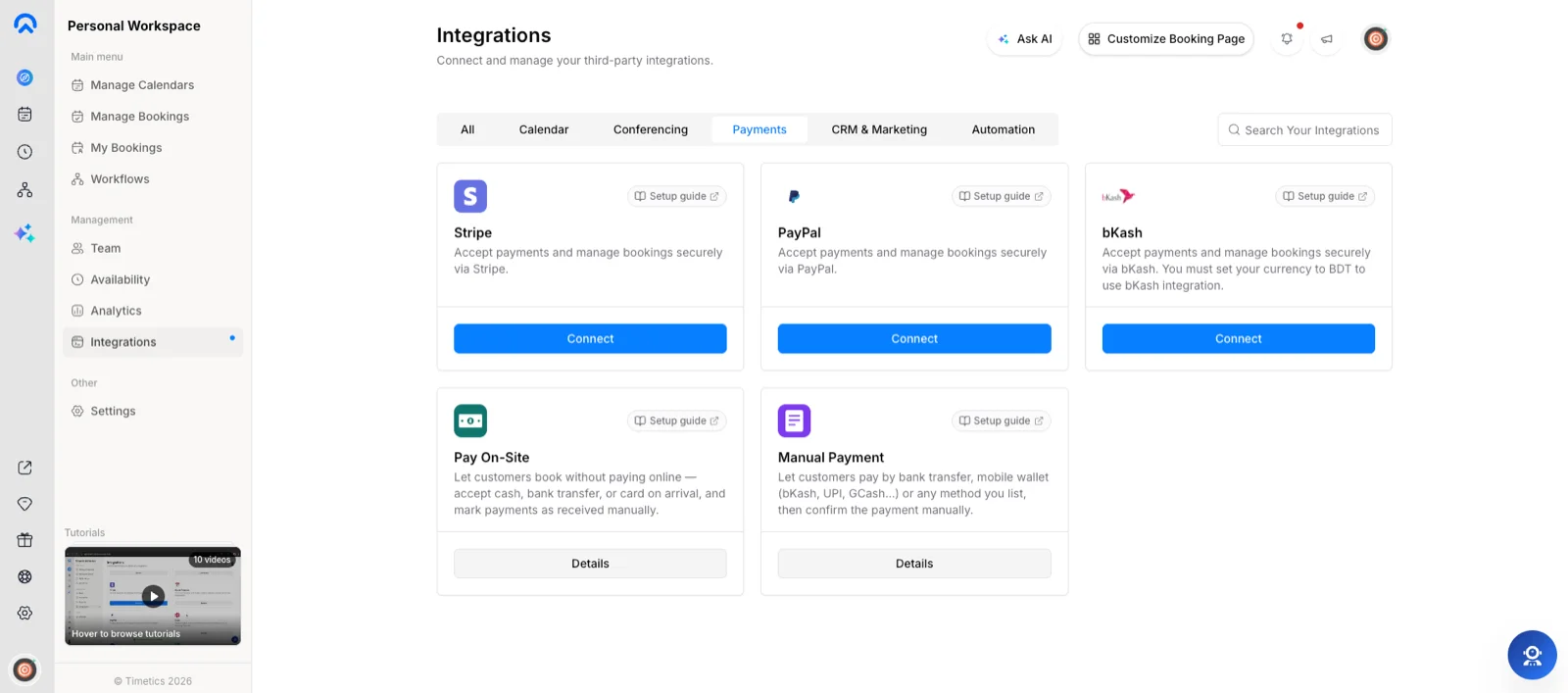
Users can set service prices, offer discounted rates, configure recurring bookings, charge for additional guests, accept deposits, and apply coupons. It also supports service add-ons and payment integrations, including Stripe, PayPal, and bKash, subject to plan availability.

Timetics AI payment integrations page with Stripe, PayPal, bKash, Pay On-Site, and Manual Payment options

This makes it particularly useful for businesses selling services with different pricing structures, partial payments, and additional service options.

Winner: Tie

Calendly is an excellent choice for selling paid meetings, session packages, and collecting payments through invoices or payment links. Timetics AI offers greater flexibility for service-specific pricing, deposits, add-ons, and booking-related payment management. The better option depends on what you sell.

5. Calendly vs. Timetics AI: Integrations

Calendly

Calendly provides an extensive integration ecosystem covering calendars, video conferencing, CRM platforms, marketing tools, and workplace productivity applications.

Calendly integrations and apps library with browser extensions and mobile apps

Alongside Google Calendar, Outlook, Zoom, and Microsoft Teams, users can connect platforms such as Salesforce, HubSpot, Slack, and numerous other business tools. It also offers browser extensions, mobile apps, and API-based integration options.

Timetics AI

Timetics AI focuses on integrations that support everyday appointment scheduling and service management.

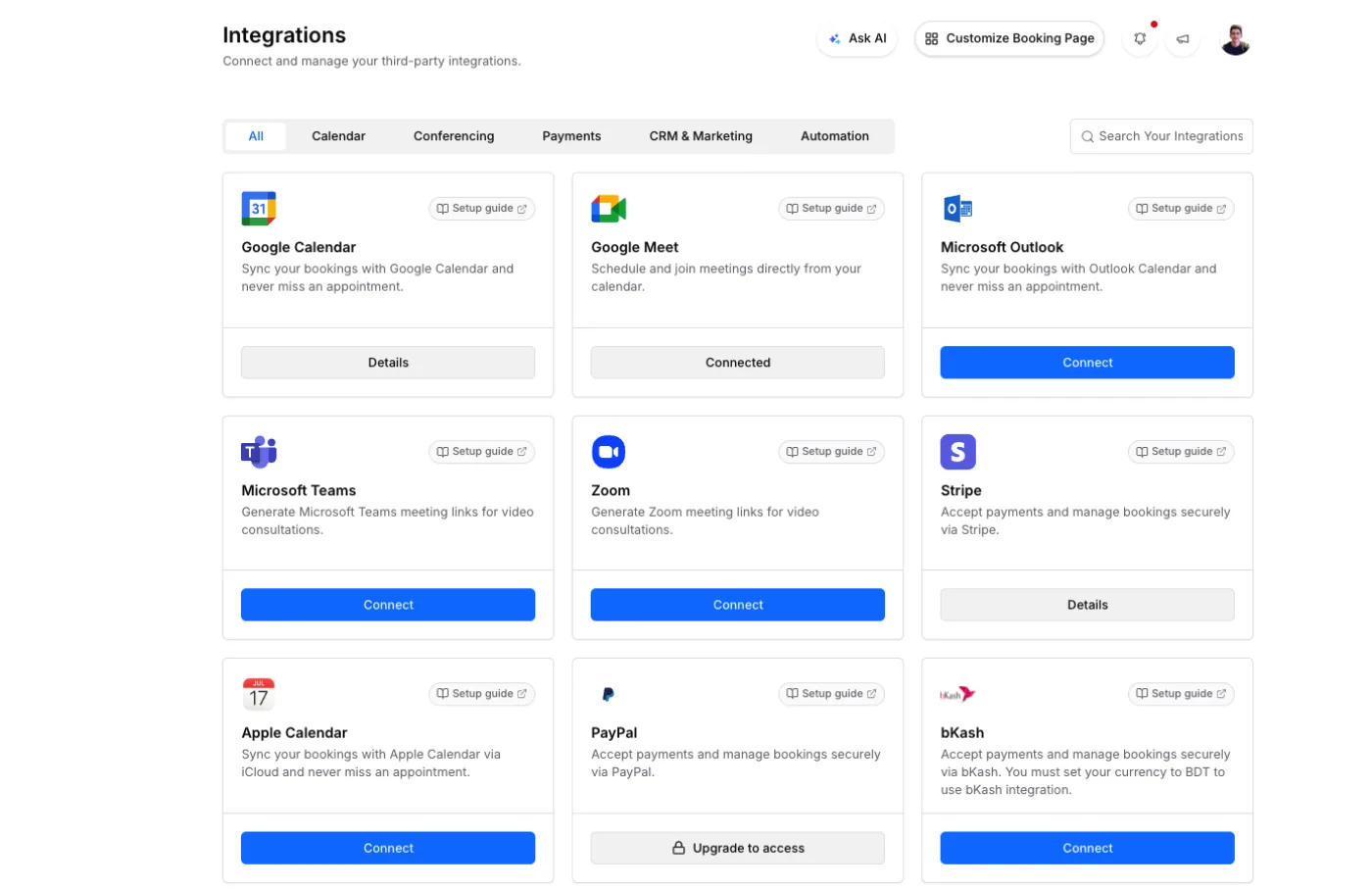
It connects with Google Calendar, Outlook, Apple Calendar, Google Meet, Zoom, Microsoft Teams, Stripe, PayPal, and several CRM and automation platforms, including HubSpot, Zoho CRM, GoHighLevel, and Zapier.

Timetics AI integrations page with calendar, conferencing, and payment integrations

While its integration library is smaller, it covers many of the tools consultants, agencies, and service businesses commonly use.

Winner: Calendly

Calendly wins for its larger integration ecosystem and stronger enterprise connectivity. However, Timetics AI offers a practical selection of integrations for everyday booking and business operations.

Final Comparison Verdict

Final comparison verdict by category
Comparison Category Winner
Initial Setup and User Experience Timetics AI
Appointments and Meeting Workflows Timetics AI
Language Support Timetics AI
Payments and Service Sales Tie
Integrations Calendly

So, Finally Which One Should You Choose?

Choose Calendly if your business primarily schedules meetings, coordinates complex sales teams, or relies on enterprise integrations.

Choose Timetics AI if you want more control over appointment bookings, branded booking websites, service pricing, and day-to-day business operations without relying on multiple separate tools.

Both platforms are capable scheduling solutions. The right choice comes down to whether you need a meeting-focused scheduling platform or a more flexible booking and service management system.

Your Smarter Scheduling Starts Here

Ready to Switch to Better Scheduling?

Move beyond Calendly with Timetics AI. Get started for free or unlock lifetime access with a one-time payment.

  • One-Time Payment Available
  • Lifetime Updates
  • No Per-User Pricing

Frequently Asked Questions

Which tool is more suitable for my business needs?

Honestly, it depends on your business needs and preferences. If you need a simple and high-scaling tool for booking online meetings and calls, Calendly might be a good option for you. But, if you need a more robust & easier-to-use tool for managing online + offline while automating your scheduling, Timetics is the better option for you.

How does Calendly stand out with scheduling online meetings and calls?

Calendly helps you with scheduling online meetings and calls by allowing you to set your availability, share your booking link, and let your clients or prospects book their own appointments. You can also integrate Calendly with your calendar, email, video conferencing, and CRM platforms.

How do we know the data entered is kept safe and secure?

Timetics always gives 100% dedication to total safety with the data kept in the database and gives utmost regard to the policy. You can check our privacy policy here.

What are the supported integrations available on Timetics right now?

Right now, Timetics offers you a series of useful integrations like Google Calendar, Google Meet, Zoom, iCal, Pabbly, Stripe, PayPal, Zapier and of course, OpenAI integration.