Calendly Alternatives in 2026: 10 Top Scheduling Tools Compared


Table of Contents
Scheduling a meeting should be simple. But the right scheduling tool depends on how you work. Calendly is a popular choice, but it may not meet every need.
Some businesses want more control over branding. Others need built-in payments, team scheduling, automated reminders, or better tools for managing appointments.
Several Calendly alternatives offer these features. Some are designed for sales teams. Some work better for consultants, recruiters, teachers, healthcare providers, and service businesses.
This guide compares the 10 best Calendly alternatives in 2026. You will learn how they work, who they are best for, and what makes each platform different.
Calendly vs the 10 Alternatives: Feature Comparison
| Product | Price model | Free plan | Payments and deposits | Team scheduling | Multiple businesses |
| Calendly | From $10/user/month annually | ✅ | ✅ | ✅ | ❌ |
| Timetics AI | $12/month for 10 users or $19/month for 30 users | ✅ | ✅ | ✅ | ✅ |
| Acuity Scheduling | From $16/month annually | ❌ | ✅ | ✅ | ❌ |
| Cal.com | Teams from $12/user/month annually | ✅ | ✅ (limited) | ✅ | ❌ |
| Doodle | Pro: $15/month or $132/year; Team: $16/user/month annually | ✅ | ✅ (limited) | ✅ | ❌ |
| YouCanBookMe | Free; paid plans from $9/month | ✅ | ✅ | ✅ | ✅ (add-on) |
| SimplyBook.me | From $11.90/month annually or $13.90/month | ✅ | ✅ | ✅ | ✅ (add-on) |
| Setmore | Pro from $5/user/month with annual billing | ✅ | ✅ | ✅ | ❌ |
| Microsoft Bookings | Included with Microsoft 365, from $7/user/month annually | ❌ | ❌ | ✅ | ✅ (add-on) |
| Zoho Bookings | From $6/user/month annually or $8/month | ✅ | ✅ | ✅ | ✅ (add-on) |
| HubSpot Meeting Scheduler | Free; Sales Hub Starter from $7/user/month annually | ✅ | ✅ (limited) | ✅ | ✅ (add-on) |
Prices were checked on September 13, 2026. Prices are in US dollars, exclude taxes, and may change.
How Did We Evaluate These Calendly Alternatives?
We evaluated each Calendly alternative using the same criteria to provide a fair, practical comparison:
- Ease of use: How quickly users can create an account, connect a calendar, and share a booking page.
- Scheduling features: Support for one-to-one and group meetings, recurring appointments, buffer times, and team scheduling.
- Integrations: Compatibility with calendars, video conferencing, payment processors, CRM systems, and marketing tools.
- Automation: Features such as confirmations, reminders, follow-ups, calendar updates, and automatic meeting assignments.
- Customization and branding: Options for logos, colors, custom questions, personalized links, and custom domains.
- Pricing and value: Free and paid plans, feature limits, and overall value for the cost.
- Security and reliability: Privacy controls, account protection, permissions, and service stability.
- Best use case: The types of users and businesses each platform serves best, from freelancers to sales teams and healthcare organizations.
Our goal is not to recommend one tool for everyone, but to help you choose the Calendly alternative that best fits your workflow, budget, team size, and business needs.
10 Best Calendly Alternatives in 2026
Choosing the best Calendly alternative really comes down to your workflow. We looked at each tool’s key features, usability, integrations, pricing, and who it’s best for. Here’s a closer look.
Note: Pricing was checked in September 2026. Prices may change over time.
1. Timetics AI – Best All-in-One Option for Service Businesses and Growing Teams
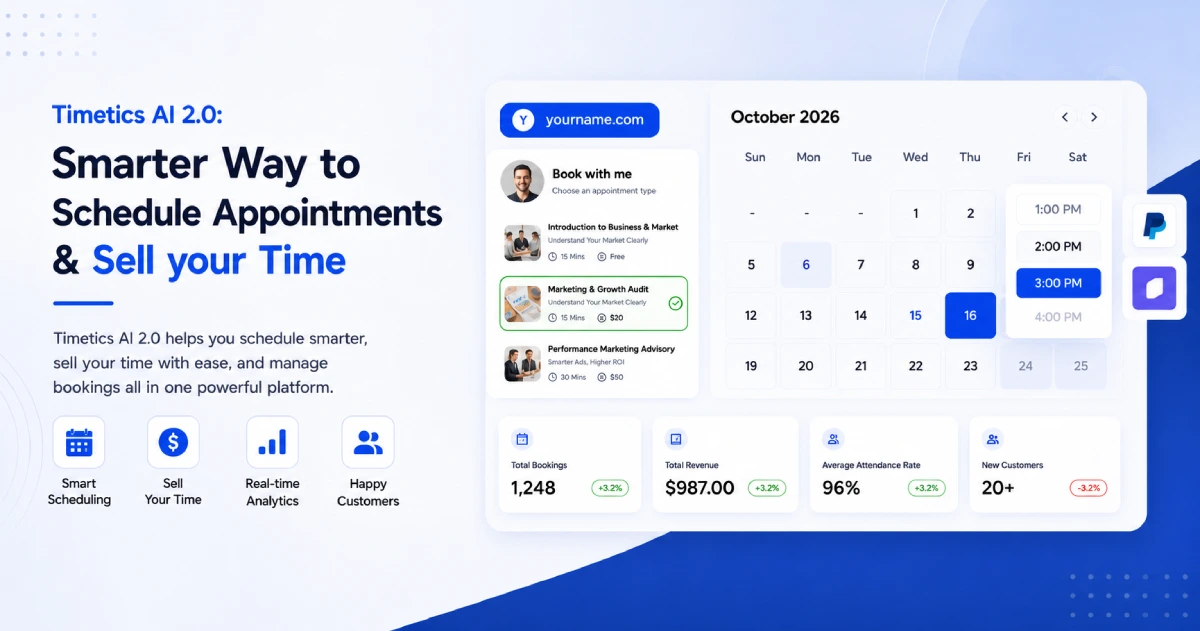
Timetics AI is a smart appointment scheduling and booking platform for individual professionals, teams, agencies, and service businesses. It combines scheduling, payments, deposits, customer management, automation, and an AI assistant in one system.
The platform supports both simple meetings and sales-driven paid services. A consultant can offer different session types. A salon can manage services and locations. A teacher can arrange recurring classes. An agency can manage several teams or brands through separate workspaces.
What makes Timetics AI the best Calendly alternative?
Timetics AI focuses on the full customer journey. It does not stop after a customer chooses a time. A business can collect booking information, accept a deposit or full payment, send reminders, offer extra services, and manage the customer from one dashboard.
Key features
- Unlimited bookings
- Timetics AI Agent
- Sales-driven booking pages
- Multiple Workspaces
- Booking Page Builder
- Service-Based Scheduling
- Team Scheduling
- Workflows & Automation
- Secret booking links
- White-label Booking Experience
- Agency Dashboard
- Facepopup
- Progressive Web App (PWA)
- Add video conferencing
- Reminder & feedback workflow emails
- Team invitation & role permissions
- Advanced coupon logic
- Custom SMTP & SMS
- Tax control
- And many more
Calendar, meeting, and CRM integrations
Timetics AI connects with Google, Outlook, Apple, Yahoo, and iCal calendars. Two-way syncing helps keep availability updated and reduces double-booking.
It also works with popular business tools, including:
- Google Meet
- Zoom
- Microsoft Teams
- Stripe
- PayPal
- bKash
- HubSpot CRM
- Zoho CRM
- GoHighLevel CRM
- Zapier
- ActiveCampaign
- Slack
- Discord
- Twilio
Custom webhooks are available for businesses that want to send booking information to other systems. Explore the complete Timetics AI feature list.
Pricing
- Start: Free forever for up to three users
- Earn: $12 per month for up to 10 users
- Scale: $19 per month for up to 30 users
- Consultants and Agencies lifetime plan: Currently listed at $299
- Scaling Teams lifetime plan: Currently listed at $499
Why choose Timetics AI instead of Calendly?
Choose Timetics AI if you want to manage meetings, services, payments, customers, and teams from one platform. It will be a better fit when booking is directly connected to business income and also offer better value for growing teams.
Pros
- Free plan supports up to three users
- Unlimited bookings and event types
- AI agent included
- Built-in service and consultation booking
- Supports payments, deposits, coupons, and refunds
- Useful tools for teams and multiple locations
- Customer management is included
- Connects with popular calendars, CRMs, and meeting tools
- Paid plans include several users
- Lifetime payment options are available
Cons
- Full multilingual support is listed as coming soon
- Currently don’t have any mobile apps
- New users may need time to explore all the available business features
Best for: Consultants, coaches, agencies, educators, clinics, salons, fitness businesses, service providers, and growing teams that want scheduling, payments, automation, and customer management in one place.
2. Acuity Scheduling – Best for Service-Based Businesses
Acuity Scheduling is an online appointment booking platform from Squarespace. It is a strong choice for businesses that sell services, classes, or consultations.
Clients can book, reschedule, or cancel appointments through a branded booking page. Businesses can also collect customer information with custom forms. This makes Acuity useful for salons, coaches, consultants, fitness instructors, and wellness providers.
Key features
- Branded online booking pages
- Unlimited services and appointments
- Custom client intake forms
- Calendar and time-zone management
- Email confirmations, reminders, and follow-ups
- Text message reminders on selected plans
- Payments through Stripe, Square, PayPal, and Venmo
- Appointment packages, memberships, and gift certificates
- Integrations with Zoom, Google Meet, and GoToMeeting
Pricing
Acuity offers its annual plans start at $16 per month. The Standard plan costs $27 per month, and the Premium plan costs $49 per month when billed annually.
Why choose Acuity Scheduling instead of Calendly?
Choose Acuity if appointments are a major part of your business. Its payment, intake form, membership, package, and gift certificate tools can help you manage the full customer booking process. Calendly is well suited to meeting scheduling. Acuity may be a better fit when customers need to choose a service, provide information, and pay during booking.
Pros
- Strong tools for service businesses
- Built-in payment and deposit options
- Useful customer intake forms
- Supports packages and memberships
- Highly customizable booking pages
Cons
- No permanent free plan is listed
- Some useful features require a higher-priced plan
- It may offer more tools than someone needs for simple meetings
Best for: Consultants, coaches, salons, fitness businesses, wellness providers, and other appointment-based businesses.
📚 Related reading: Acuity Scheduling vs. Timetics: A Side-by-Side Comparison
3. Cal.com – Best for Customization and Flexible Scheduling
Cal.com is a flexible scheduling platform for individuals, teams, and larger organizations. It is especially useful for businesses that want more control over their booking system.
Individual users can create unlimited event types and connect multiple calendars on the free plan. Businesses can add shared availability, round-robin scheduling, routing forms, custom branding, and advanced security features.
Key features
- Unlimited event types and calendar connections
- One-to-one, group, and recurring events
- Shared team availability
- Round-robin scheduling
- Routing forms
- Custom booking questions
- Email and text notifications
- Payments through Stripe and PayPal
- More than 100 app integrations
- Custom APIs and webhooks
- Google Meet, Microsoft Teams, Zoom, and other video tools
- Salesforce and HubSpot connections
Pricing
Cal.com offers Teams plan starts at $12 per user per month when billed annually. The Organization’s plan starts at $28 per user per month when billed annually. Enterprise pricing is customized for each business.
Why choose Cal.com instead of Calendly?
Choose Cal.com if you want greater control over how your scheduling system works. It provides unlimited event types and calendar connections for individual users. It also offers advanced tools for teams, developers, and large organizations.
Pros
- Generous free plan for individuals
- Strong customization options
- Useful team and routing features
- Supports payments during booking
- Wide range of integrations
- Advanced security options for organizations
Cons
- Advanced setup can take time
- Some team features require a paid plan
- Large organizations may need technical support during setup
Best for: Freelancers, technology companies, startups, development teams, and organizations that need a flexible scheduling system.
4. YouCanBookMe – Best for Custom Booking Pages
YouCanBookMe is a flexible appointment scheduling tool. It helps individuals and teams create booking pages that match their brands.
Users can change the page color, background, text, logo, questions, and meeting rules. The platform supports more than 40 languages and automatically shows each visitor’s local time zone.
Key features
- Custom booking pages and forms
- One-to-one and group appointments
- Automatic time-zone detection
- Support for more than 40 languages
- Email and text reminders
- Zoom, Google Meet, and Microsoft Teams integrations
- Payments through Stripe
- Apple Pay and Google Pay support
- Buffer times and booking limits
- Single-use booking links
- Team scheduling and round-robin assignment
- Booking and revenue reports
Pricing
Its monthly prices start at $9 for the Individual plan. The Professional plan costs $13 per month. The Team plan costs $18 per member per month. Discounts are available for longer subscriptions.
Why choose YouCanBookMe instead of Calendly?
Choose YouCanBookMe if you want more control over the appearance and content of your booking page. It is also useful for international businesses. Its language and time-zone features can make booking easier for customers in different countries.
Pros
- Highly customizable booking pages
- Free plan available
- Supports more than 40 languages
- Accepts online payments
- Useful reminder and follow-up tools
- Strong options for individuals and teams
Cons
- The free plan includes only one booking page
- Many advanced features require a paid plan
- The large number of settings may take time to learn
Best for: Freelancers, consultants, educators, international teams, and businesses that want a branded booking experience.
📚 Related reading: YouCanBookMe vs. Timetics: A Side-by-Side Comparison
5. SimplyBook.me – Best for Managing a Service Business
SimplyBook.me is more than a basic meeting scheduler. It is an online booking and business management system for companies that provide services.
Customers can book through a dedicated booking website, an existing business website, or social media. Businesses can also accept payments, sell gift cards, offer coupons, and manage staff.
Key features
- Custom booking website
- Booking widgets for existing websites
- Facebook and Instagram bookings
- Online and in-person payments
- Coupons and gift cards
- Memberships and service packages
- Group and multiple bookings
- Staff and location management
- Email and text notifications
- Client records and booking history
- Mobile apps for administrators and customers
- More than 50 optional custom features
Pricing
Basic plans start at $13.90 per month. The Standard plan costs $29.90 per month, while the Premium plan costs $59.90 per month. An Enterprise plan is available with custom pricing.
Why choose SimplyBook.me instead of Calendly?
Choose SimplyBook.me if you need to manage appointments and other parts of a service business in one place. It offers tools for payments, promotions, memberships, staff, and customer management.
Calendly is often easier for arranging meetings. SimplyBook.me can be more suitable for businesses that sell bookable services to customers.
Pros
- Free plan available
- Built for service businesses
- Includes a booking website
- Supports payments and promotions
- Useful staff and location tools
- Large selection of optional features
Cons
- Each plan limits monthly bookings
- Lower plans limit how many custom features you can use
- Setup may take longer because there are many options
Best for: Salons, spas, fitness centers, tutors, medical practices, consultants, and businesses that sell appointments or classes.
6. Zoho Bookings – Best for Businesses Using Zoho Apps
Zoho Bookings is an online scheduling platform for individuals and customer-facing teams. It works closely with Zoho CRM, Zoho Desk, Zoho Meeting, and other Zoho products.
The platform supports simple meetings and more complex appointments. Businesses can schedule group sessions, panel interviews, recurring meetings, and resource bookings.
Key features
- One-to-one appointments
- Group and recurring bookings
- Meetings with multiple hosts
- Rooms and equipment booking
- Round-robin appointment assignment
- Custom booking forms and pages
- Email, text, and WhatsApp reminders
- Online payment collection
- Calendar and video meeting integrations
- Customer portal
- Appointment and revenue reports
- AI-powered account setup
Pricing
Basic and Premium plans are available for teams. Prices depend on the user’s country, the number of users, and the billing period. Annual subscriptions start at $60 for 10 users, while the premium plan costs $90. For 50 users, the basic plan is $300 and the premium plan is $450.
Why choose Zoho Bookings instead of Calendly?
Choose Zoho Bookings if your business already uses other Zoho applications. Appointment and customer information can move between Zoho Bookings and tools such as Zoho CRM.
Pros
- Free plan for one user
- Strong connection with Zoho products
- Supports several appointment types
- Offers payment and reminder tools
- Includes appointment and revenue reports
- Custom booking pages are available
Cons
- The free plan supports only one event type
- Some useful features require the Premium plan
- Resource booking costs extra
- It offers less value if a business does not use Zoho products
Best for: Sales teams, support teams, consultants, educators, healthcare providers, and businesses already using the Zoho system.
7. HubSpot Meeting Scheduler – Best for Sales and CRM Workflows
HubSpot Meeting Scheduler is a booking tool inside HubSpot Sales Hub. It connects meeting scheduling with HubSpot’s customer relationship management system, also called a CRM.
When a potential customer books a meeting, HubSpot can save the person’s details and meeting activity in the CRM. Sales representatives can then view the customer’s history and manage the next steps from one place.
Key features
- Shareable meeting links
- Google and Microsoft 365 calendar connections
- Automatic time-zone adjustment
- Custom meeting lengths and availability
- Booking pages for individuals and teams
- Website and live-chat booking
- Direct HubSpot CRM connection
- Automatic activity records
- Sales email integration
- Meeting preparation and follow-up tools
- AI assistance on selected paid plans
Pricing
HubSpot’s Sales Hub Starter begins at $7 per month per seat. The Professional plan starts at $800 per month, and the Enterprise plan starts at $3,600 per month.
Why choose HubSpot Meeting Scheduler instead of Calendly?
Choose HubSpot Meeting Scheduler if you want bookings to connect directly with your sales records. It can reduce the need to move customer information between separate tools.
Pros
- Free meeting scheduler available
- Direct connection with HubSpot CRM
- Useful for tracking sales prospects
- Works with Google and Microsoft calendars
- Can be added to websites and live chat
- Keeps meeting activity with customer records
Cons
- Mainly designed for sales and marketing teams
- Advanced automation requires a paid HubSpot plan
- Paid plans can become expensive as a team grows
- It may be too complex for simple personal scheduling
Best for: Sales representatives, marketing teams, agencies, and growing businesses that use HubSpot CRM.
8. Setmore – Best for Affordable Appointment Scheduling
Setmore is an online appointment scheduling platform for small businesses and service providers. It helps customers book appointments, pay online, and receive reminders from a branded booking page.
It supports individual appointments, group classes, recurring bookings, and staff calendars. This makes Setmore useful for salons, consultants, tutors, fitness trainers, and local service businesses.
Key features
- Branded online booking page
- One-to-one appointments and group classes
- Up to four team calendars on the free plan
- Staff logins and shared calendar access
- Recurring appointments
- Email and text reminders
- Payments and deposits through Square, Stripe, or PayPal
- Google Calendar sync
- Zoom and Google Meet integrations
- Booking buttons for websites, Facebook, Instagram, and Google Business Profile
Pricing
Pro plan starts at $5 per user per month with annual billing. The Pro plan adds branding removal, text reminders, two-way calendar sync, advanced team tools, and more.
Why choose Setmore instead of Calendly?
Choose Setmore if you run an appointment-based business and need an affordable tool for staff scheduling, customer payments, deposits, and classes.
Calendly is mainly designed for arranging meetings. Setmore is more suitable for businesses that book customers for services and want a simple, customer-friendly booking page.
Pros
- Free plan supports up to four team members
- Accepts online payments and deposits
- Supports classes and recurring appointments
- Easy staff calendar management
- Strong social media and website booking options
Cons
- Advanced tools require the Pro plan
- Fewer CRM and sales-routing features than Calendly
- May not suit large enterprise sales teams
Best for: Salons, tutors, consultants, fitness trainers, clinics, and small service businesses that need affordable appointment scheduling.
9. Doodle – Best for Finding a Time for Group Meetings
Doodle is best known for its group polls. A user suggests several meeting times, and each participant selects the options that work for them. This makes it easier to find a time that suits a group.
Doodle also provides booking pages, one-to-one scheduling, and sign-up sheets. It is useful when people work at different companies and cannot view one another’s calendars.
Key features
- Group meeting polls
- One-to-one meeting scheduling
- Personal and shared booking pages
- Sign-up sheets
- Calendar connections
- Automatic calendar invitations
- Meeting reminders
- Custom branding on paid plans
- Team administration and permission controls
- Video conferencing integrations
Pricing
Doodle has a free plan with group polls, a booking page, and sign-up sheets. A single Professional subscription costs $15 per month or $132 per year. Team plans start at $16 per user per month when billed annually.
Why choose Doodle instead of Calendly?
Choose Doodle when several people need to agree on a meeting time. Participants can vote on suggested time slots without sharing their full calendars. Doodle is often simpler when a group must choose a time together.
Pros
- Simple group polls
- Participants do not need to share their calendars
- Free plan available
- Useful for meetings between different organizations
- Includes booking pages and sign-up sheets
Cons
- The free version has limited branding options
- Advanced features require a paid plan
- It is less focused on payments and service appointments than some alternatives
Best for: Project teams, committees, teachers, recruiters, community groups, and anyone arranging meetings with several participants.
10. Microsoft Bookings – Best for Microsoft 365 Users
Microsoft Bookings is an appointment scheduling tool included with several Microsoft 365 plans. It connects closely with Outlook and Microsoft Teams.
Businesses can create public booking pages, list services, add staff members, and set working hours. Customers can choose an available time without contacting the business first.
Key features
- Personal and shared booking pages
- Outlook calendar connection
- Microsoft Teams meetings
- Staff and service management
- Custom appointment requirements
- Email confirmations and reminders
- Customer rescheduling and cancellation
- Multiple booking calendars
- Appointment tracking
- Different staff roles and permissions
- Automatic protection against double-booking
Pricing
Microsoft Bookings is included with several Microsoft 365 business, education, and enterprise subscriptions. It is not normally purchased as a simple standalone scheduling plan.
Microsoft 365 Business Basic starts at $7 per user per month when paid annually. This plan includes Bookings, Outlook, Teams, business email, and other Microsoft tools. A version without Teams starts at $5.40 per user per month.
Why choose Microsoft Bookings instead of Calendly?
Choose Microsoft Bookings if your company already uses Microsoft 365. It works directly with Outlook and Teams, so employees may not need to add another separate platform.
Calendly supports a wider range of outside tools. Microsoft Bookings may be more convenient for a business that mainly works inside the Microsoft system.
Pros
- Included with many Microsoft 365 plans
- Strong Outlook and Teams connections
- Supports personal and team scheduling
- Central place for managing staff appointments
- Customers can reschedule or cancel online
- Familiar system for Microsoft users
Cons
- Requires an eligible Microsoft 365 subscription
- Less attractive for businesses that do not use Microsoft tools
- Some advanced virtual appointment features require Teams Premium
- Customization is more limited than some dedicated booking platforms
Best for: Companies, schools, healthcare teams, and other organizations that already use Microsoft 365, Outlook, and Teams.
How Are Modern Scheduling Platforms Different From Traditional Booking Systems?
Traditional booking systems mainly record appointments. Modern scheduling platforms manage the entire booking process. They connect calendars, automate communication, collect payments, and help teams manage customers.
| Area | Traditional booking systems | Modern scheduling platforms |
| Booking method | Customers usually call, email, or visit the business. | Customers book online through a shared link or website. |
| Availability | Staff check available times manually. | Available times update automatically from connected calendars. |
| Access | Booking may only be available during business hours. | Customers can book online at any time. |
| Calendar updates | Staff add appointments by hand. | Bookings automatically appear on connected calendars. |
| Double-booking | Mistakes can happen when calendars are not updated. | Calendar syncing helps prevent two appointments at the same time. |
| Time zones | Staff and customers calculate time differences themselves. | The platform automatically shows times in the customer’s time zone. |
| Confirmations | Staff send confirmation messages manually. | Confirmation emails are sent automatically. |
| Reminders | Staff must contact customers before appointments. | Automatic email, text, or WhatsApp reminders can be sent. |
| Rescheduling | Customers must contact the business. | Customers can reschedule through a secure link. |
| Cancellations | Staff update cancellations manually. | Customers can cancel online based on the business’s rules. |
| Payments | Payment is often collected after the appointment. | Businesses can collect deposits or full payments during booking. |
| Team scheduling | A staff member chooses who receives each booking. | Round-robin rules can send bookings to available team members. |
| Services | Staff explain available services to every customer. | A booking page can show services, prices, durations, and locations. |
| Online meetings | Meeting links are created and sent manually. | Video meeting links can be created automatically. |
| Automation | Most tasks require human work. | Workflows handle confirmations, reminders, follow-ups, and updates. |
| Reports | Staff count bookings and income manually. | Dashboards can show appointments, cancellations, customers, and revenue. |
| Integrations | Information stays inside one system or paper record. | Booking data can connect with CRM, payment, marketing, and communication tools. |
| AI support | AI assistance is normally unavailable. | Some platforms use AI to create schedules, answer questions, and manage bookings. |
| Business growth | The system mainly stores appointments. | The platform can help sell services, reduce missed appointments, and manage customers. |
Which Calendly Alternative Is Best For Your Industry Or Role?
The best Calendly alternative depends on what you need to schedule. A freelancer may want a simple booking page. A service business may need payments and customer records. A large sales team may need advanced lead routing.
The table below shows which platform may fit each industry or role.
| Industry or role | Best Calendly alternative | Why it may be a good fit |
| Coaches and consultants | Timetics AI | It supports paid consultations, different session types, deposits, recurring bookings, and customer management. |
| Freelancers and solo professionals | YouCanBookMe | It offers customizable booking pages, automatic time-zone detection, and a free plan. |
| Salons, spas, and beauty businesses | SimplyBook.me | It supports services, staff, payments, memberships, gift cards, and customer bookings. |
| Fitness trainers and wellness providers | Acuity Scheduling | It can manage classes, appointments, packages, memberships, intake forms, and payments. |
| Teachers and education providers | Timetics AI | It supports individual sessions, group classes, recurring bookings, payments, and team management. |
| Schools using Microsoft 365 | Microsoft Bookings | It works with Outlook and Teams and is included with several Microsoft 365 plans. |
| Recruiters and hiring teams | Doodle | Group polls make it easier to find a time for interviews with several participants. |
| Sales teams using HubSpot | HubSpot Meeting Scheduler | It connects bookings with customer records, sales activity, and follow-up work inside HubSpot CRM. |
| Large business-to-business sales teams | Setmore | It can qualify website leads and route each meeting to the correct sales representative. |
| Businesses using Zoho products | Zoho Bookings | It connects with Zoho CRM, Zoho Desk, Zoho Meeting, and other Zoho tools. |
| Technology companies and developers | Cal.com | It offers APIs, webhooks, many integrations, and advanced customization options. |
| Agencies managing several clients | Timetics AI | Workspaces help agencies manage separate brands, teams, and booking systems from one account. |
| International businesses | YouCanBookMe | It supports more than 40 languages and automatically displays the correct local time zone. |
| Healthcare organizations | Acuity Scheduling or Microsoft Bookings | Both offer appointment and staff management. Suitable plans may also provide extra privacy and compliance controls. |
| Businesses with several locations | Timetics AI or SimplyBook.me | Both can organize staff, services, and appointments across different business locations. |
| Committees and community groups | Doodle | Participants can vote on suggested meeting times without sharing their full calendars. |
| Businesses that rent rooms or equipment | Zoho Bookings | Resource booking can manage the availability of rooms, equipment, and other bookable items. |
| Small teams with limited budgets | Timetics AI | Its free plan supports up to three users, while paid plans include several team members for one monthly price. |
| Companies already using Microsoft tools | Microsoft Bookings | It connects directly with Outlook, Teams, and the wider Microsoft 365 system. |
How should you choose?
Start by identifying the main reason people book with you.
- Choose Timetics AI, Acuity Scheduling, or SimplyBook.me if you sell services and accept payments.
- Choose Doodle if several people must agree on one meeting time.
- Choose HubSpot Meeting Scheduler or Setmore if scheduling is part of your sales process.
- Choose Microsoft Bookings or Zoho Bookings if your company already uses those software systems.
- Choose Cal.com if you need strong customization and technical control.
- Choose YouCanBookMe if you want a highly personalized booking page.
You should also consider your budget, team size, payment needs, preferred integrations, and future growth. The right platform should make booking easier for both your team and your customers.
Is Timetics AI better than Calendly?
Timetics AI can be better than Calendly for service businesses, agencies, and growing teams that want more features at a lower team cost. Calendly may be better for users who want a well-known, meeting-focused platform with a larger integration system.
| Area | Timetics AI | Calendly |
| Free plan | Up to 3 users, unlimited event types, unlimited bookings, and an AI agent | 1 event type, 1 calendar connection, and unlimited meetings |
| Paid pricing | Starts at $12 per month for up to 10 users | Standard starts at $10 per user per month with annual billing |
| Service booking | Supports services, consultation types, add-ons, coupons, deposits, and multiple locations | Supports paid meetings, packages, payment links, and invoices |
| AI assistance | Manages calendars and availability through simple written instructions | Callie schedules meetings through email and is currently in beta |
| Best fit | Service businesses, consultants, educators, agencies, and affordable team scheduling | Individuals, sales teams, and larger companies with meeting-based workflows |
Timetics AI offers strong value for teams because its plans include several users for one monthly price. It also brings scheduling, payments, customer management, and service tools together.
The better choice depends on your workflow. Choose Timetics AI if you sell services or want affordable team features. Choose Calendly if you mainly schedule meetings and need its wider integration system.
Compare the latest information on the Timetics AI pricing page and Calendly pricing page.
Frequently asked questions about Calendly alternatives
1. What is the best Calendly alternative in 2026?
The best alternative depends on how you work. Timetics AI is a strong all-in-one choice for services and teams. Doodle is better for group polls, while HubSpot and Setmore suit sales teams.
2. Is there a free alternative to Calendly?
Yes. Timetics AI, Cal.com, Doodle, YouCanBookMe, Zoho Bookings, SimplyBook.me, and HubSpot offer free options. However, each free plan has different limits.
3. Which Calendly alternative is best for small businesses?
Timetics AI is a good option for small businesses that need bookings, payments, reminders, and customer management. Its free plan supports up to three users. SimplyBook.me and Acuity are also useful for service businesses.
4. Which Calendly alternative is best for teams?
Timetics AI is suitable for growing teams because its plans include several users for one price. Cal.com offers flexible team scheduling and routing. Microsoft Bookings works well for teams already using Microsoft 365.
5. Which alternative is best for booking paid appointments?
Timetics AI, Acuity Scheduling, and SimplyBook.me are strong choices for paid appointments. They support payments and service-based booking. Timetics AI also offers deposits, coupons, and paid add-on services.
6. What is the best Calendly alternative for group scheduling?
Doodle is one of the best options when several people need to agree on a time. Participants vote on suggested time slots. Cal.com and Timetics AI also support group bookings.
7. Which Calendly alternative is best for sales teams?
HubSpot Meeting Scheduler is useful for teams using HubSpot CRM. Setmore is better for large teams that need advanced lead qualification and routing. Timetics AI can also send booking information to popular CRM platforms.
8. Is Timetics AI cheaper than Calendly?
Timetics AI may cost less for teams because its plans include several users for one monthly price. Calendly normally charges for each user seat. Always check the latest pricing before making a decision.