What Is Service-Based Booking Software? (And Why Your Business Needs It)


Table of Contents
Service-based booking software is basically a scheduling platform designed specifically for businesses that sell services rather than products.
In simple words, it turns your services into a clear online booking system.
In this guide, we’ll explain what service-based booking software is, how it works, who needs it, and what features matter most. We’ll also show how modern tools like Timetics AI 2.0 are making service booking smarter with automation, AI support, payments, and productivity-focused workflows.
📌 Quick Summary: What You’ll Learn
You’ll learn how to stop treating your booking page like a calendar and start running it as a revenue system – one that converts visitors into paying, committed clients before the call ever starts.
- What revenue-first booking software actually means – and how it differs from traditional scheduling tools
- The four tips that turn a basic booking page into a high-converting revenue system
- How the full booking journey works – from visitor landing to confirmed appointment
- Why traditional booking pages fail to convert and how to fix that
- A side-by-side comparison of revenue-first booking vs standard appointment scheduling
- Which businesses need revenue-first booking — and which ones don’t
- How Timetics AI 2.0 powers the full revenue-first model with built-in payments, intake questions, workspaces, and automation
- A verified, step-by-step guide to setting up your revenue-first booking page with Timetics AI 2.0 — live in one session
By the end, you’ll know exactly how to turn your scheduling link into a system that qualifies clients, collects payment, and fills your calendar with high-intent appointments automatically.
What Is Service-Based Booking Software?
Service-based booking software helps your clients choose a service, pick a time, share important details, make a payment if needed, and receive automatic confirmations or reminders.
For consultants, coaches, agencies, tutors, wellness businesses, salons, and other service providers, this can save time, reduce missed appointments, and create a smoother client experience.
The result is a booking experience that functions less like a shared calendar and more like a structured storefront: one where clients arrive informed, committed, and already paid. For example:
- A consultant can let clients book paid strategy calls.
- A fitness trainer can offer personal training sessions.
- A salon can let customers book haircuts, skincare, or beauty treatments.
- Or, a tutor can allow students to book trial classes or recurring lessons.
The main goal is simple: make the booking process easier for both the business and the client. This is different from a basic calendar link.
A calendar link mainly helps someone pick a time. But service-based booking software helps manage the full journey around that booking: what the client is booking, how much it costs, who will provide the service, what details are needed, and what happens after the booking is confirmed.
How Does Service Based Booking Software Work?
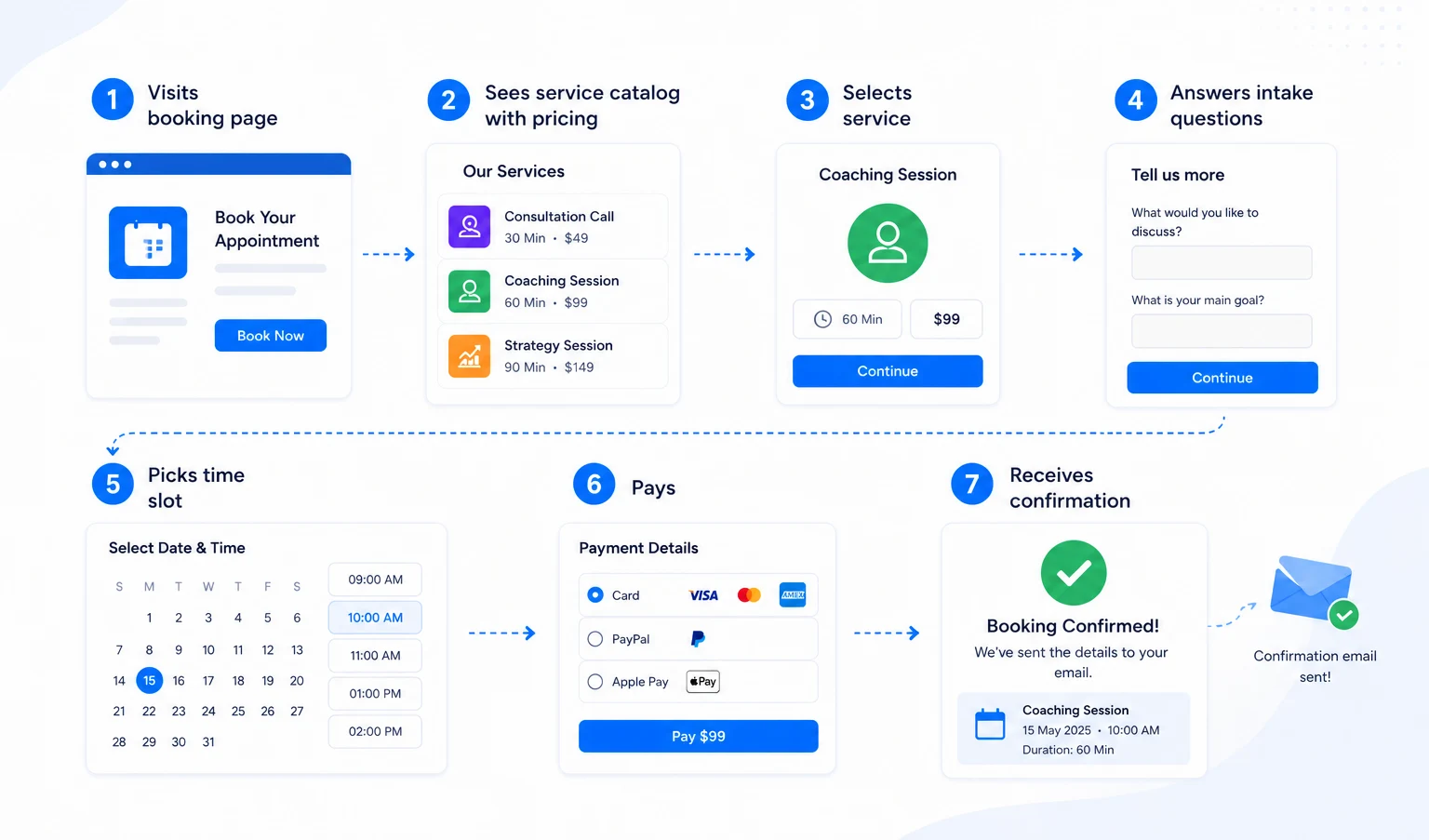
Service-based booking software handles the entire booking process from first click to confirmed appointment automatically. There are two sides to how it works: what the client experiences, and what happens on your end behind the scenes.
What the Client Does (Step by Step)
Walk through the client-side journey in numbered steps: (1) Visits booking page → (2) Sees service catalog with pricing → (3) Answers intake questions → (4) Picks time slot → (5) Pays → (6) Receives confirmation.
Step 1: They visit your booking page. You share a link ( in your email signature, on your website, in a social media bio ) and the client clicks it and lands on your public booking page.
Step 2: They browse your services. Instead of seeing a blank calendar, they see your services listed with names, descriptions, durations, and prices.
Step 3: They answer your intake questions. If you want to know their goals, their budget, their location, or anything else before the appointment, they answer it here, as part of the booking flow. No separate form. No follow-up email asking for details.
Step 4: They pick a time slot. Only after choosing a service and completing intake does the calendar appear. They select an available slot that works for them.
Step 5: They pay. Payment is collected at checkout – via card, PayPal, or whichever method you’ve set up. The appointment isn’t confirmed until payment is complete.
Step 6: They receive a confirmation. An automated confirmation lands in their inbox immediately. It includes appointment details, the service they booked, and any instructions you’ve set up in advance.
What Happens on Your End
While the client moves through those six steps, the software is working in the background:
- Your calendar updates automatically – no manual entry, no double-booking risk
- Payment is captured and recorded – no invoice to send later
- Reminders go out on schedule – 24 hours before, 1 hour before, whatever you configure
- No-show nudges are triggered – if a client hasn’t confirmed, the system follows up
- Your intake answers are stored – so you can review them before the call
By the time the appointment starts, both sides are prepared. You know who’s coming and why. They know what they paid for and what to expect.
📚 Related reading: Top 10 SaaS Tools That Every Startup Should Use in 2026
Key Features to Look For in Service-Based Booking Software
Not all booking platforms are built the same way. Some only handle scheduling. Others go much further – managing payments, automating reminders, and supporting your whole team. Here are the core features that matter most for a service business, and why each one earns its place.
1. Service Catalog with Pricing
Your booking page should show what you offer, not just when you’re free.
Look for a platform that helps you list each service with a name, description, duration, and price. Clients should be able to read what they’re buying and choose the right option before they ever see a time slot.
This one feature alone removes most of the “what do you charge?” and “how long is the session?” questions you’re currently answering manually.
2. Payment Collection at Booking
Good booking software collects payment at checkout, the moment a slot is confirmed. Look for support for common payment methods like Stripe and PayPal, and ideally an on-site or custom payment option for businesses that operate differently.
Payment up front also reduces no-shows significantly. A client who has already paid is far more likely to show up.
3. Intake Forms and Booking Questions
Every service business needs some information before an appointment.
- A therapist needs to know a client’s history.
- A consultant needs to know the problem they’re being hired to solve.
- A cleaning company needs to know the size of the property.
Look for a platform that helps you add custom questions directly inside the booking flow, not as a separate form sent over email after the fact. The answers should be saved and accessible before the appointment starts.
4. Automated Reminders and Confirmations
Once a booking is confirmed, the software should handle all follow-up communication automatically.
This includes:
- Instant confirmation sent to the client
- Reminder emails or messages before the appointment
- Follow-up nudges if the client hasn’t confirmed attendance
- Post-appointment messages if you want to request a review or send next steps
You set it up once. The system runs it every time.
5. Calendar Sync
Your booking software should connect directly to the calendar you already use – Google Calendar, Outlook, or Apple Calendar.
When a client books, it appears on your calendar instantly. When you block time on your calendar, it closes that slot on your booking page automatically. No manual updates. No double-bookings.
6. Group and Recurring Booking
Not every appointment is one-to-one or one-time.
If you run group sessions – workshops, classes, training programs – you need software that can handle multiple clients booking the same slot. If you have clients who come back weekly or monthly, a recurring booking saves everyone from going through the process from scratch each time.
7. Team Scheduling and Permissions
If you work with a team, the software needs to handle more than just your own calendar.
Look for features like:
- Assigning bookings to specific team members
- Setting individual availability per staff member
- Controlling who can see and manage which bookings
- Round-robin distribution so work is spread evenly across the team
8. Workspace or Multi-Brand Support
If you manage more than one business, brand, or client or if you run an agency, you need the ability to keep everything separated inside one account.
A workspace feature helps you run multiple brands from a single dashboard without mixing client data, calendars, or booking pages.
9. Meeting Platform Integrations
For businesses that run virtual appointments, the booking software should connect directly to the meeting tool you use – Zoom, Google Meet, Microsoft Teams, or others.
When a booking is confirmed, the meeting link should be generated and included in the confirmation automatically. The client doesn’t need to do anything extra. Neither do you.
10. Analytics and Booking Insights
You should be able to see what’s working.
Look for basic reporting on total bookings, revenue, no-show rate, and which services are booked most often. Even simple data helps you make better decisions about your availability, pricing, and service offerings over time.
Who Needs Service-Based Booking Software?
If your business delivers a service to a client and that service has a price, a duration, and some preparation involved, you need more than a basic scheduling link.
Service-based booking software is built for any business where the appointment itself is the product. That covers a wide range of industries, business sizes, and working styles.
Quick reference: Does your business type need it?
| Business type | Primary need | Key feature |
| Coaches and consultants | Paid session booking with intake | Service catalog + payment at checkout |
| Beauty and personal care | Multi-service, multi-staff booking | Staff selection + deposit collection |
| Fitness and wellness | Individual and group session mix | Recurring booking + group slots |
| Home services | On-site job intake and deposit | Custom intake + payment upfront |
| Healthcare-adjacent | Structured pre-appointment intake | Intake forms inside the booking flow |
| Education and tutoring | Recurring lessons, upfront payment | Recurring booking + session packages |
| Agencies and studios | Multi-team, multi-client coordination | Workspaces + team scheduling |
| Recruitment and HR | Candidate interview coordination | Round-robin distribution + team scheduling |
Here’s how different types of businesses use it in practice.
✅ Coaches and Consultants
Coaches and consultants sell their time and expertise. A service-based booking system helps them list each offering with a description and price, collect intake information before the first call, and take payment at checkout.
This replaces the typical cycle of: send a Calendly link → receive a booking → send a separate intake form → send a payment request → manually confirm everything.
✅ Beauty and Personal Care
Salons, barbershops, lash studios, and skincare clinics have multi-service menus, multiple staff members, and clients who need to book specific treatments with specific people.
Service-based booking software handles all of it: each treatment listed with duration and price, staff selection at booking, deposits collected upfront to protect against no-shows, and automated reminders so clients don’t forget their appointment.
✅ Fitness and Wellness
Personal trainers, yoga studios, physiotherapists, and nutritionists run a mix of one-to-one sessions and group classes , often with recurring clients.
They need software that handles both: individual appointments with intake questions, and group slots where multiple clients can book the same time.
Recurring booking is particularly useful here , a client on a weekly training plan shouldn’t have to rebook from scratch every seven days.
✅ Home Services
Cleaning companies, plumbers, electricians, landscapers, and repair technicians operate on-site. Their booking needs are practical: the client needs to describe the job, confirm the location, choose a time window, and ideally pay a deposit.
Service-based booking software handles the intake (property size, job type, address), the payment, and the confirmation , all before a technician is dispatched.
✅ Healthcare-Adjacent Services
Therapists, counselors, nutritionists, and private healthcare practitioners operate in a space where the intake process is especially important. Clients often need to describe their situation before a first appointment.
A service-based booking system puts that intake inside the booking flow, structured, recorded, and accessible before the session begins.
It also handles the practical side: appointment type, duration, payment, and reminders.
✅ Education and Tutoring
Tutors, language teachers, music instructors, and online educators typically work with recurring clients on regular schedules.
Service-based booking software helps them list each session type clearly, take payment upfront, and set up recurring bookings so regular students don’t need to rebook every week.
✅ Agencies and Studios
Creative agencies, marketing studios, and consultancies often run client onboarding calls, project kickoffs, and review sessions on a regular basis. When multiple team members are involved, booking coordination gets complicated quickly.
A workspace feature helps agencies manage multiple client accounts or internal teams from one dashboard with separate booking pages, calendars, and data for each.
✅ Recruitment and HR Teams
Recruiters and HR professionals spend a significant portion of their week scheduling candidate interviews, panel reviews, onboarding sessions, and team check-ins.
Service-based booking software with team scheduling and round-robin distribution removes the back-and-forth entirely. Candidates get a booking link, choose a time, and the system assigns the right interviewer automatically.
Service-Based Booking Software vs. Basic Scheduling Tools: What’s the Difference?
The core difference between service-based booking software and basic scheduling tools is scope: a basic tool is designed only to find a mutual time for a meeting, while service-based software manages the entire pre-appointment transaction.
Side-by-Side Comparison
| Basic scheduling tool | Service-based booking software | |
| First thing the client sees | A calendar with open time slots | A service catalog with names, descriptions, and prices |
| Service and pricing display | Not included | Built into the booking flow |
| Payment collection | Not included – invoiced separately or not at all | Collected at checkout before the appointment is confirmed |
| Intake and qualifying questions | Not included – sent separately if at all | Part of the booking flow |
| Automated reminders | Basic confirmation email only | Fully configurable – confirmations, reminders, no-show nudges, follow-ups |
| No-show protection | None | Payment upfront + automated reminder sequences |
| Team scheduling | Limited or add-on | Built in – with role permissions and booking distribution |
| Multi-brand or workspace support | Rarely included | Supported – separate data per brand or client |
| Meeting link generation | Often included | Included – Zoom, Google Meet, Teams auto-generated on confirmation |
| Post-booking admin work | High – invoicing, follow-up, data entry | Low – system handles confirmation, payment, and communication |
How Timetics AI Approaches Service-Based Booking
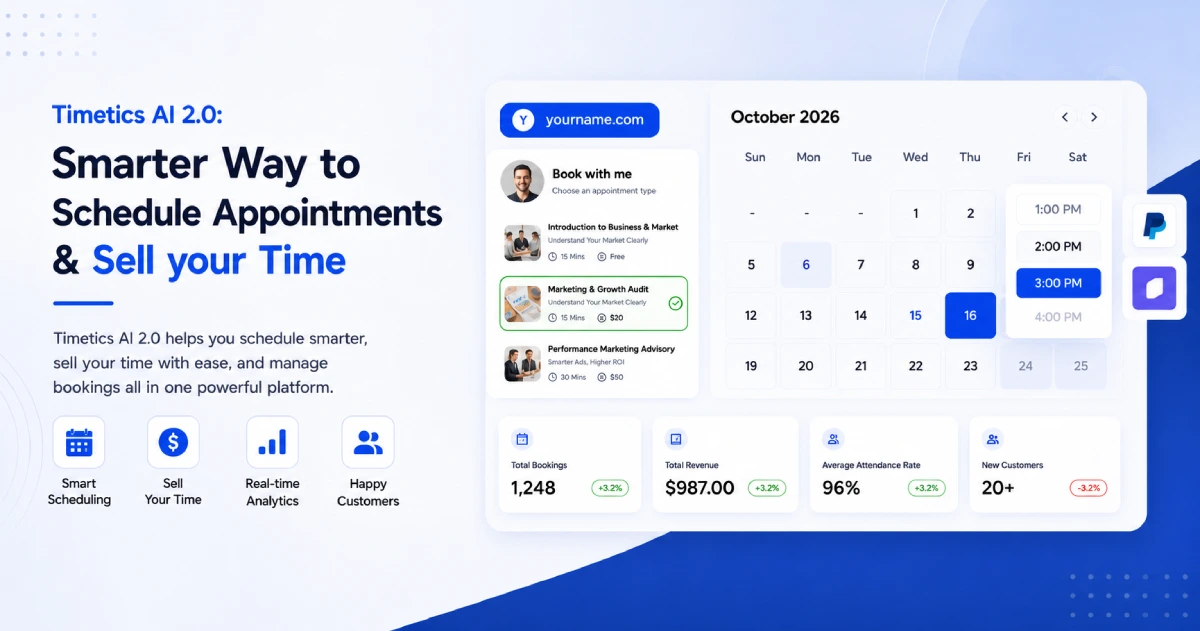
Timetics AI 2.0 was built to manage the full pre-appointment experience, from how your services are presented to how payment is collected to how your team handles what comes next.
The core idea behind Timetics is straightforward: your booking page should do the selling before the call begins.
Here is how that plays out across the platform’s key areas.
A Booking Page Built Around Your Services
When you set up a booking page in Timetics, the starting point is your service catalog – not your calendar.
- You create each service with a name, description, duration, and price.
- You can add extra services that clients can optionally add to their booking at checkout.
- You can set buffer time between appointments so back-to-back sessions don’t run into each other.
- You can add intake questions that are specific to each service – so a client booking a strategy session answers different questions than a client booking a review call.
The result is a public booking page that looks and functions more like a service menu than a calendar widget. Clients arrive, understand what’s available, choose what fits their situation, and move through the booking flow with a clear sense of what they’re committing to.
Payment Built Into the Booking Flow
Timetics connects directly to Stripe, PayPal, and on-site payment, and payment happens at checkout, before the appointment is confirmed.
There is also a custom payment question type for businesses that need to collect variable amounts or handle payment in a non-standard way. Coupons can be added and applied at checkout. The entire payment step sits inside the booking flow – not in a separate invoice sent later.
For service businesses that have struggled with late payments, unpaid invoices, or clients who book speculatively and cancel without consequence, this is one of the most practically useful aspects of how Timetics is structured.
Workflow Automation That Runs in the Background
Once a booking is confirmed, Timetics handles follow-up automatically through its workflow system.
You configure the rules once – what gets sent, when it gets sent, and to whom. From that point, the system runs it for every booking without any manual input:
- Confirmation messages are sent immediately after booking
- Reminders sent at intervals you define – 24 hours before, 1 hour before, or any schedule that fits your business
- No-show nudges if a client hasn’t confirmed attendance
- Follow-up messages after the appointment is complete
This automation layer is what removes the daily admin work from running a service calendar. You’re not writing reminder emails. You’re not chasing clients who haven’t confirmed. The system handles all of it.
Team Scheduling and Workspaces
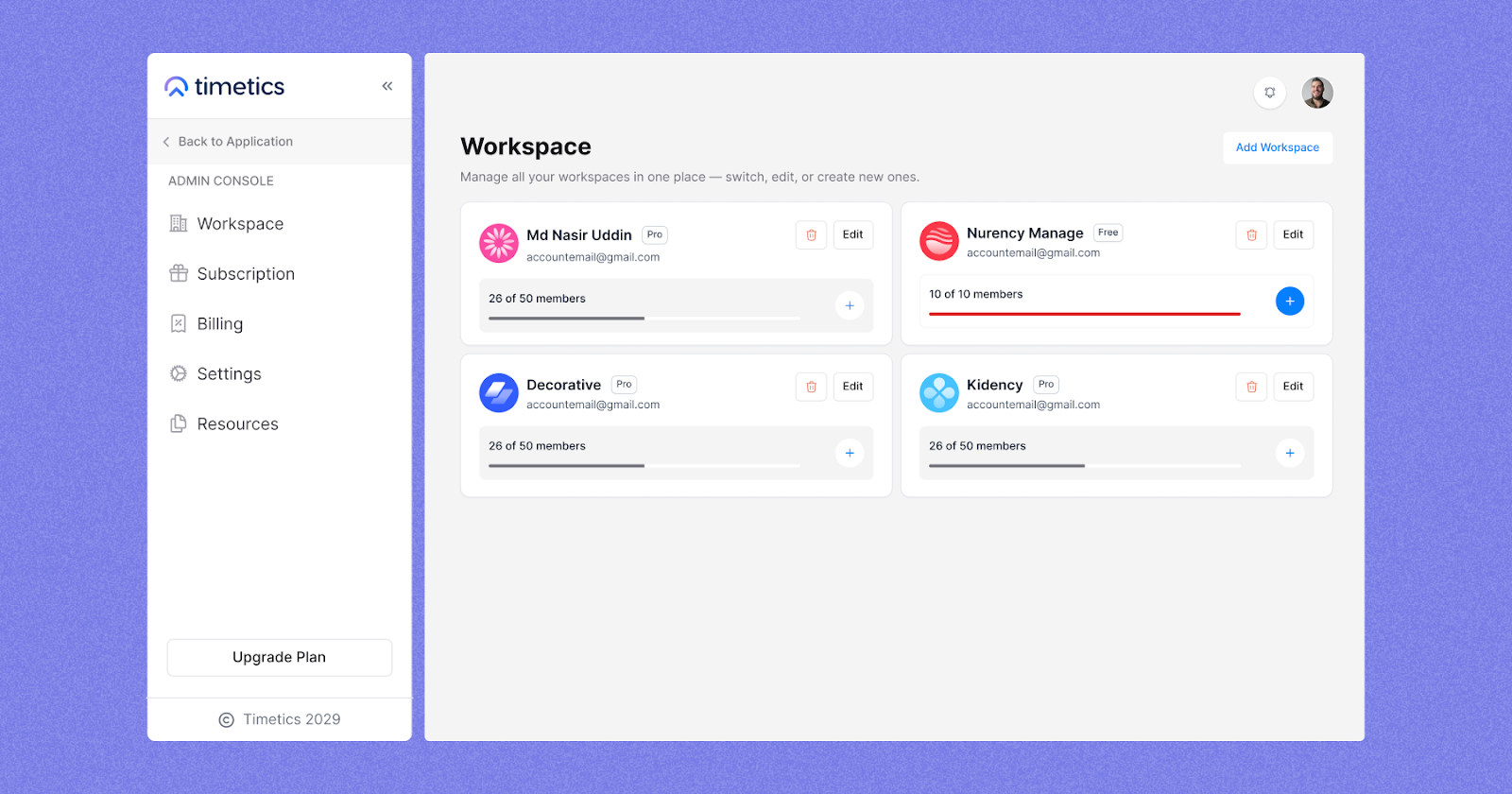
For businesses with more than one person, Timetics includes team scheduling with role-based permissions. Bookings can be assigned to specific team members, each with their own availability and calendar. You control who can view, manage, and edit what.
For businesses managing more than one brand, client, or location, the Workspace feature keeps everything separated inside one account.
Each workspace has its own booking page, calendar, and client data – fully isolated from the others. You switch between them from a single dashboard without logging in and out or mixing anything up.
This makes Timetics practical not just for solo professionals but for agencies, studios, and multi-location operators who need structure at a slightly larger scale.
Integrations With the Tools You Already Use
Timetics connects to the calendars, meeting platforms, and business tools that most service businesses already rely on:
- Calendar sync: Google Calendar, Microsoft Outlook, Apple Calendar
- Meeting platforms: Zoom, Google Meet, Microsoft Teams, Facetime, Slack, Discord – meeting links are generated automatically when a booking is confirmed
- CRM and automation: Zapier, ActiveCampaign, GoHighLevel CRM
These integrations mean Timetics fits into an existing workflow rather than replacing everything around it.
- A coach already using Zoom doesn’t need to change how they run sessions.
- A business already using GoHighLevel doesn’t need to rebuild their CRM.
The booking layer connects to what’s already in place.
What the Timetics AI Agent Does and Why It Matters for Service Businesses
Timetics includes an AI scheduling agent that helps you manage your bookings through natural language – typing what you want done instead of navigating through menus and settings.
Instead of clicking through screens to reschedule an appointment, you tell the agent: “Reschedule Sarah’s call to Thursday afternoon.”
Instead of manually sending a reminder to a specific client, you type: “Send a reminder to everyone booked on Friday.” The agent handles it.
Current capabilities include:
- Rescheduling appointments on command
- Sending reminders to specific clients or booking groups
- Processing refunds without navigating the payment settings manually
- Finding available slots based on a natural language request
This matters for service businesses because booking management doesn’t happen in neat, scheduled blocks. It happens throughout the day – between sessions, on a phone, during a ten-minute gap.
An agent that understands plain instructions removes the friction of stopping what you’re doing to navigate a dashboard every time something needs adjusting.
It also lowers the learning curve for new team members. Instead of training someone on where every setting lives, they can type what they need and get it done.
Timetics AI 2.0 at a Glance
| Area | What Timetics does |
| Booking page | Service catalog with pricing, descriptions, and intake questions |
| Payment | Stripe, PayPal, on-site, and custom payment – collected at checkout |
| Automation | Confirmations, reminders, no-show nudges, follow-ups – fully configurable |
| Team scheduling | Staff availability, role permissions, booking assignment |
| Workspaces | Multi-brand and multi-client management from one dashboard |
| Calendar sync | Google Calendar, Outlook, Apple Calendar |
| Meeting integrations | Zoom, Google Meet, Teams – auto-generated on confirmation |
| CRM integrations | Zapier, ActiveCampaign, GoHighLevel |
| AI Agent | Natural language commands for rescheduling, reminders, refunds, and slot finding |
Verified ratings: G2 – 4.8/5 · Trustpilot – 4.6/5 · AppSumo – 4.6/5
How to Choose the Right Service-Based Booking Software for Your Business
The right service-based booking software depends on what you sell, how clients book, how your team works, and which tools you already use.
These five questions will help you understand what you need first, so you do not choose a platform based only on price, features, or a free trial.
Question 1: Do I Need to Display Services and Pricing – or Just Time Slots?
If people only need to book a meeting with you, a simple scheduling link may be enough. For example, internal meetings, sales demos, hiring calls, or quick discovery calls usually need only one thing: an available time slot.
But if clients need to choose between different services, you need more than a calendar link.
For example:
- 30-minute consultation vs. 60-minute consultation
- Basic package vs. premium package
- One service type vs. another
- Online session vs. in-person service
In this case, your booking software should show the service first, then the available time.
What to look for:
Choose service-based booking software if clients need to select a service, compare pricing, and book a time in one flow. A basic scheduler is enough only when people already know the meeting purpose and only need to pick a time.
Question 2: Do I Need to Collect Payment at the Point of Booking?
Payment is one of the biggest differences between a basic scheduling tool and service-based booking software.
If you sell paid sessions, consultations, classes, or appointments, collecting payment during booking can save a lot of manual work.
It helps you:
- Confirm client commitment
- Reduce unpaid bookings
- Avoid manual payment follow-ups
- Lower no-show risk
- Keep booking and payment records together
Not every business needs upfront payment. Some businesses work with retainers, monthly invoices, or long-term contracts. But if you sell one-time or session-based services, payment at booking is usually important.
What to look for:
You need booking software with payments if clients pay per session, appointment, class, or consultation. It helps confirm the booking, reduce no-shows, and remove the need to chase payment later.
Question 3: Am I Managing One Brand or Multiple?
Many businesses start with one booking page. But things can become harder when you manage more than one brand, team, location, or client.
For example, you may need separate booking setups for:
- Different business brands
- Different client accounts
- Multiple service locations
- Separate teams
- Agency-managed clients
- Different service categories
Without multi-brand or workspace support, you may end up using separate accounts for each brand. That creates more login issues, mixed data, messy reporting, and extra admin work.
What to look for:
You need workspace support if you manage bookings for multiple brands, teams, locations, or clients. It keeps booking pages, calendars, and client data separate without forcing you to use multiple accounts.
Question 4: Will I Need Team Scheduling?
If you work alone, team scheduling may not feel important right now. But if other people take appointments in your business, you need it from the start.
Team scheduling helps each team member manage their own availability and booking capacity.
It is useful for:
- Agencies
- Clinics
- Salons
- Coaching teams
- Training centers
- Consulting teams
- Support or onboarding teams
Without team scheduling, you may need to assign bookings manually. That creates confusion as your team grows.
What to look for:
Team scheduling is important when more than one person accepts bookings. It helps route appointments to the right team member based on availability, capacity, or booking rules.
Question 5: What Does My Current Tech Stack Require?
Booking software doesn’t exist in isolation. It needs to connect to the tools you already use – your calendar, your video conferencing platform, your CRM, and potentially your marketing automation.
Before committing to a platform, map out your current stack:
- Which calendar do you use? – Google Calendar, Outlook, or Apple Calendar should sync automatically
- Which meeting platform do you use? – Zoom, Google Meet, or Microsoft Teams links should be generated automatically on booking confirmation
- Do you use a CRM? – If you’re managing leads and client relationships in GoHighLevel, ActiveCampaign, or a similar tool, your booking software should connect to it
- Do you use automation tools? – Zapier compatibility opens up connections to hundreds of other platforms without custom development
Switching booking platforms is disruptive enough. Discovering after the fact that your new platform doesn’t connect to your existing calendar or CRM makes it significantly more so.
What to look for: Native integrations with the specific tools you already use – not just a general promise of “integrations.” Check the integration list before you commit.
Putting It Together: A Simple Decision Framework
Answer these five questions honestly and the right category of tool becomes clearer:
| Question | If yes → you need |
| Do clients need to choose between services and pricing? | Service catalog + booking flow |
| Do you need payment collected at booking? | Native payment integration |
| Are you managing more than one brand or client? | Workspace / multi-brand support |
| Do you have a team taking bookings? | Team scheduling + permissions |
| Do you rely on specific tools – CRM, calendar, meeting platform? | Verified native integrations |
If you answered yes to three or more of these, a basic scheduling link is almost certainly the wrong tool for where your business is right now.
One More Thing: Setup Should Not Take a Week
A platform that requires extensive technical setup, a developer to configure, or days of onboarding before your first booking is live is adding friction at exactly the wrong moment.
Good service-based booking software should get you to a live, functional booking page – with services, pricing, intake questions, and payment configured – in under an hour. The complexity should live in the features, not in the setup process.
What to look for: A clear onboarding flow, documentation that explains each step, and a free plan or trial period so you can verify it works for your specific use case before committing.
Final Thoughts
Choosing the right booking system is not just a software decision. It affects how clients book, how your team works, how payments are handled, and how much time you spend on repetitive tasks.
If your business only needs simple meeting scheduling, a basic booking link can work. But if you sell services, manage clients, collect payments, or coordinate a team, you need a more complete system.
Service-based booking software gives you that structure. It helps clients choose the right service, understand the price, book a time, and get clear next steps without extra confusion.
For businesses that want to manage this process with less manual work, Timetics AI 2.0 is a strong option to consider. It brings service booking pages, payment support, reminders, team scheduling, workspaces, and AI-assisted booking workflows into one platform.
Ready to make service booking easier?
Explore Timetics AI 2.0 and create smarter booking pages for your service business.
Frequently Asked Questions About Service-Based Booking Software
What is service-based booking software?
Service-based booking software helps businesses accept and manage service appointments online. Clients can choose a service, pick a time, share details, and confirm the booking without calling, emailing, or waiting for manual replies.
Who needs service-based booking software?
Service-based booking software is useful for consultants, coaches, trainers, tutors, agencies, salons, clinics, wellness businesses, and any business that sells time, appointments, sessions, or professional services.
How is service-based booking software different from appointment scheduling software?
Appointment scheduling software mainly helps people pick a time. Service-based booking software goes further by showing services, prices, durations, staff availability, intake forms, payments, reminders, and follow-ups in one booking flow.
Can service-based booking software collect payments?
Yes. Popular service-based booking platforms like Timetics AI 2.0 allow businesses to collect payments during booking. This is helpful for paid consultations, coaching sessions, classes, training calls, salon services, and other appointment-based services.
What features should I look for in service-based booking software?
Look for service pages, pricing options, calendar sync, payment collection, team scheduling, automated reminders, client intake forms, cancellation rules, rescheduling options, and integrations with your existing tools.
A good platform should not only book appointments. It should help you manage the full service workflow.
Is service-based booking software good for consultants and coaches?
Yes. Consultants and coaches can use service-based booking software to sell discovery calls, strategy sessions, coaching packages, paid consultations, and recurring sessions. It helps clients understand the offer before they book.
Does Timetics AI offer service-based booking?
Yes. Timetics AI 2.0 is built specifically around the service-based booking model. Its booking pages are structured around a service catalog rather than a raw calendar. It is rated 4.8/5 on G2, 4.6/5 on Trustpilot, and 4.6/5 on AppSumo.
What is the best service based booking software for small businesses?
If you want booking pages, payment support, team scheduling, reminders, and AI-assisted workflows, Timetics AI 2.0 is a strong option to consider.
Can I use service based booking software without a website?
Yes, many platforms like Timetics AI 2.0 help you share a direct booking page link without building a full website. You can add that link to your social media profile, email signature, ads, landing page, or client messages. This is useful for coaches, consultants, freelancers, trainers, and solo service providers who want to start taking bookings quickly.