Best Booking Software for Service Businesses


Table of Contents
Getting more bookings is important. But for a service business, getting the right bookings matters even more.
A simple calendar link can help clients choose a time. But it does not always explain what the service includes, who it is for, how much it costs, what the client needs to share, or what happens after the booking.
This is why choosing the right booking software for service businesses is so important.
The right booking system should do more than show available time slots. It should help you present your services, collect client details, manage payments, send reminders, reduce no-shows, and keep your team organized.
In this guide, we will compare the 7 best online booking software for service businesses and show which tool fits which type of business. We will also look at where Timetics AI fits for service providers who need a smarter, more automated way to manage bookings.
What Is Online Booking Software for Service Businesses?
Online booking software works as a digital software system that helps people book services online.
Instead of calling, sending messages, or waiting for a reply, clients can visit your booking page, choose a service, pick a time, and confirm the appointment by themselves.
The main job of booking software is simple: it saves time for both you and your clients.
But for a service business, a booking tool should do more than show available time slots. It should also help clients understand what they are booking.
A good booking system can show:
- What services you offer
- How long each service takes
- How much it costs
- What details the client needs to share
- Whether payment is required
- What happens after the booking
This makes the whole process clearer. Clients know what to expect before they confirm. You also get better booking details, fewer wrong-fit appointments, and less manual work.
That is why service businesses need booking software that works like more than a calendar. It should help you explain your service, collect the right information, manage payments, send reminders, and keep every appointment organized.
📚 Goodreads: Agentic AI: The Next Evolution of Conversational AI
Quick Comparison – How These 7 Tools Stack Up for Service Businesses
| Tool | Service Catalog | Upfront Payment | Intake Forms | Team Scheduling | AI Features | Best For |
| Timetics AI 2.0 | ✅ | ✅ | ✅ | ✅ | ✅ AI Scheduling Agent | Service-first businesses |
| Acuity Scheduling | ⚠️ Partial | ✅ | ✅ | ✅ | ❌ | Intake-heavy services |
| SimplyBook.me | ✅ | ✅ | ✅ | ✅ | ❌ | High-volume / clinics |
| Calendly | ✅ | ⚠️ Limited | ⚠️ Routing forms only | ✅ | ❌ | Meeting-heavy consulting |
| Square Appointments | ✅ | ✅ | ⚠️ Basic | ✅ | ❌ | In-person / POS |
| Setmore | ⚠️ Basic | ⚠️ Paid plan only | ❌ | ⚠️ Limited | ❌ | Solo / budget |
| Cal.com | ⚠️ Via API | ⚠️ Via Stripe API | ⚠️ Basic | ✅ | ❌ | Technical / custom builds |
How We Ranked These Booking Software (The Service-Business Criteria)
To compare these booking tools fairly, we did not only look at how easy it is to share a calendar link.
For service businesses, booking software needs to support the full journey from service selection to appointment confirmation. A good tool should help clients understand what they are booking, while also helping the business save time and reduce manual work. Here are the main criteria we used to rank the tools.
Service-Based Booking Flow
A service business does not only sell time. It sells a service.
So we checked whether each tool lets businesses show clear service options, pricing, duration, and details before the client chooses a time.
This matters because a client should know what they are booking before they confirm the appointment.
Ease of Use
A booking tool should not take days to understand.
We looked at how easy it is to create a booking page, add services, set availability, connect calendars, and start accepting appointments.
The easier the setup, the faster a business can start using it.
Payment Support
Many service businesses need to collect payment before the appointment.
This can be full payment, a deposit, or a paid consultation fee. We looked at whether each tool supports online payments and how useful that is for real service-based businesses.
Payment support is important for consultants, coaches, clinics, salons, fitness trainers, and other paid service providers.
Automation and Reminders
Manual follow-up takes time.
So we checked whether each tool helps with booking confirmations, appointment reminders, rescheduling, and follow-up messages.
A good reminder system can reduce missed appointments and help clients show up prepared.
Team and Staff Scheduling
Some businesses have one service provider. Others have a full team.
We looked at whether each tool supports staff availability, team calendars, multiple services, and better appointment management across different people.
This is important for agencies, clinics, salons, spas, and growing service teams.
Client Experience
The booking page should feel clear for the client.
We checked whether the client can easily understand the service, select the right option, choose a time, share details, and complete the booking without confusion.
A better client experience usually means fewer wrong bookings and fewer support questions.
AI and Workflow Support
AI is not useful if it only sounds modern. It should reduce real work.
So we looked at whether the tool can help with faster setup, smarter workflows, booking recommendations, or admin tasks that usually take time.
This is where Timetics AI gets a strong advantage because it focuses on AI-powered booking workflows, automation, and service-based scheduling.
Best Fit for Real Service Businesses
Finally, we looked at which tool fits which type of business.
For example:
- A freelancer may only need a simple booking link.
- A consultant may need paid sessions and intake questions.
- A salon may need staff scheduling and reminders.
- An agency may need multiple workspaces and team booking pages.
- A coach may need packages, payments, and follow-ups.
So instead of choosing one tool for everyone, we ranked each option based on where it works best.
Key Features to Look for in Booking Software for Service Businesses
Choosing the wrong booking tool costs more than a monthly fee. It costs you no-shows, unqualified clients, and hours of manual admin every week.
Here’s what actually matters for service businesses.
- Service Catalog with Pricing: Clients should see your services, prices, and durations before picking a time, not after. This one feature changes the quality of every booking you receive.
- Upfront Payment Collection: Deposits or full payment at booking = fewer no-shows, better-qualified clients. If a tool only collects payment after the appointment, it’s working against you.
- Custom Intake Forms: Ask the right questions during booking – project scope, preferences, health history, so both sides arrive prepared. Look for conditional logic and multiple question types.
- Automated Reminders and Follow-Ups: Confirmation emails, pre-appointment reminders, post-visit follow-ups, all triggered automatically. Manual reminders don’t scale past 10 clients a week.
- Calendar Sync and Meeting Integration: Real-time sync with Google, Outlook, or Apple Calendar prevents double-bookings. Auto-generated Zoom or Google Meet links eliminate the back-and-forth before every virtual session.
- Buffer Time Between Appointments: Automatically adds breathing room between sessions, no manual calendar blocking needed. Essential for travel-based or high-volume service businesses.
- Team Scheduling and Staff Routing: Assigns clients to the right staff member based on availability or specialty. Each team member gets individual settings, roles, and permissions.
- Group and Recurring Booking: Fitness classes, group workshops, weekly coaching calls, these need booking types that most generic tools skip entirely. Recurring booking eliminates rebooking the same client every week.
- Workflow Automation: The best tools run the admin around your appointments, not just record them. Look for trigger-based workflows and, ideally, a native AI layer that handles reschedules, refunds, and exceptions without manual input.
The 7 Best Online Booking Software for Service Businesses
To help you choose the right platform, we analyzed the top online booking software based on real business needs, key features, customer feedback, and overall value. Here are our top seven picks.
1. Timetics AI 2.0 – Best for Service-First Booking with Built-In Sales Conversion
Starting price: Free plan available · Paid plans available here with an amazing offer. Lifetime starts at $49 (Free updates for life)👉 Suitable for: Coaches, consultants, agencies, and service-based small businesses
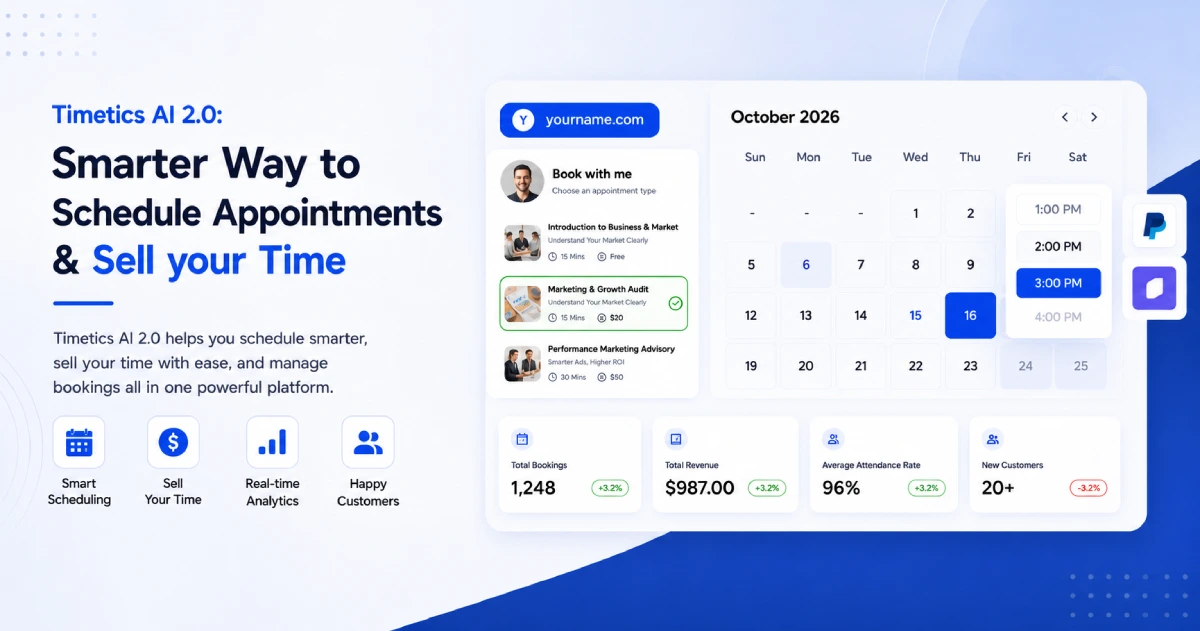
Timetics AI 2.0 is a sales-driven appointment booking platform that turns your booking page into a client-converting storefront. Instead of just showing available time slots, it leads clients through your services, pricing, and intake questions – and collects payment – before a time slot is ever confirmed.
The result: clients arrive prepared, payments are secured upfront, no-shows drop, and you spend less time on admin and more time on actual work.
What It Does Well for Service Businesses
- Service catalog with pricing – clients see service names, descriptions, durations, and prices before picking a time
- Payment at booking – Stripe, PayPal, on-site, and bKash supported; collect deposits or full payment upfront
- Custom intake forms – per-service questions with multiple formats including a custom payment question type
- Automated workflows – confirmations, reminders, follow-ups, and no-show nudges run without manual input
- AI Scheduling Agent – handles slot selection, reschedules, refunds, and reminders via a natural language chat interface
- Calendar sync – real-time sync with Google, Outlook, and Apple Calendar
- Meeting integrations – Zoom, Google Meet, Teams, Slack, Discord, and FaceTime links auto-generated per booking
- Team scheduling – individual availability, roles, and permissions per staff member
- Group and recurring booking – built in natively, no workarounds needed
- Workspaces – manage multiple brands or clients from one dashboard with fully isolated data
- CRM integrations – GoHighLevel, ActiveCampaign, and Zapier supported
Ratings: ⭐ G2 – 4.8/5 · AppSumo – 4.6/5 · Trustpilot – 4.6/5
Honest Drawback
Newer than Calendly or Acuity – smaller third-party review base and a growing native integration library. Most gaps are covered through Zapier, but verify compatibility with any niche tools you rely on before committing.
It Is Not Suitable For
Field service or logistics-heavy businesses that need technician dispatch, route optimization, or job-site management. Timetics is built for appointment-based service businesses – not operations-heavy workflows.
2. Acuity Scheduling – Best for Customizable Client Intake and Branded Booking Pages
Starting price: ~$16/month · No permanent free plan. 👉 Suitable for: Service businesses that need deep intake customization and a polished client-facing booking experience
Acuity Scheduling is a well-established booking platform that gives service businesses strong control over their client intake process and booking page branding. Clients self-schedule from your availability, complete custom intake forms, and pay deposits or packages at booking. It sits closer to the service-business model than generic schedulers – but still leads with availability before services.
What It Does Well for Service Businesses
- Intake forms – highly customizable with conditional logic, required fields, and file uploads
- Packages and subscriptions – sell bundles of sessions or memberships directly at booking
- Deposits and payment – Stripe, PayPal, and Square supported; deposits and cancellation fees configurable
- Branded booking pages – custom colors, logo, and embed options to match your business identity
- Calendar sync – Google, Outlook, iCloud, and Exchange supported
- Meeting integrations – Zoom and Google Meet auto-generate per booking
- Multi-staff scheduling – each team member gets individual availability and booking rules
- Reminder emails – automated confirmation and reminder sequences included
- Coupons and gift certificates – built in natively
Ratings: ⭐ G2 – 4.7/5 · Capterra – 4.8/5 · Trustpilot – 4.4/5
Honest Drawback
Acuity is still calendar-first at its core – clients pick a time before fully engaging with your service context. The service catalog experience is less structured than Timetics AI 2.0. Automation is also relatively basic compared to workflow-first platforms – follow-up sequences require third-party tools like Zapier.
It Is Not Suitable For
Businesses that need advanced workflow automation, an AI scheduling layer, multi-workspace management, or a true service-storefront experience where pricing and services lead the booking flow.
📚 Related reading: Acuity Scheduling vs. Timetics: A Side-by-Side Comparison
3. SimplyBook.me – Best for High-Volume Service Businesses with Complex Scheduling Rules
Starting price: Free (limited) · Paid plans from ~$9.9/month. 👉 Suitable for: Salons, spas, clinics, fitness studios, and any location-based business with multiple staff and services running all day
SimplyBook.me is purpose-built for businesses where bookings are the entire operation – not just occasional meetings. It handles complex scheduling rules, multiple service types, multi-staff routing, and a wide range of payment gateways out of the box. If you run a busy service location where the calendar never stops, SimplyBook.me gives you the operational depth to manage it.
What It Does Well for Service Businesses
- Service catalog – multiple service types with individual durations, pricing, and capacity rules
- Buffer time and cleanup rules – set prep or cleanup time per service automatically
- Multi-staff routing – assign bookings by staff member, specialty, or location
- Payment gateways – Stripe, PayPal, and many regional gateways supported
- HIPAA compliance option – relevant for healthcare and therapy practices
- Marketplace listing – get discovered via Booking.page, their client-facing marketplace
- Custom booking website – multiple templates; embeddable on your existing site
- Class and group bookings – capacity limits and group session management built in
- Loyalty and membership features – rewards system and membership packages supported
- Wide integration library – Google Calendar, Facebook, Instagram, QuickBooks, Xero, and more
Ratings: ⭐ G2 – 4.5/5 · Capterra – 4.6/5 · Trustpilot – 4.3/5
Honest Drawback
Pricing is based on booking volume and the number of add-on features you activate – costs can scale unexpectedly as your business grows. The interface is feature-dense, which means setup time is higher than simpler tools. There is no AI scheduling layer or intelligent agent capability.
It Is Not Suitable For
Solo professionals or early-stage businesses who need a quick, clean setup. Also not ideal for virtual-first service businesses – SimplyBook.me’s strengths are rooted in physical, location-based operations.
4. Calendly – Best for Consultation and Meeting-Heavy Service Businesses
Starting price: Free · Paid plans from ~$10/month per seat. 👉Suitable for: Consultants, sales teams, coaches, and recruiters whose primary “service” is a call or meeting
Calendly is one of the most widely used scheduling tools in the world. It makes booking a meeting fast, frictionless, and professional. But it was built for scheduling time, not selling services. For businesses where the appointment itself is the product – a strategy call, a sales demo, a recruitment interview – Calendly performs very well.
What It Does Well for Service Businesses
- Clean booking flow – minimal friction for clients; fast setup for hosts
- Routing forms – direct different client types to the right meeting type or team member
- Round-robin scheduling – distributes bookings evenly across a team automatically
- Time zone detection – best-in-class; prevents scheduling confusion across regions
- Wide integration library – connects with HubSpot, Salesforce, Zoom, Google Meet, Teams, Slack, and 100+ tools
- Embeddable booking widget – drop your calendar into any website or landing page
- Automated reminders – email and SMS reminders included on paid plans
Ratings: ⭐ G2 – 4.7/5 · Capterra – 4.7/5 · Trustpilot – 4.6/5
Honest Drawback
Calendly has no native service catalog – clients pick a time without seeing what they’re booking or what it costs. Payment collection is limited and not central to the booking flow. There are no workflow automation sequences, no AI scheduling agent, and no service-storefront experience. It’s a scheduling tool, not a service booking platform.
It Is Not Suitable For
Businesses that sell priced services, need upfront payment collection, want clients to choose from a service menu, or require intake forms beyond basic routing questions. If your revenue depends on structured service delivery – not just booked meetings – Calendly will leave gaps.
📚 Related reading: Calendly vs. Timetics: A Side-by-Side Comparison
5. Square Appointments – Best for In-Person Service Businesses That Need Booking and POS Together
Starting price: Free (individuals) · Paid plans from ~$29/month. 👉 Suitable for: Salons, barbershops, spas, personal care businesses, and any brick-and-mortar service operation that handles in-person checkout
Square Appointments is the booking arm of the Square ecosystem – and its biggest strength is exactly that. If you already use Square for payments, inventory, or point-of-sale, adding Square Appointments creates a seamless end-to-end system where bookings and checkout live in one place. For physical service businesses, that integration removes a major operational headache.
What It Does Well for Service Businesses
- POS integration – booking and in-person checkout are fully connected in one system
- Service catalog – list services with prices and durations; clients choose at booking
- Staff scheduling – set individual availability per team member; auto-assign based on service
- Online payment – deposits and full payment supported through Square’s payment infrastructure
- 24/7 booking – clients book from your website, Google, or Instagram at any time
- Automated reminders – email and text reminders to reduce no-shows
- Loyalty and gift cards – built into the Square ecosystem
- Free plan for individuals – solo operators can get started at no cost
Ratings: ⭐ G2 – 4.4/5 · Capterra – 4.4/5 · Trustpilot – 3.9/5
Honest Drawback
Square Appointments is heavily optimized for in-person businesses. Virtual service providers – online coaches, remote consultants, digital agencies – get little value from the POS-integrated model. Automation is basic, intake forms are limited, and there is no AI scheduling capability or advanced workflow builder.
It Is Not Suitable For
Virtual or remote service businesses, businesses that need advanced client intake, workflow automation, or multi-brand workspace management. Also not ideal if you’re not already inside the Square ecosystem – the value drops significantly without it.
📚 Related reading: What Is Service-Based Booking Software? (And Why Your Business Needs It)
6. Setmore – Best Free Option for Solo Service Providers Just Getting Started
Starting price: Free · Paid plans from ~$5/month per user. 👉 Suitable for: Solo operators and early-stage service businesses that need a clean, simple booking page without monthly fees
Setmore is one of the most accessible entry points into online booking for service businesses. Its free plan is genuinely useful – unlimited appointments, a clean public booking page, and basic reminders included at no cost.
It won’t scale with a growing business, but it doesn’t need to – that’s not what it’s built for.
What It Does Well for Service Businesses
- Free plan – unlimited appointments on the free tier; no credit card required
- Clean booking page – simple, client-friendly interface with minimal setup
- Basic service listing – add services with names, durations, and prices
- Email reminders – automatic confirmation and reminder emails on all plans
- SMS reminders – available on paid plans
- Payment processing – Stripe and Square integration on paid plans
- Calendar sync – Google and Office 365 sync supported
- Embeddable widget – drop your booking page into your website or link from social media
- Mobile app – manage bookings from iOS and Android
Ratings: ⭐ G2 – 4.5/5 · Capterra – 4.6/5 · Trustpilot – 4.2/5
Honest Drawback
Setmore is intentionally simple – which means it hits a ceiling fast. There are no workflow automations, no intake forms, no AI features, no group booking, and no recurring appointment support on the free plan. Payment is locked behind paid tiers. Most growing service businesses outgrow it within 6–12 months.
It Is Not Suitable For
Businesses with a team, multiple service types, recurring clients, or any need for automated workflows and intake. If you are past the “getting started” stage, Setmore will require you to migrate to a more capable platform sooner than you’d like.
📚 Related reading: How Smart Scheduling Saves Time (10+ Hours Per Month) and Keeps You Productive
7. Cal.com – Best for Technical Teams That Want Full Customization and Control
Starting price: Free (cloud) · Self-hosted (open source, free) · Paid plans from ~$12/month. 👉 Suitable for: Tech-forward businesses, developers, and teams that want a fully customizable, API-first booking layer built into their existing workflow
Cal.com takes a different approach from every other tool on this list. It’s open-source, API-first, and built for teams that want complete control over how scheduling works – not a polished out-of-the-box product.
You can self-host it, customize every aspect of the booking flow, and plug it into almost any existing system.
What It Does Well for Service Businesses
- API-first infrastructure – connects with virtually any tool, CRM, or internal system
- Open-source option – self-host for full data control and zero per-seat fees
- Generous free plan – unlimited event types and calendar connections at no cost
- Embeddable anywhere – inline embed on any website with minimal code
- Wide integration library – 5,000+ tools via native integrations and API
- Team scheduling – round-robin, collective, and managed event types supported
- Time zone handling – strong cross-timezone scheduling support
- Routing forms – direct different booking types to the right team member
Ratings: ⭐ G2 – 4.5/5 · Product Hunt – 4.8/5 · Trustpilot – 3.8/5
Honest Drawback
Cal.com’s flexibility comes at the cost of out-of-the-box usability. Service catalogs, upfront payment collection, intake forms, and workflow automation all require technical configuration or third-party integrations to work properly. Non-technical users will find the setup frustrating compared to purpose-built service booking tools.
It Is Not Suitable For
Non-technical solo operators or small service businesses that need a ready-to-use solution. If you want a service storefront, intake forms, and payment collection without writing a line of code – Cal.com is not the right starting point.
Which Online Booking Software Is Right for Your Service Business?
The right tool depends on how your business actually operates. Match your situation below.
| Business Type | Best Tool | Why |
| Coaches, consultants, solo professionals | Timetics AI 2.0 | Service catalog + upfront payment + intake forms + AI agent |
| Salons, spas, barbershops | SimplyBook.me or Square Appointments | Staff routing + buffer time + deposit collection + POS |
| Fitness instructors, tutors, group sessions | Timetics AI 2.0 or SimplyBook.me | Group booking + recurring appointments + payment built in |
| Home service and cleaning businesses | SimplyBook.me | Multi-staff routing + location-based scheduling + automation |
| Agencies managing multiple brands or clients | Timetics AI 2.0 | Workspaces – isolated data per brand from one dashboard |
| Sales teams, recruiters, meeting-heavy roles | Calendly | Clean flow + routing forms + wide integrations |
| Technical teams and developer-led businesses | Cal.com | Open-source + API-first + full customization control |
| Solo providers just getting started | Setmore | Free plan + simple setup + no commitment required |
Conclusion
Honestly, there’s no perfect booking software for every service business. But there is a right one for yours.
If clients are showing up unprepared, payments are coming in late, or you’re spending more time on admin than on actual work – the tool you’re using isn’t doing its job.
The good news? Switching is easier than it sounds. And the right platform pays for itself the first time it stops a no-show or lands a pre-qualified client.
If you’re not sure where to start – give Timetics AI 2.0 a shot. It’s free to try, takes minutes to set up, and actually built for businesses that sell services – not just schedule meetings.
No credit card. No complicated setup. Just a booking page that works for your business.
FAQs About Booking Software for Service Businesses
What is booking software for service businesses?
Booking software for service businesses helps clients book appointments, choose services, pick time slots, submit details, and confirm bookings online. It saves time because you do not need to manage every booking manually.
What is the best booking software for service businesses?
The best booking software depends on your business type. For simple meetings, Calendly can work well. For service-based booking with payments, automation, team scheduling, and AI support, Timetics AI is a strong option.
Why do service businesses need booking software?
Service businesses need booking software to reduce manual work, avoid double bookings, collect client details, send reminders, and make the booking process easier for clients. It helps both the business and the client stay organized.
Is Timetics AI good for service businesses?
Yes. Timetics AI is built for service businesses that need more than a basic calendar link.It helps you show services, manage bookings, collect payments, automate reminders, and use AI support to reduce repetitive scheduling tasks.
What is the difference between scheduling software and booking software?
Scheduling software mainly helps people pick a time. Booking software usually does more. It can show services, collect client details, accept payments, send reminders, and manage appointments from one dashboard.
Should small service businesses use booking software?
Yes, even small service businesses can benefit from booking software.
Is Calendly enough for service businesses?
Calendly is good for simple scheduling. But if your business needs service pages, pricing, payments, client details, automation, or team booking workflows, you may need a more service-focused tool like Timetics AI.
Can I use booking software for paid appointments?
Yes. Many booking tools let you collect payment before the appointment. This is useful for consultants, coaches, salons, fitness trainers, clinics, and other businesses that sell paid sessions or services.