"What I like most about Timetics AI is how it brings everything into one place: scheduling, client management, and follow-ups."
Online appointment booking
Your booking page should sell, not just schedule. Timetics AI lets clients find your service, book, pay and get reminded, all from one link.
No credit card required · Free plan for up to 3 users
Timetics AI is appointment scheduling software that turns your booking page into a place to sell. Clients see your services and prices, pick an open time in their own time zone, pay online and get reminders by email. Your calendars stay in sync, and the AI assistant can book, move or cancel meetings when you ask.
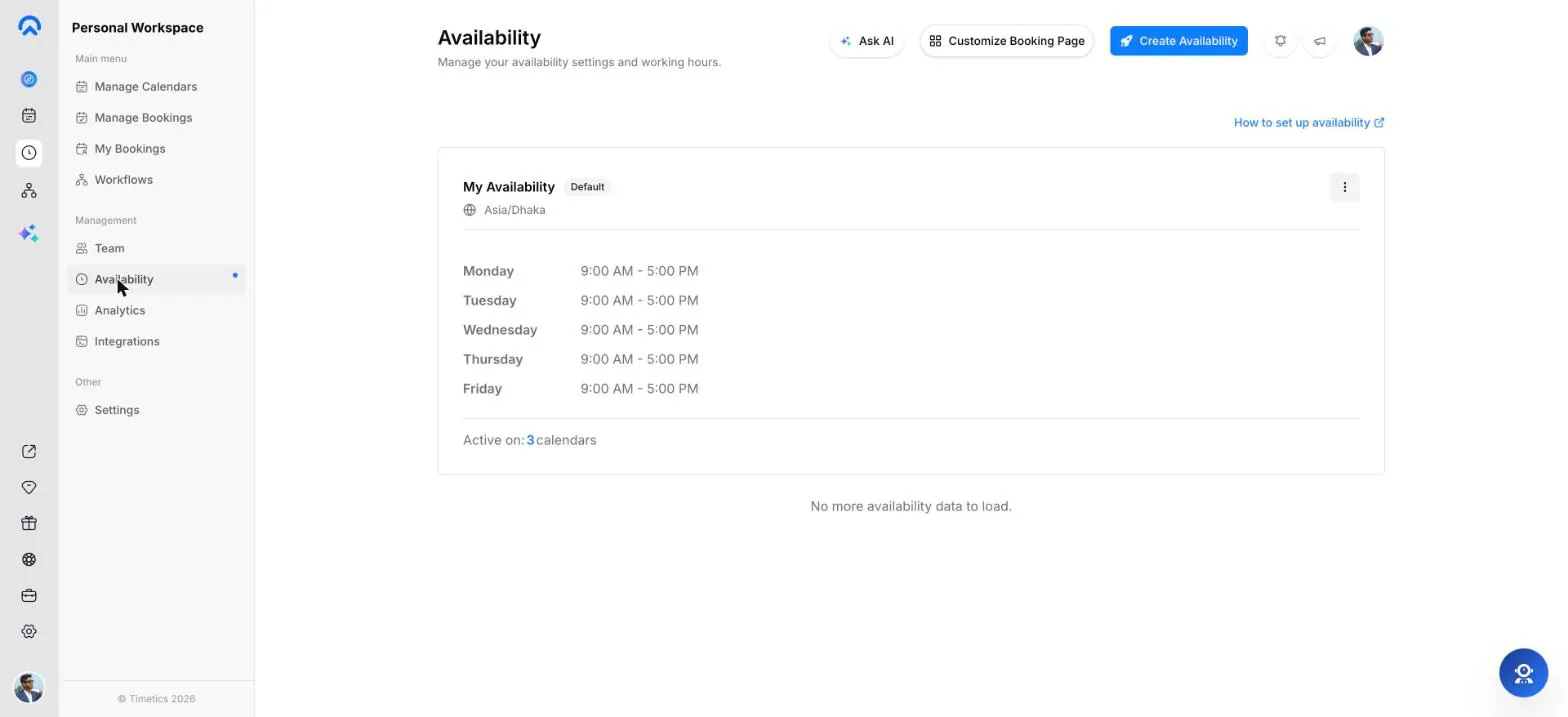
Availability & booking rules
Timetics reads your connected calendars before it offers a time, so a slot that is busy anywhere never shows on your booking page.
Booking types
When you create a calendar in Timetics, you choose one of five appointment types. Each one has its own link, length and optional price.
Book one-on-one meetings based on your availability. Offer several consultation types, each with its own price and length.
Offer bookable services with set time, price, and staff. Several team members can host the same service.
Run classes or group sessions where many guests book the same time. 10 seats by default, and the page can show how many are left.
Meet one guest with several team members at once. Guests only see times when every member is free.
Share bookings fairly across your team, one host per booking. Guests see a time when any member is free.
Clients book a daily, weekly or monthly series in one go. Every date is checked first, and the price covers the whole series.
Booking pages & website
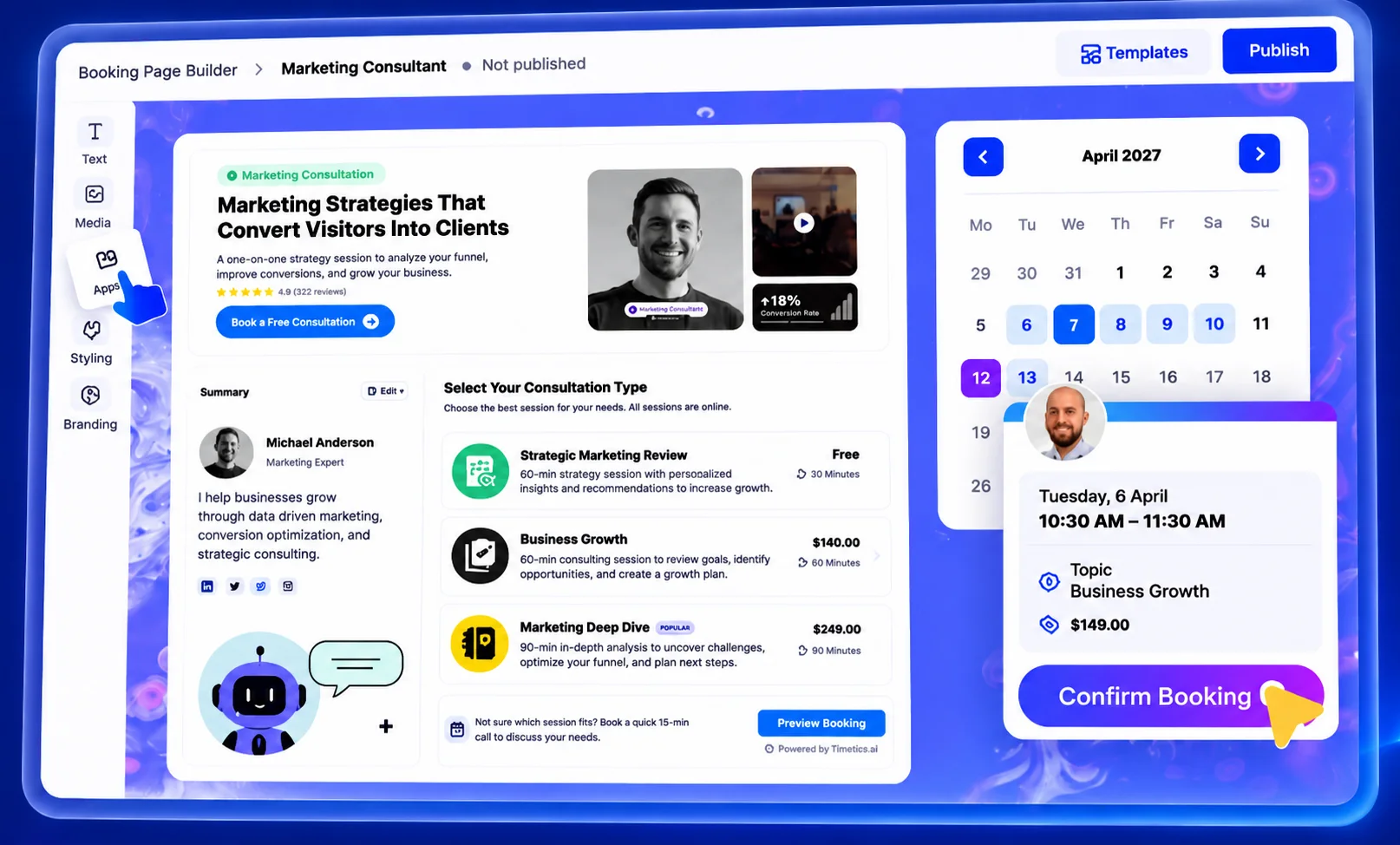
Clients see your services, prices and open times before they pick a slot. No website yet? Build one inside Timetics.
One page lists all your calendars, and each calendar gets its own page in a month, week or day layout.
Drag in hero, testimonial, FAQ, video and other blocks, or start from a ready-made template.
Copy ready-made code for a regular or React site, with your own background, text and brand colors.
Hide the Timetics name on Earn and above. Run pages on your own domain with your own logo on Scale.
Ask what you need before the meeting with ten answer types. Answers show in the booking and in exports.
Give each calendar its own title, description and sharing image, and send guests to your own page after they book.
Team scheduling
Share incoming bookings, bring several people into one meeting and keep each person to the access they need.
Payments & deposits
A booking on a paid calendar stays pending until the payment goes through, so the money is in before the session starts.
Reminders & workflows
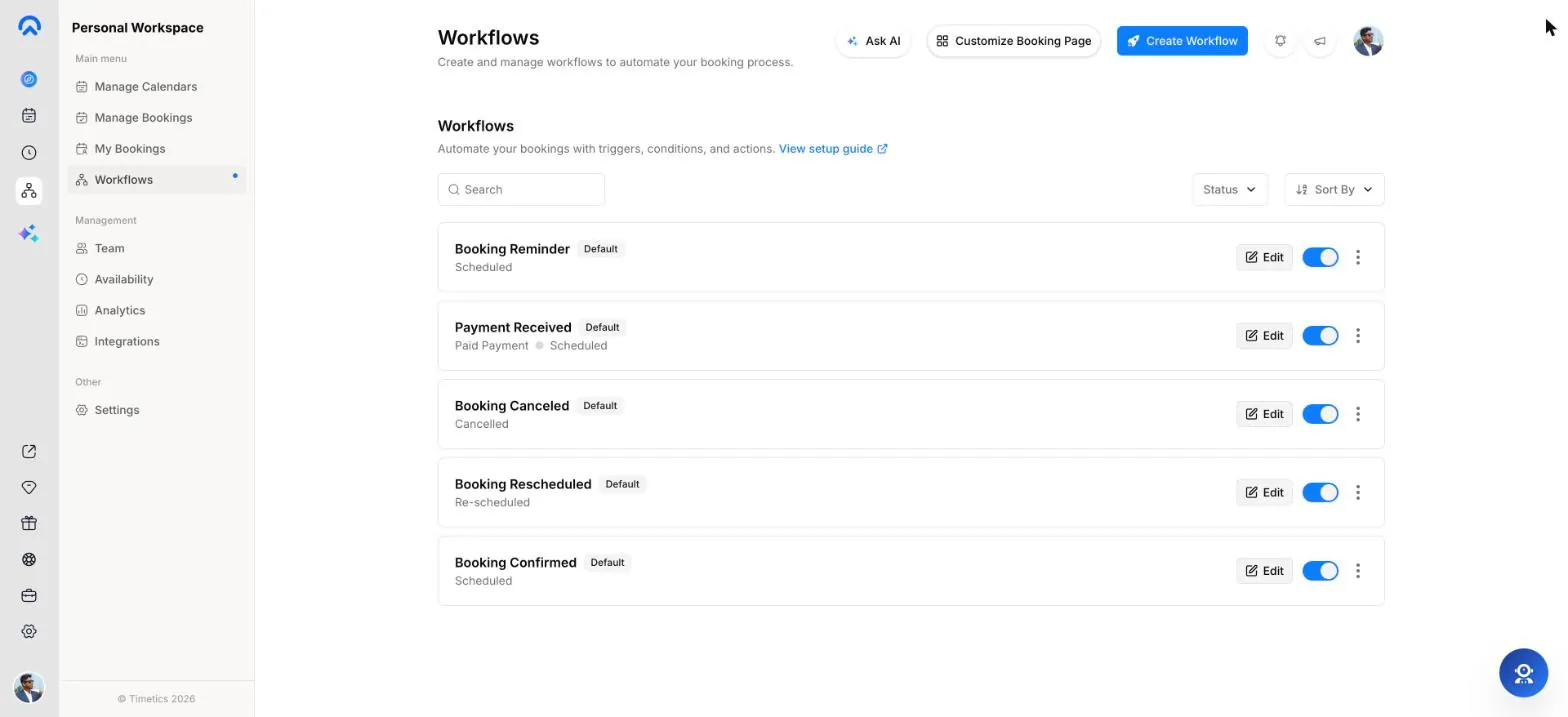
A workflow starts when a booking is made, cancelled or rescheduled, then sends emails, reminders or waits for a set time.
Every new booking triggers an email, and guests can add it to any calendar app from that email.
Workflow reminders go out before the meeting, and partly paid bookings get a reminder for the rest.
Add a wait step, then send a thank-you or next-step email on its own.
Text through your own Twilio number and message from your own WhatsApp Business number.
Run a workflow only for paid, free or partly paid bookings, or for chosen calendars.
Guests change or cancel from their link inside your notice period, and can be asked for a reason.
AI assistant & MCP
Type or say what you need. The assistant works with your calendars, bookings, hours, team, settings, integrations and analytics.
Languages & time zones
Clients far away should not have to do time math or read a page in a language they do not speak.
Security & data
Timetics AI runs on GDPR-ready infrastructure, and each workspace keeps its bookings apart from the others.
Integrations
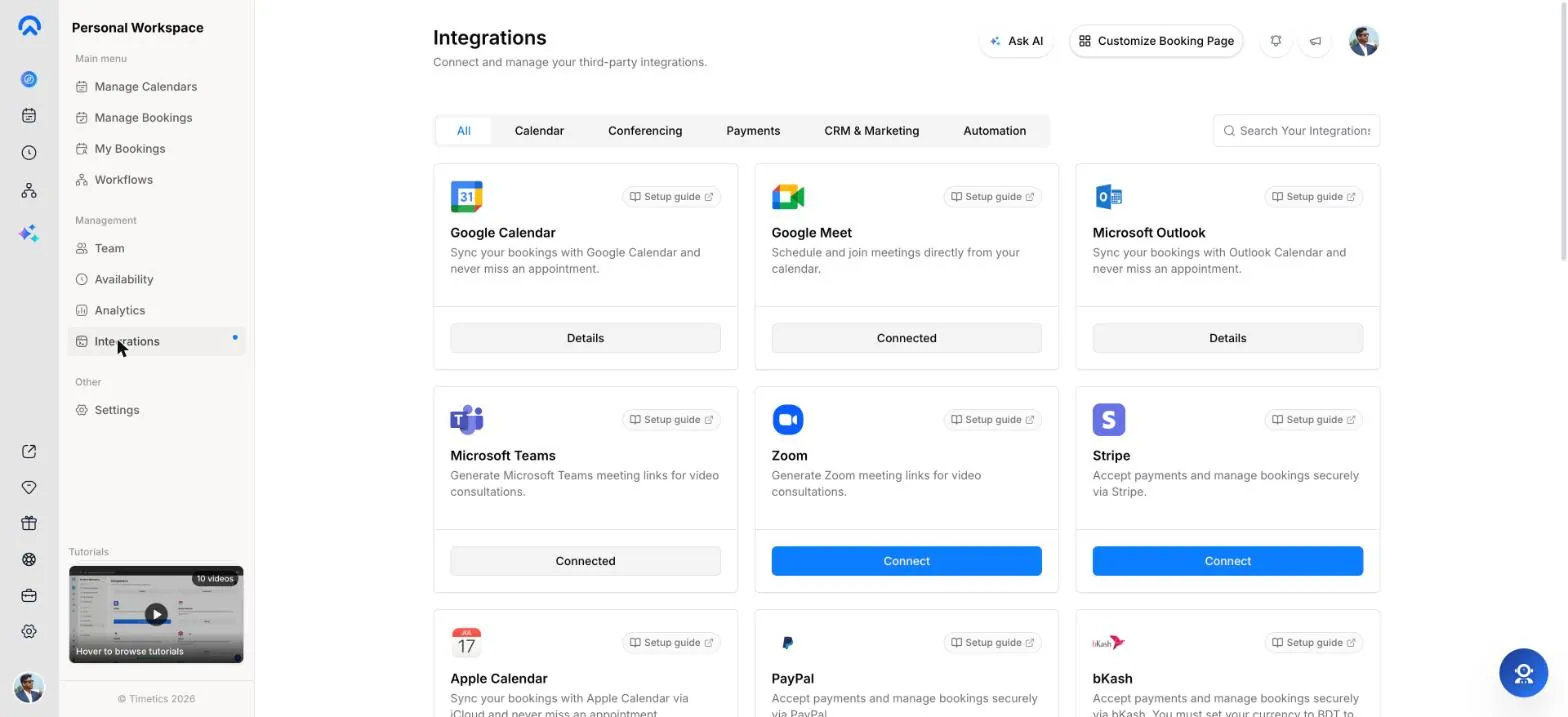
Google Calendar and Outlook with a sign-in, Apple Calendar with an app-specific password.
Google Meet, Zoom, Microsoft Teams, FaceTime or a custom link for any other room.
Stripe on every plan and PayPal on Earn and above, both into your own account.
HubSpot, Zoho CRM, GoHighLevel, ActiveCampaign and Zapier get each new booking.
A formatted message for each new booking, with a test button and an on/off switch.
Booking and payment events sent to your own software, signed with your secret.
Compare
| Feature | Timetics AI | Calendly | Lunacal | Acuity | Cal.com |
|---|---|---|---|---|---|
| 5-person team, per month |
$15 Earn · up to 10 users · $12 billed yearly |
$100 Teams · $20 per seat |
$75 Teams · $15 per user |
$34 Standard · up to 6 calendars |
$60 Teams · $12 per user |
| Free plan | Yes, up to 3 users | Yes, 1 event type | 7-day trial | 7-day trial | Yes, 1 user |
| One-time lifetime option | Yes, from $69 | Not listed | Not listed | Not listed | Not listed |
| Round robin | Yes | Teams plan | Teams plan | Separate staff calendars | Teams plan |
| Payments | Stripe, PayPal, deposits | Stripe, PayPal | Stripe, PayPal | Stripe, Square, PayPal | Stripe, PayPal |
| Booking website builder | Yes (Earn) | Not listed | Booking page content | Scheduler page | Not listed |
| AI assistant | Yes, on every plan | Paid add-on | Enterprise (beta) | Not listed | Not listed |
| Several businesses in one account | Yes, workspaces | Not listed | Not listed | Not listed | Organizations plan |
Prices are list prices on monthly billing, checked on each company's pricing page on 16 Nov 2026. Plans and prices change; check the vendor's site before you buy.
GDPR-ready infrastructure, encrypted payments and role-based team access keep every booking, invoice and client detail protected end to end.
Try it for free"What I like most about Timetics AI is how it brings everything into one place: scheduling, client management, and follow-ups."
"I love the Timetics AI booking system; it is truly wonderful. Its simplified scheduling reduces manual work and makes it so much easier to manage appointments."
"An awesome alternative to Calendly. I love how easy it is to create customized booking pages with the look I want."
"I needed a scheduling tool for my webpage, similar to Calendly, and Timetics AI made it simple."
"It is the most complete and innovative option to reserve and generate a feeling of exclusivity with my clients."
"I've been using Salon Booking Softwares (MindBody, ShortCuts, Milano, StyleSeat, etc.) and Timetics AI is by far the most complete.."
"I find timetics very promising, it is one of those offers that I intend to keep. Well done."
"Timetics AI simplifies scheduling by eliminating repeated email exchanges with a simple booking link."
"I like that Timetics AI has white label facilities along with all the Calendly features. I appreciate the clean UI and how straightforward it is to set up."
Savings
Move the slider to your team size and see the difference over one and five years.
Timetics AI plan: $69 (1–5 users)
Year 1 Savings
$1,131
5 Year Savings
$5,931
ROI
1,639%
Compared with Calendly Teams at $20 per user per month, billed monthly (calendly.com/pricing, checked November 2026). Timetics price is the one-time lifetime deal for that team size.
Pricing
One price covers your whole team, not each person on it.
For solo professionals getting started.
Up to 3 users · No credit card
For consultants, coaches and agencies charging clients.
Up to 10 users · $12/mo billed yearly · 30-day free trial
For growing teams that need automation and control.
Up to 30 users · $19/mo billed yearly · 30-day free trial
Prefer to pay once? Lifetime deals start at $69 ↗ Compare all features ↗
Use cases
Anyone who books meetings or appointments with clients and wants booking pages, calendars, payments and follow-ups in one place.
Sell services with set prices, take payment at booking and share the work across your staff.
Scheduling for small businessesOne booking page for every kind of meeting you take, from a free intro call to a paid session.
Scheduling for individualsRound robin, meetings with the whole team and four roles, on plans priced for the team.
Scheduling for teamsEverything service businesses ask before choosing a booking system: how online booking works, what it costs, how it cuts no-shows, how to take payments, and how AI scheduling helps. Clear answers, with Timetics AI as the example.
What is Timetics AI?
Timetics AI is a sales-driven appointment and service booking software for coaches, consultants, agencies, and small service businesses. It combines a no-code booking page, online payments, automated reminders, client management, and an AI scheduling agent in one platform, with a free plan and a one-time lifetime option.
Most scheduling tools only show open time slots. Timetics AI shows what you sell first: your services, packages, prices, and expertise. Clients choose a service, pick a time, pay at checkout, and arrive ready to buy.
Timetics AI is built by the team behind the Timetics WordPress booking plugin. It is rated 4.8/5 on G2, 4.6/5 on Trustpilot, and 4.6/5 on AppSumo.
What is appointment scheduling software?
Appointment scheduling software lets clients book time with your business online, 24/7, without calls or back-and-forth emails. It shows your real availability, confirms each booking, sends reminders, and syncs with your calendar. Service booking software adds prices, payments, and client records, so the booking is also the sale.
Scheduling link vs. service booking software
| Basic scheduling link | Service booking software (Timetics AI) | |
|---|---|---|
| What the client sees | Open time slots | Services, prices, packages, then time slots |
| Payment | Usually separate | Paid or deposit at checkout |
| No-show protection | Reminder email | Reminders, deposits, easy rescheduling |
| Client records | Name and email | History, notes, custom fields |
| Best for | Internal and sales calls | Paid sessions, appointments, consultations |
People also call it online booking software, an appointment booking system, a booking app, or an online scheduler.
How does online booking software work?
Online booking software works in five steps: the client opens your booking page, chooses a service, picks an open time, enters their details, and pays. The booking then confirms automatically, lands on your calendar, and triggers reminders. No one on your team has to touch it.
What the client does on a Timetics AI booking page:
What happens on your side: the booking appears on your Google, Outlook, or Apple calendar. Reminder and follow-up emails go out on schedule. The client's record is saved for next time.
Do clients need to download an app to book?
Clients don't need to download anything. They book from your Timetics AI booking link or from a booking form embedded on your website, in any browser on phone or desktop. Nothing to install.
You can share the link anywhere: your website, Instagram or LinkedIn bio, email signature, WhatsApp, or Google Business Profile. Use private links for invite-only clients.
For you and your team, Timetics AI also installs as a Progressive Web App, so it opens like an app on any device.
Why do service businesses need online booking software?
Service businesses use online booking software to stop losing time and money on scheduling. It ends phone tag, takes bookings while you sleep, prevents double-bookings, cuts no-shows, and collects payment before the session. If clients book with you every week, it pays for itself fast.
Signs your business needs it:
Even with a small client base, online booking makes you look more professional and frees hours each week for paid work.
How does booking software reduce no-shows?
Booking software reduces no-shows in three ways: automatic reminders, a payment or deposit at booking, and easy self-service rescheduling. A 2016 BMJ Open meta-analysis of 21 studies found that digital reminders alone lowered no-show rates from 21% to 15%. Adding a deposit gives clients a financial reason to show up.
How Timetics AI helps you cut no-shows:
Tip: ask for a deposit on first-time clients and long or high-value sessions. Keep free discovery calls deposit-free.
What features should appointment booking software have?
The must-have features are online self-booking, two-way calendar sync, automated reminders, payments at booking, and client records. Beyond that, look for availability rules, group and recurring bookings, branding, and integrations with your CRM and video tools. Timetics AI includes all of these.
Core (every business needs):
Growth (as you add services and staff):
Brand and automation:
See the full Timetics AI feature list.
Can I take payments and deposits when clients book?
Timetics AI collects payment at the moment of booking through Stripe, PayPal, or bKash. You can charge the full price, take a partial deposit, or let clients pay on-site. Refunds are processed from your dashboard, so you never chase an invoice after a session.
Payment options in Timetics AI:
| Option | What it does | Good for |
|---|---|---|
| Full prepayment | Client pays the whole price at checkout | Paid consultations, coaching sessions |
| Deposit | Client pays part now, the rest later | High-value services, first-time clients |
| Pay on-site | Client books free, you mark it paid later | Salons, clinics, local services |
| Add-on services | Paid extras chosen at checkout | Raising the value of each booking |
| Coupons | Discount codes for promos | Launches, returning clients |
| Refunds | Refund from the dashboard | Cancellations under your policy |
Stripe is included on the free plan. PayPal, deposits, and coupons start on the Earn plan. bKash lets clients in Bangladesh pay by mobile wallet.
What is an AI scheduling agent?
An AI scheduling agent manages your booking setup from plain-language instructions instead of menus. In Timetics AI, you type something like "Take Mondays off" or "Create a 30-minute free discovery call" and the agent does it, usually in under a second. It is included at no extra cost.
What you can ask the Timetics AI agent:
| You type | It does |
|---|---|
| "Create a 1:1, 30 min, free" | Creates a new booking calendar |
| "Change duration to 45 min" | Updates the calendar |
| "Set my weekly hours to 9–5" | Sets your availability |
| "Block Fridays this month" | Blocks dates on your calendar |
| "Show today's bookings" | Lists your schedule |
| "How do I enable payments?" | Walks you through setup |
Deleting a calendar asks for confirmation first, and blocked dates can be unblocked. Changes to bookings that already have attendees are made in the bookings dashboard.
Prefer to work from Claude or Cursor? See the MCP connector below. Learn more about the AI scheduling agent.
Do I need a website to take online bookings?
You don't need a website to take bookings. Timetics AI gives you a hosted booking page with its own shareable link, built with a drag-and-drop, no-code builder. If you already have a website, you can embed the booking form on WordPress, Wix, Squarespace, or any site with a short snippet.
What you can put on a Timetics AI booking page:
Start from 12+ industry templates, such as life coach, tutor, financial advisor, doctor, or beauty salon, or from a blank page. See the booking website builder and real examples in Built with Timetics.
Can booking software handle multiple staff and locations?
Timetics AI lets you add team members with their own calendars and availability, and run bookings across many locations from one dashboard. Clients pick a provider and a location, and only matching open times show, so the right person gets the right booking.
What teams and multi-location businesses get:
Learn more about scheduling for small businesses.
Can I manage multiple brands or client accounts in one booking tool?
Timetics AI lets one account run several brands, businesses, or client accounts through separate workspaces. Each workspace has its own services, team, booking pages, and data, kept fully isolated, so agencies and multi-brand owners manage everything from one login without mixing clients.
Who it's for:
What you get:
How many workspaces each plan includes:
| Plan | Workspaces | Members per workspace |
|---|---|---|
| Solo Creator lifetime ($69) | 3 | 5 |
| Small Business lifetime ($132) | 15 | 30 |
| Consultants & Agencies lifetime ($265) | 30 | 60 |
| Scaling Teams lifetime ($370) | 80 | Unlimited |
The agency dashboard starts at the Small Business tier. White-label and custom domains start at Consultants & Agencies (or the Scale subscription). Calendly lists multiple workspaces and white-label as limited.
Can I manage bookings from Claude or other AI assistants?
Timetics AI includes an MCP connector, so you can manage your bookings from AI assistants such as Claude, Cursor, and Codex. MCP (Model Context Protocol) is an open standard that lets AI tools connect securely to the apps you use, so your assistant can work with your Timetics AI booking data without copy and paste.
Why it matters:
In-app AI agent vs. MCP connector
| Timetics AI agent | MCP connector | |
|---|---|---|
| Where you use it | Inside the Timetics AI app | Inside Claude, Cursor, Codex, or another MCP client |
| Best for | Quick setup changes in plain language | Working with bookings alongside your other tools |
| Plans | All plans, including the $69 lifetime deal | Scale plan, Consultants & Agencies lifetime tier and up |
With both the in-app agent and MCP, Timetics AI is built for teams that already work with AI every day.
Which apps does Timetics AI integrate with?
Timetics AI integrates with 20+ tools across calendars, video, payments, CRM, and automation. The most used are Google Calendar, Outlook, Zoom, Google Meet, Stripe, PayPal, HubSpot, GoHighLevel, and Zapier, which connects bookings to 7,000+ more apps.
| Category | Integrations |
|---|---|
| Calendars (two-way sync) | Google Calendar, Microsoft Outlook, Apple Calendar |
| Video meetings | Zoom, Google Meet, Microsoft Teams, FaceTime, any custom meeting link |
| Payments | Stripe, PayPal, bKash |
| CRM and marketing | HubSpot, GoHighLevel, Zoho CRM, ActiveCampaign |
| Messaging | Twilio SMS, WhatsApp, Slack, Discord |
| Automation | Zapier, outgoing webhooks |
| Custom SMTP (send from your own domain) | |
| AI tools | MCP connector for Claude, Cursor, Codex |
| Maps | Google Maps for in-person locations |
Is my client data secure in Timetics AI?
Timetics AI runs on GDPR-ready infrastructure, with encrypted payments and role-based team access. Card payments are processed by Stripe and PayPal, and each workspace keeps its data separate, so one client's bookings are never visible in another's workspace.
How Timetics AI protects your data:
Read the privacy policy for full details.
What types of businesses use booking software?
Any business that sells time, sessions, or appointments uses booking software. Timetics AI is used most by coaches, consultants, agencies, and small service businesses, and also by clinics, salons, fitness studios, tutors, and real estate and financial advisors.
| Business type | How they use Timetics AI |
|---|---|
| Coaches and consultants | Sell paid sessions and packages; free discovery calls with intake questions |
| Agencies | One workspace per client, white-label pages, CRM sync |
| SaaS founders and sales teams | Demo and discovery calls that flow into HubSpot or GoHighLevel |
| Clinics, therapists, healthcare | Book across practitioners and locations, with reminders and intake fields |
| Salons, spas, barbershops | Clients choose a stylist, add extras, pay a deposit |
| Fitness, yoga, wellness | Group classes with attendee caps, recurring sessions |
| Tutors and educators | One-on-one and group lessons across time zones |
| Real estate, legal, financial advisors | Property viewings and client meetings synced to the CRM |
| Home services, non-profits, community groups | On-site visits, volunteer slots, pay on-site |
How much does appointment scheduling software cost?
Most appointment scheduling software costs $10–$20 per user per month, so a five-person team pays $600–$1,200 a year. Timetics AI is different: a free-forever plan, flat team plans from $12 a month (billed yearly) for up to 10 users, or a one-time lifetime deal from $69 with no recurring fees.
Timetics AI subscription plans
| Plan | Price | Users | Highlights |
|---|---|---|---|
| Start | $0, free forever | 3 | Unlimited bookings and event types, calendar sync, Stripe, reminders. No credit card. |
| Earn | $15/month, or $12/month billed yearly | 10 | Booking website builder, branding removal, PayPal, deposits, coupons, group booking, CRM integrations |
| Scale | $24/month, or $19/month billed yearly | 30 | Custom domain, white-label, MCP, webhooks, Twilio SMS, WhatsApp, custom SMTP |
Timetics AI lifetime deals (pay once)
| Tier | One-time price | Workspaces | Members per workspace |
|---|---|---|---|
| Solo Creator | $69 | 3 | 5 |
| Small Business | $132 | 15 | 30 |
| Consultants & Agencies | $265 | 30 | 60 |
| Scaling Teams | $370 | 80 | Unlimited |
Is the lifetime deal really one payment? Yes. You pay once and keep the features of your tier, including future updates within that tier.
Is there a refund policy? Yes. A 30-day, 100% money-back guarantee. See the refund policy.
Is there a WordPress version? Yes. Timetics is also a WordPress plugin. The hosted Timetics AI needs no hosting, updates, or backups on your side. Compare them in Timetics SaaS vs WordPress.
See the pricing page for full plan details.
Is there a Calendly alternative without monthly fees?
Timetics AI is a Calendly alternative you can buy once: the $69 lifetime deal covers up to 5 team members per workspace with no monthly or per-seat fees. It also adds what Calendly charges extra for or lacks, such as a booking website builder, deposits, add-on services, workspaces, and an included AI agent.
Five-year cost for a 5-person team
| Calendly Teams | Timetics AI Solo Creator | |
|---|---|---|
| Price | $20 per seat per month (billed monthly) | $69 once |
| Year one | $1,200 | $69 |
| Five years | $6,000 | $69 |
| You save | – | $5,931 over 5 years |
Where each tool fits
| Timetics AI | Calendly | |
|---|---|---|
| Pricing model | Free, flat team plans, or lifetime | Per seat, per month |
| Booking website builder | Yes, with custom domain | Booking link only |
| Deposits and add-on services | Yes | No |
| Multiple business workspaces and white-label | Yes | Limited |
| AI scheduling agent | Included | Paid add-ons |
| Booking page languages | 12+ | 8 |
| Setup time (vendor estimate) | About 2 minutes | 1+ weeks |
| Enterprise SSO (SAML, SCIM) | No | Yes |
| Native iOS/Android apps | Progressive Web App | Yes |
Calendly fits large companies that need SSO and enterprise controls. Timetics AI fits coaches, consultants, agencies, and service businesses that want to sell and get paid through their booking page. Full comparison: Calendly vs Timetics AI. Also compare Acuity, YouCanBookMe, and Trafft.
How do I choose the right booking software?
Choose booking software by matching it to how you sell: if clients pay for sessions, you need payments and deposits at booking; if you have staff or clients, you need teams and workspaces; and if your team will grow, avoid per-seat pricing. Use the checklist below to compare tools side by side.
Quick checklist before you buy:
How do I get started with Timetics AI?
Timetics AI fits modern service businesses because it puts booking, selling, payments, and AI in one tool at a flat price. You stop paying separately for a scheduler, a booking website, and a payment tool, and you can set up a working booking page in about two minutes.
With Timetics AI, you get:
Get started with Timetics AI in 5 steps:
Your calendar should sell, not just schedule.
No credit card required · 30-day money-back guarantee on paid plans
Set up your booking page in minutes. Free for up to 3 users.