How AI Reduces Scheduling Friction for Service Businesses


Table of Contents
Scheduling an appointment should be simple. Yet for many service businesses, it turns into a chain of emails, phone calls, calendar checks, availability updates, and follow-up messages.
This unnecessary effort is known as scheduling friction.
It can appear anywhere in the booking journey-from unclear service options and outdated availability to repetitive data entry, missed reminders, and difficult rescheduling.
AI helps remove these roadblocks by automating the booking process and making scheduling faster and easier. Instead of endless back-and-forth messages, customers can book appointments, receive instant confirmations, and reschedule when needed-all without manual effort.
In this guide, you’ll learn what scheduling friction is, how it affects service businesses, and how AI-powered scheduling helps you save time, improve customer experience, and keep your calendar running smoothly.
What is Scheduling Friction?
Scheduling friction is any unnecessary delay, effort, confusion, or repeated action that makes booking or managing an appointment more difficult.
It affects both customers and service providers. For businesses, it often involves manually checking calendars, answering repetitive questions, updating availability, sending reminders, and correcting unsuitable bookings.
Common examples include:
- Back-and-forth emails or phone calls to find a suitable time
- Customers selecting the wrong service or appointment type
- Conflicting calendars that create double-booking risks
- Confusing time-zone information
- Re-entering the same booking details across multiple tools
- Missing confirmations, reminders, or preparation instructions
- Complicated cancellation and rescheduling processes
- Staff repeatedly searching for settings or setup instructions
This friction matters because every additional step increases the chance that a customer will delay or abandon the booking. Even when the appointment is completed, unclear service details or missing intake information can leave the customer and provider poorly prepared. For service businesses, reducing scheduling friction does more than save administrative time.
📚 Related reading: AI-Powered Appointment Booking Software: What It Is, How It Works, and Whether You Need It
How Does AI Reduce Scheduling Friction
AI reduces scheduling friction by turning booking requests into actions, keeping availability accurate, and automating repetitive administrative work. It creates a shorter path between a customer’s intent to book and a confirmed appointment-while giving service providers more control over their time.
Here are the main ways it improves the scheduling process.
1. Turns Natural-Language Requests Into Scheduling Actions
An AI scheduling agent can interpret instructions written in everyday language. Instead of searching through several menus, a user can enter a request such as:
- “Create a 30-minute discovery call.”
- “Set my availability to 9 AM–5 PM on weekdays.”
- “Block next Monday.”
- “Show today’s bookings.”
The agent identifies the user’s intent, connects it to the relevant scheduling settings, and performs the supported action. This reduces the clicks, interruptions, and learning time involved in managing booking software.
2. Keeps Availability More Accurate
Outdated availability can lead to failed booking attempts, calendar conflicts, and frustrated customers. AI-assisted scheduling makes it easier to update working hours, block unavailable dates, and manage appointment windows.
When the booking platform is connected to external calendars, scheduled appointments can also stay synchronized. Customers are then shown availability based on current calendar information rather than a schedule that must be updated separately.
3. Helps Customers Choose the Right Service
Scheduling friction often begins before a customer reaches the calendar. If services are poorly explained, customers may select the wrong appointment type or contact the business for clarification.
A structured booking experience can present each service with its description, duration, price, meeting format, and relevant provider. This allows customers to understand what they are booking before selecting a time.
For example, a consultant can separate a free discovery call from a paid strategy session. Clients can choose the option that matches their needs instead of booking any available slot.
4. Automates Confirmations and Reminders
Manually sending a message for every appointment creates repetitive work and increases the chance that important communication will be missed.
Scheduling automation can send confirmation messages immediately after a booking and reminders as the appointment approaches. It can also provide meeting links, preparation instructions, or follow-up information at predefined times.
These messages do not guarantee attendance, but they can reduce uncertainty and help customers remember what they booked, when it will happen, and how to join.
5. Collects Information Before the Appointment
Pre-booking questions allow businesses to gather essential information while the customer schedules the appointment.
An agency might ask about the client’s project type, while a tutor could ask about the learner’s subject and current skill level. A consultant may request the customer’s objectives before a paid session.
Collecting this context early reduces follow-up emails and helps the provider prepare. However, forms should remain concise. Asking for unnecessary information can introduce new friction instead of removing it.
6. Reduces Repetitive Administrative Work
Service professionals frequently repeat the same scheduling tasks: checking availability, creating booking calendars, answering setup questions, sending instructions, and locating specific settings.
AI can handle or assist with many of these predictable actions. Staff can then focus on exceptions, sensitive requests, and customer interactions that require judgment.
The purpose is not to automate every decision. It is to remove repetitive steps that do not need individual attention.
7. Makes Scheduling Tools Easier to Navigate
Operational friction also occurs when users know what they want to do but cannot find the right feature.
An AI assistant can guide users to the appropriate page or provide instructions inside the scheduling platform. For example, a user could ask how to connect a payment method or where to manage bookings instead of leaving the platform to search through documentation.
This type of assistance reduces setup time and makes advanced scheduling features more accessible to businesses without dedicated technical staff.
📚 Related reading: How Smart Scheduling Saves Time (10+ Hours Per Month) and Keeps You Productive
AI Scheduling vs. Traditional Booking Systems: What Actually Changes?
Traditional booking systems let customers select from predefined appointment times. AI scheduling adds an intent-driven layer that helps users manage calendars, availability, and booking tasks through natural-language requests. The main difference is not simply online booking—it is how much effort is required to operate the system.
| Area | Traditional booking system | AI scheduling system |
| System control | Users navigate menus and settings | Users can describe supported actions naturally |
| Calendar setup | Event details are entered manually | AI can create booking calendars from instructions |
| Availability | Hours and blocked dates are edited manually | AI can apply availability changes from a request |
| Customer booking | Customers select a predefined time | Customers follow a more guided, context-aware process |
| Service selection | Often starts with an event type or calendar | Can emphasize the right service before the time slot |
| Routine communication | Uses manually configured automation | AI can simplify how workflows are managed |
| Feature discovery | Users search menus, help pages, or documentation | AI can answer questions or direct users to a feature |
| Exceptions | Staff handle unusual requests | Staff remain responsible for complex or sensitive cases |
| Primary benefit | Enables online self-service | Reduces the effort required to manage self-service |
Traditional platforms such as Calendly and Acuity already provide useful features including calendar synchronization, reminders, intake forms, and payments. AI scheduling does not replace these foundations. It makes the administrative layer more conversational and easier to operate.
The practical question is therefore not whether traditional scheduling software works. It is whether a business spends enough time configuring, updating, and navigating its booking process to benefit from AI assistance.
Where Does AI Scheduling Create the Most Value
AI scheduling creates the most value in businesses that manage frequent appointments, repeat similar administrative tasks, or coordinate availability across multiple services and team members. It is especially useful when delays or confusion during booking can cause customers to leave before confirming an appointment.
Consultants and Coaches
Consultants and coaches often offer different appointment types, such as discovery calls, paid consultations, and recurring sessions. AI scheduling can help them create booking calendars, update availability, collect client information, and automate confirmations. This reduces time spent coordinating appointments and helps both parties arrive with clear expectations.
Agencies and Sales Teams
Agencies and sales teams frequently schedule discovery calls, demonstrations, onboarding sessions, and client reviews. AI-assisted booking can shorten the time between an inquiry and a confirmed meeting. It also helps teams maintain consistent booking rules and direct prospects toward the appropriate appointment type.
Salons, Spas, and Personal-Care Businesses
These businesses must coordinate services, durations, staff availability, and customer preferences. A structured scheduling system helps customers select the correct service and available provider before confirming. Automated reminders can also keep appointment details clear without requiring staff to contact every customer manually.
Clinics and Appointment-Based Practices
Clinics and similar practices can use scheduling automation to present appropriate appointment options, collect necessary preparation details, and send reminders. However, sensitive information, urgent requests, and unusual patient needs should always have a clear path to human assistance.
Tutors and Training Providers
Tutors and educators may manage different subjects, session lengths, instructors, and recurring classes. AI scheduling can reduce coordination work by keeping availability organized and allowing learners to book the right type of session. Pre-booking questions can also help instructors understand the learner’s needs in advance.
Multi-Team and Multi-Brand Businesses
Organizations operating several teams, locations, brands, or client accounts face additional scheduling complexity. AI-assisted administration can make routine calendar changes easier, while separate workspaces and shared booking rules help prevent information from becoming fragmented.
AI scheduling delivers less value when appointments are rare, informal, or highly unpredictable. Its strongest use case is a repeatable booking process with clear services and rules—where automation can remove routine work without removing human judgment.
How do you reduce scheduling friction with Timetics AI
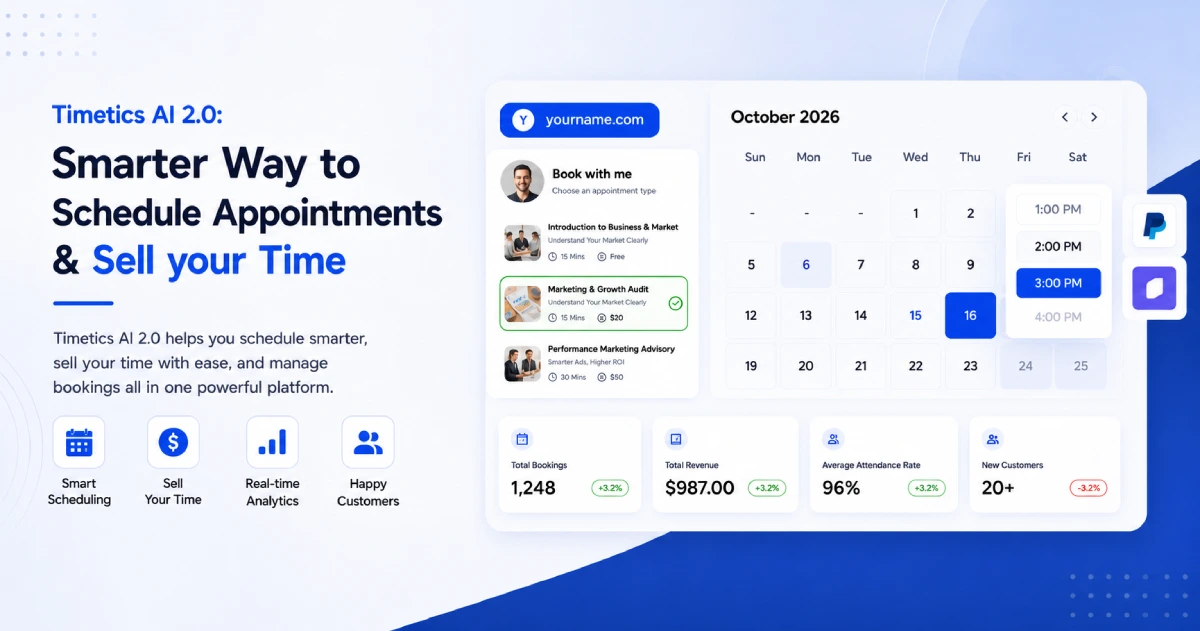
Timetics AI reduces scheduling friction by combining natural-language calendar management with service-based booking, calendar synchronization, payments, and automated communication. Businesses can simplify both sides of the process: how staff manage scheduling and how customers complete a booking.
Create Booking Calendars With Simple Instructions
The Timetics AI Agent can create supported booking calendars from natural-language commands. For example, a user can request: “Create a 30-minute discovery call on Zoom.”
The agent interprets details such as the appointment type, duration, and meeting format. This reduces the need to locate and complete each setting manually.
Manage Availability Without Searching Through Menus
Businesses can use the AI agent to add or update working hours, block dates, or close an entire day. A user might enter “Set my weekday availability to 9 AM–5 PM” or “Block next Monday.”
Timetics also asks for confirmation before destructive actions and records agent activity, helping users retain control over scheduling changes.
Connect Existing Calendars
Timetics can connect with external calendars, including Google Calendar, so confirmed bookings appear in the user’s existing schedule. Calendar synchronization reduces duplicate data entry and helps prevent customers from selecting times that conflict with recorded commitments.
Businesses should still test their connections and availability rules before publishing a booking page.
Help Customers Select the Right Service
A Timetics booking page can show customers the available services before asking them to choose a time. Each service can include relevant information such as its description, duration, price, and assigned team member.
This service-first structure helps prevent customers from booking a generic time slot that does not match their needs.
Collect Information and Payment During Booking
Businesses can add pre-booking questions to collect the context needed for an appointment. A consultant might ask about the customer’s goals, while an agency could request the project type or current platform.
For paid services, Timetics supports payment options within the booking journey. Collecting information and payment before confirmation can reduce follow-up work and make expectations clearer for both parties.
Automate Appointment Communication
Timetics can automate booking confirmations, reminders, and follow-up messages based on configured workflows. Meeting details can be shared without staff manually preparing a message for every appointment.
This keeps customers informed while allowing the business to manage communication more consistently.
Find Features and Setup Guidance Faster
The AI agent can answer supported how-to questions or direct users to the appropriate area of Timetics. Instead of leaving the platform to search for instructions, a user can ask questions such as:
“How do I enable a payment method?”
This reduces feature-discovery friction and can make the platform easier for new team members to learn.
Make Appointment Scheduling Easier With Timetics AI
Reduce repetitive scheduling work with natural-language commands, service-based booking pages, calendar synchronization, and automated communication. Timetics AI helps your customers book with less confusion while giving your team more time to focus on delivering excellent service.
Frequently Asked Questions About AI Booking Automation
What is AI booking automation?
AI booking automation uses artificial intelligence to help manage appointment setup, availability, and other scheduling tasks. It reduces the manual work required to move from a booking request to confirmation.
How does AI reduce scheduling friction?
AI reduces scheduling friction by simplifying calendar updates, service selection, confirmations, reminders, and routine administration. This creates a faster booking process for customers and staff.
Which businesses benefit most from AI scheduling?
Consultants, agencies, clinics, salons, coaches, tutors, and other appointment-based businesses can benefit. It is most valuable when the booking process is frequent and follows clear rules.
What can the Timetics AI Agent do?
The Timetics AI Agent can create and update booking calendars, manage availability, block dates, display bookings, navigate to features, and answer supported setup questions using natural-language instructions.
Can Timetics AI reschedule or cancel existing appointments?
Bookings with existing attendees are currently rescheduled or canceled through the Timetics bookings dashboard. This ensures attendee details and notifications are managed through the appropriate workflow.