How to Reduce Appointment No-Shows with Smarter Booking Software


Table of Contents
Appointment no-shows are one of the most frustrating problems for service-based businesses. A client books a time, your team keeps that slot open, and then no one shows up.
The result is lost time, missed revenue, and an empty calendar gap that could have gone to someone else.
But appointment no-shows are not always about careless clients.
Sometimes the booking process is the real problem. The client may forget the meeting, miss the reminder, misunderstand the service, or book too quickly without feeling committed.
In other cases, they may not know how to reschedule, where to join, or what they need to prepare before the appointment.
That is where smarter booking software helps.
Modern appointment booking software does more than let people pick a time. It can explain the service, collect intake details, send automated appointment reminders, sync calendars, create meeting links, and even collect payments or deposits before the appointment starts.
In this guide, we’ll explain how to reduce appointment no-shows using smarter booking software, why traditional booking links are often not enough, and how tools like Timetics AI can help service businesses create a more reliable booking process.
What Causes Appointment No-Shows? (And Why It’s Not Always the Client’s Fault)
An appointment no-show happens when someone books a meeting, consultation, or service but does not attend and does not cancel in time.
For a business, this means wasted time, lost revenue, and a missed chance to serve another client. In many cases, the booking process makes it too easy for people to book without fully understanding, preparing, or committing to the appointment.
Here are the most common reasons appointment no-shows happen.
The Client Forgets the Appointment
This is the most common reason.
A client may book an appointment today for next week. But if they do not receive a reminder, the appointment can easily get buried under work, personal tasks, emails, or other meetings.
This is where automated appointment reminders become important. A reminder before the meeting helps the client remember the time, service, and next step.
The Booking Details Are Not Clear
Sometimes clients miss appointments because they do not fully understand what they booked. They may not know:
- What the appointment is for
- How long it will take
- Whether it is online or in person
- What they need to prepare
- Who they will meet
- Where they should join
When the booking page does not explain these details clearly, the client may treat the appointment as less important.
There Is No Real Commitment
Free and quick booking links can be useful, but they can also attract low-intent clients.
When someone can book a call in a few seconds without answering any questions or making any payment, they may not feel strongly committed to showing up.
This is why many service businesses use intake questions, deposits, or upfront payments to reduce missed appointments. These small steps help filter serious clients from casual visitors.
The Client Does Not Know How to Reschedule
Not every missed appointment starts as a no-show.
Sometimes the client knows they cannot attend, but they do not see an easy way to reschedule or cancel. So they ignore the appointment instead.
A smarter booking system should make rescheduling simple. This helps businesses save the booking instead of losing it completely.
Time Zone Confusion Creates Missed Meetings
For online consultations, coaching calls, demos, and remote services, time zone confusion is a real problem.
A client may think the meeting is at 3 PM their time, while the calendar invite shows 3 PM in another time zone. This simple mistake can lead to missed appointments.
Good appointment booking software should handle time zones clearly so both sides know the correct meeting time.
Manual Follow-Up Is Easy to Miss
If your team has to manually send every confirmation, reminder, and follow-up message, something will eventually slip.
A busy team may forget to remind a client. A client may miss one email. A meeting link may not be sent on time.
Scheduling automation software helps reduce this risk by handling these small but important tasks automatically.
The Appointment Does Not Feel Valuable Enough
Clients are more likely to show up when they understand the value of the appointment.
For example, a paid consultation, strategy session, medical appointment, or business demo feels more important when the booking page clearly explains the outcome.
A weak booking page only says, “Pick a time.”
A stronger booking page says, “Here is what you will get, how it works, and what to expect.”
That difference matters.
Traditional Booking Links vs Modern Booking Software
Traditional booking links are helpful when you only need someone to pick a time. But for service businesses, that is often not enough. You also need to explain the service, confirm details, send reminders, and reduce appointment no-shows before they happen.
Modern booking software gives you a more complete system for handling the full appointment journey.
| Area | Traditional Booking Link | Modern Booking Software |
| Main purpose | Lets clients pick a time | Manages the full booking process |
| Service details | Often limited | Shows service name, price, duration, and details |
| Client commitment | Low | Higher with intake forms, payments, or deposits |
| Reminders | Basic or limited | Sends automated appointment reminders |
| Rescheduling | May be simple but limited | Lets clients reschedule or cancel more easily |
| Payments | Usually missing or basic | Can collect full payment or deposits |
| Client details | Not always collected | Collects intake questions before booking |
| Team scheduling | Limited | Supports team availability and shared calendars |
| Time zone handling | Can still confuse users | Shows clearer time zone and calendar details |
| Best for | Simple meetings | Service businesses, teams, consultants, and clinics |
A traditional booking link can work well for quick internal calls or simple meetings. But if you want to reduce no-shows, qualify clients, collect payment, and keep your schedule more reliable, modern appointment booking software is a better fit.
This is where tools like Timetics AI become useful. Instead of only sharing your available time slots, you can create service-based booking pages, collect client details, add payments, and automate reminders from one place.
How Modern Booking Software Prevents No-Shows
Modern booking software helps reduce appointment no-shows by making the booking process clearer, more organized, and more serious for the client. Instead of only letting someone pick a time, it helps them understand the service, confirm details, get reminders, and stay prepared before the appointment.
1. Service-First Booking Pages That Filter Low-Intent Clients
A basic booking link usually starts with available time slots. But a smarter booking page starts with the service. It can show:
- Service name
- Duration
- Price
- Meeting type
- What the client should expect
This helps clients understand what they are booking before they choose a time. When the service is clear, people are more likely to take the appointment seriously.
It also filters low-intent clients. If someone is not serious, they may leave before booking. But if they understand the service and still book, they are more likely to show up.
2. Upfront Payments and Deposits That Create Real Commitment
Payments and deposits can help reduce no-shows because they create commitment.
When a client pays before the appointment, even a small amount, the booking feels more important. They are less likely to miss it without notice. This works well for:
- Consultations
- Coaching sessions
- Clinics
- Salons and spas
- Fitness sessions
- Agency calls
You do not always need full payment. A small deposit can also help protect your time and reduce casual bookings.
3. Intake Questions That Increase Client Ownership
Intake questions make the client more involved in the booking process.
Instead of booking in one click, they answer a few simple questions like:
- What do you need help with?
- What is your goal for this appointment?
- Is there anything we should know before the meeting?
This helps your team prepare better. It also makes the client feel more responsible for the appointment.
When clients share details before booking, they are more likely to remember and attend.
4. Automated Multi-Channel Reminders and No-Show Nudges
Many no-shows happen because people forget.
Automated appointment reminders help solve this. A booking system can send reminders before the appointment without manual work. A simple reminder flow can include:
- Confirmation after booking
- Reminder 24 hours before
- Same-day reminder
- Follow-up if the client misses the appointment
These reminders can include the time, meeting link, service name, and reschedule option.
This helps clients stay updated and gives them a chance to reschedule instead of disappearing.
5. Calendar Sync and Automatic Meeting Links That Remove Logistical Excuses
Some clients miss appointments because they cannot find the meeting link or save the wrong time.
Modern appointment booking software can fix this with calendar sync and automatic meeting links. A good setup should include:
- Calendar invite
- Correct time zone
- Meeting link
- Service details
- Reschedule option
When everything is clear and easy to access, clients have fewer reasons to miss the appointment.
A Practical No-Show Reduction Setup with Timetics AI
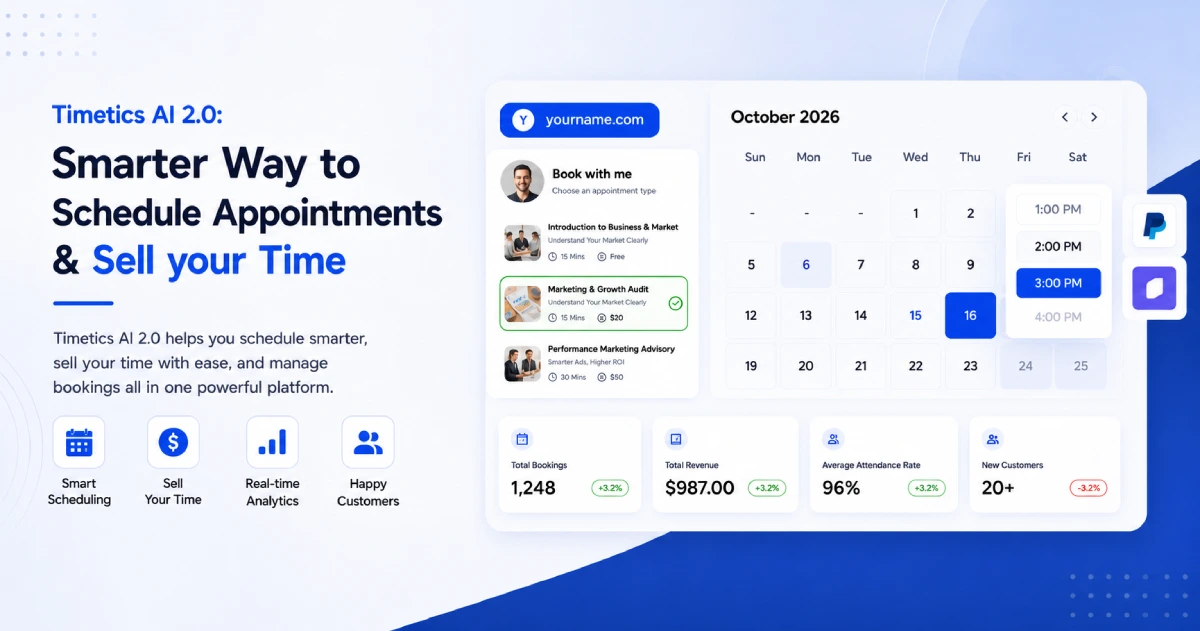
Timetics AI can help you reduce appointment no-shows by making your booking flow more clear, organized, and automated. Instead of only sharing a booking link, you can set up a complete process that guides the client before the appointment.
Here is a simple setup you can follow.
Step 1: Create a service-based booking page: Add your services with clear names, descriptions, and pricing. Don’t just show a calendar – give clients something to choose from before they pick a time.
Step 2: Enable payment or deposit collection: Set up Stripe or PayPal and require either a full payment or a partial deposit at booking. Even 25–50% upfront makes a measurable difference in client commitment.
Step 3: Add 2–3 intake questions: Ask clients something simple before they confirm. “What do you want to get out of this session?” is enough. It increases ownership and helps you prepare.
Step 4: Configure your reminder sequence: Go to Notifications and enable:
- Confirmation email immediately after booking
- Reminder 48 hours before the appointment
- Final reminder 2–3 hours before
Step 5: Connect your calendar and video tool: Sync Google Calendar, Outlook, or Apple Calendar. Connect Zoom or Google Meet. Timetics will automatically embed the meeting link in every confirmation and reminder.
Step 6: Turn on your no-show nudge workflow: Enable the post-no-show automation so that if a client misses their slot, they automatically receive a follow-up with an easy option to rebook.
That’s the full system, and once it’s configured, it runs on its own for every booking you receive.
Which Businesses Benefit Most from No-Show Prevention Software?
No-show prevention software is useful for any business that sells time, appointments, or personal service. If one missed booking means lost income or wasted staff time, smarter booking software can help. Here are the businesses that benefit most.
Consultants and Coaches
Consultants and coaches often sell paid calls, strategy sessions, or one-on-one guidance.
No-shows waste valuable expert time. With service details, intake questions, payments, and reminders, clients understand the value of the session before they book.
Clinics and Healthcare Providers
Clinics lose time when patients miss appointments without notice.
Booking software can help by sending reminders, showing appointment details, and making it easier for patients to reschedule instead of missing the visit.
Salons, Spas, and Wellness Centers
A missed slot can directly affect daily revenue for salons, spas, fitness trainers, and wellness centers.
Deposits, service duration, staff availability, and reminder messages help clients stay committed to their booking.
Agencies and Service Teams
Agencies often handle discovery calls, onboarding calls, client meetings, and review sessions.
Modern booking software helps teams manage calendars, collect client details, and reduce missed meetings across different team members.
SaaS and Sales Teams
SaaS teams use appointments for product demos, onboarding, and customer success calls.
When a lead misses a demo, the sales process slows down. Automated reminders, meeting links, and calendar sync help keep leads on track.
Freelancers and Creators
Freelancers and creators may offer paid audits, consultation calls, lessons, or project meetings.
A clear booking page with payment, intake questions, and reminders helps protect their time and reduce casual bookings.
Final Thoughts: Reducing No-Shows Starts Before the Appointment
Reducing appointment no-shows is not only about reminding clients at the last minute. It starts from the moment they visit your booking page.
When your booking process is clear, clients know what they are booking, how long it will take, what they need to prepare, and why the appointment matters. This makes them more likely to show up.
Smarter booking software helps you do that with service details, intake questions, payments or deposits, calendar sync, and automated reminders.
So, if your business depends on appointments, do not treat your booking page as just a time picker. Treat it as the first step of the client experience.
With Timetics AI, you can create service-first booking pages, collect client details, accept payments, send reminders, and manage appointments from one place.
It helps you reduce missed appointments and build a more reliable booking process without making things complicated.
FAQs About Booking Software and No-Shows
How can I reduce appointment no-shows?
You can reduce appointment no-shows by using clear service pages, automated appointment reminders, intake questions, calendar sync, and upfront payments or deposits. These steps help clients understand the appointment, remember it, and feel more committed before the meeting starts.
Can booking software really reduce no-shows?
Yes, booking software can help reduce no-shows by automating reminders, confirming appointment details, collecting client information, and making rescheduling easier. Tools like Timetics AI also help service businesses create a more organized booking process from one place.
What is the best appointment reminder software for small businesses?
The best appointment reminder software should send automated reminders, support calendar sync, manage client details, and make rescheduling simple. Timetics AI is a good option for small service businesses because it combines booking pages, reminders, payments, and client intake in one platform.
How do automated appointment reminders reduce no-shows?
Automated appointment reminders reduce no-shows by reminding clients before the appointment time. They can include the service name, date, time, meeting link, location, and reschedule option, so clients do not forget or miss important details.
Does upfront payment reduce appointment no-shows?
Yes, upfront payment or a small deposit can reduce appointment no-shows because it creates stronger commitment. When clients pay before booking, they are more likely to value the appointment and attend on time.
What features should booking software have to prevent no-shows?
Booking software should include automated reminders, service-based booking pages, intake questions, calendar sync, meeting links, rescheduling options, and payment or deposit support. Timetics AI includes these types of features to help businesses reduce missed appointments.
Is Timetics AI useful for service businesses that want fewer no-shows?
Yes. Timetics AI is useful for consultants, agencies, clinics, salons, coaches, and other service businesses that want fewer no-shows. It helps you create clear booking pages, collect client details, accept payments, sync calendars, and send reminders before the appointment.