Booking Page Optimization: How to Turn Visitors Into Qualified Appointments


Table of Contents
A booking page is where a visitor chooses a service, selects a time, and confirms an appointment. If this page is unclear or difficult to use, the visitor may leave without booking.
Booking page optimization means improving this page so more of the right people complete a booking. The goal is not simply to fill your calendar. It is to attract people who understand your service, need your help, and are ready to take the next step. These are qualified appointments.
A strong booking page clearly explains:
- What the service includes
- Who the service is for
- How long the appointment takes
- How much it costs
- What happens after booking
It should also be easy to use on a phone or computer. Visitors should not face confusing choices, unnecessary questions, or hidden information.
In this guide, you will learn how to improve your booking page, reduce booking mistakes, and turn more visitors into valuable appointments.
What is booking page optimization?
Booking page optimization is the process of improving a booking page so more suitable visitors complete an appointment.
It is not only about changing colors or adding a bigger booking button. It is about making the entire booking process clear, simple, and trustworthy.
A well-optimized booking page helps visitors answer five basic questions:
- What service can I book?
- Is this service right for me?
- How long will it take?
- How much will it cost?
- What will happen after I book?
Visitors may leave when they cannot find these answers quickly. They may also leave if the page has too many choices, asks unnecessary questions, or does not work well on a phone.
Booking page optimization removes these problems.
The goal is not always to receive the highest possible number of bookings. More bookings are not helpful if most people are a poor fit, cancel, or fail to attend.
A better goal is to receive qualified appointments. A qualified appointment comes from someone who understands your service, matches your ideal customer, and has a real reason to meet with you.
In simple terms, booking page optimization helps the right visitors make a confident decision and complete their booking without confusion.
📚 Related reading: What Is Revenue-First Booking and Why Are More Consultants Switching to It?
How is a Booking Page Different From a Landing Page?
A landing page explains an offer and encourages a visitor to take action. A booking page helps the visitor choose a service, select an available time, and confirm an appointment.
The two pages can work together, but they have different jobs.
A landing page is mainly used to build interest. It may explain a problem, introduce a service, show its benefits, and include customer reviews. Its main goal is to convince the visitor to take the next step.
A booking page comes later in the journey. The visitor may already be interested in the service. Now, the page must make booking easy.
Here is a simple comparison:
| Area | Landing Page | Booking Page |
| Main purpose | Build interest | Complete an appointment |
| Main information | Benefits and proof | Service, price, duration, and available times |
| Visitor’s question | “Why should I choose this?” | “What should I book, and when?” |
| Main action | Click a call-to-action button | Confirm a booking |
| Success measure | Leads or clicks | Confirmed, qualified appointments |
A traditional booking page may only show a calendar. This tells visitors when you are available, but it may not explain what they are booking.
An optimized booking page gives visitors more useful information. It can explain the service, show the price, display the meeting length, and ask a few important questions. This helps visitors choose the correct option before selecting a time.
For example, a consultant may offer a free 15-minute introduction call and a paid 60-minute strategy session. The booking page should clearly explain the difference. This prevents visitors from choosing the wrong meeting.
A landing page creates interest. A booking page turns that interest into a confirmed appointment. Both pages should use the same message, style, and offer so the visitor has a smooth experience.
📚 Related reading: How Smart Scheduling Saves Time (10+ Hours Per Month) and Keeps You Productive
How do you Optimize a Booking Page Step by Step?
To optimize a booking page, make the offer clear, remove unnecessary steps, show useful information, and build trust. The page should help the right visitor choose a service and complete the booking without confusion.
You should also measure completed, attended, and qualified appointments, not only the total number of bookings.
Step 1: Decide What Kind of Appointment You Want
Start by defining the main goal of the page.
Do you want visitors to book a free discovery call, a paid consultation, a product demo, or an ongoing service? Each type of appointment needs a different message and booking process.
You should also decide who the appointment is for.
For example, a business consultant may only want to speak with companies that already have a team and a clear budget.
This helps you focus on suitable appointments instead of filling your calendar with people who are unlikely to become customers.
Step 2: Write a Clear Headline
Your headline should tell visitors what they can book and why it is useful.
Avoid unclear headlines such as: Book a Call With Me
Use a more specific headline, such as: Book a 60-Minute Marketing Strategy Session for Your Small Business
The second headline explains the service, its length, and the intended audience.
Under the headline, add one or two short sentences that explain the result. Tell visitors what they will learn, solve, or receive during the appointment.
A visitor should understand the offer within a few seconds.
Step 3: Show Important Service Information
Do not make visitors search for basic details. Show the most important information before they select a time.
Each service should clearly display:
- Service name
- Short description
- Appointment length
- Price
- Meeting format
- What is included
- Who the service is for
If the service has a fixed price, show it clearly. If the final price depends on the project, you can show a starting price or explain how the quote will be calculated.
Price information helps visitors decide whether the service is suitable for them. It can also reduce uncomfortable pricing discussions during the meeting.
If you offer paid sessions, you can also collect payment before the consultation.
Step 4: Make Service Choices Easy to Compare
Too many choices can make booking difficult. Visitors may not know which service to select, so they may leave without choosing anything.
Group similar services together. Give each option a clear name and a short explanation.
For example, a consultant could offer:
| Service | Best for | Duration |
| Free introduction call | New visitors who have basic questions | 15 minutes |
| Strategy session | Businesses that need expert advice | 60 minutes |
| Monthly review | Existing clients who need regular support | 45 minutes |
If one service is the best starting point for most visitors, label it as “Recommended” or “Most Popular.” Only use these labels when they are honest.
The goal is to guide visitors, not pressure them.
Step 5: Ask Only Useful Booking Questions
Booking questions can help you understand why someone wants to meet. They can also help you prepare for the appointment.
However, a long form can make visitors leave. Only ask questions that affect the meeting or help you decide whether the person is a good fit.
Useful questions may include:
- What would you like help with?
- What result are you trying to achieve?
- When would you like to start?
- Which service are you interested in?
- Is there anything we should know before the meeting?
Name and email are usually required. Other questions should only be required when the answer is truly necessary.
Long background forms, detailed documents, and less important questions can be sent after the booking is confirmed.
This balance helps you reduce low-intent bookings without making the form difficult for serious visitors.
Step 6: Offer Useful Appointment Times
Your available times should be accurate and easy to understand.
Connect your work calendar to the booking system when possible. This helps prevent two people from booking at the same time.
You can also use simple scheduling rules:
- Add a minimum notice period.
- Limit how far in advance people can book.
- Add a break before or after each appointment.
- Limit the number of meetings per day.
- Display the visitor’s correct time zone.
- Block holidays and personal time.
Do not offer times you may need to cancel later. A smaller list of reliable time slots is better than a large list of uncertain times.
Good scheduling rules protect your workday and give visitors a more dependable experience.
Step 7: Add Trust Signals Near the Booking Form
A visitor may hesitate before sharing personal information, paying, or confirming an appointment.
Trust signals can make the decision feel safer. Useful trust signals include:
- A real customer review
- Your name and professional photo
- Relevant qualifications
- A short success story
- A clear cancellation policy
- Secure payment information
- A privacy notice
- Your business contact details
Place the most relevant proof close to the service details or booking button.
Do not fill the page with unrelated badges or reviews. One detailed and believable review can be more useful than ten short reviews with no names or context.
Step 8: Make the Page Easy to Use on a Phone
Many visitors may open your booking page from an email, social media post, or message on their phone. The complete booking process must work on a small screen.
Test the page on a real phone. Make sure visitors can:
- Read the service information
- Tap buttons without zooming
- Choose a date and time easily
- Complete every form field
- Read error messages
- Make a payment
- Confirm the appointment
The page should also load quickly. Google recommends showing the main page content within about 2.5 seconds for a good user experience. Google’s Web Vitals guidance
Use clear labels for every form field. Text should be easy to read against the background. Buttons should also be large enough to tap comfortably. These practices follow W3C accessibility guidance and make booking easier for everyone.
Step 9: Explain What Happens After Booking
Do not leave visitors wondering whether the booking worked.
The confirmation page should clearly show:
- The service they booked
- The date and time
- The correct time zone
- The meeting location or online link
- Payment status
- Preparation instructions
- Cancellation and rescheduling options
Send the same information by email. You can also send a reminder before the appointment.
Clear confirmation messages reduce confusion. They also help clients arrive on time and prepare for the meeting.
Step 10: Measure and Improve the Results
Do not guess whether the page is working. Track what visitors do.
Start with these simple measurements:
- Number of booking-page visitors
- Number of confirmed bookings
- Number of attended appointments
- Number of qualified appointments
- Number of cancellations and no-shows
- Revenue collected from bookings
You can calculate the booking completion rate with this formula:
Confirmed bookings ÷ booking-page visitors × 100
However, this number does not tell the whole story. A page may receive many bookings but very few suitable customers.
Also measure how many booked visitors attend the meeting and become qualified opportunities. This shows whether the page is attracting the right people.
When testing improvements, change one important element at a time. You could test a clearer headline, fewer questions, visible pricing, or a different service order.
Give each test enough time to collect useful information. Then keep the version that produces better appointments-not simply more clicks.
A successful booking page is clear, trustworthy, and easy to use. It helps suitable visitors understand the offer, select the right service, and confirm an appointment with confidence.
📚 Related reading: How AI Reduces Scheduling Friction for Service Businesses
Popular Bookings Tools for Appointment Bookings
Timetics AI, Calendly, and Acuity Scheduling are popular tools for managing appointments. All three can help people choose a time and confirm a booking.
However, they focus on different needs. Timetics focuses on service-based booking pages and AI support. Calendly focuses on simple meeting scheduling and routing. Acuity focuses on detailed appointments and client management.
Timetics AI
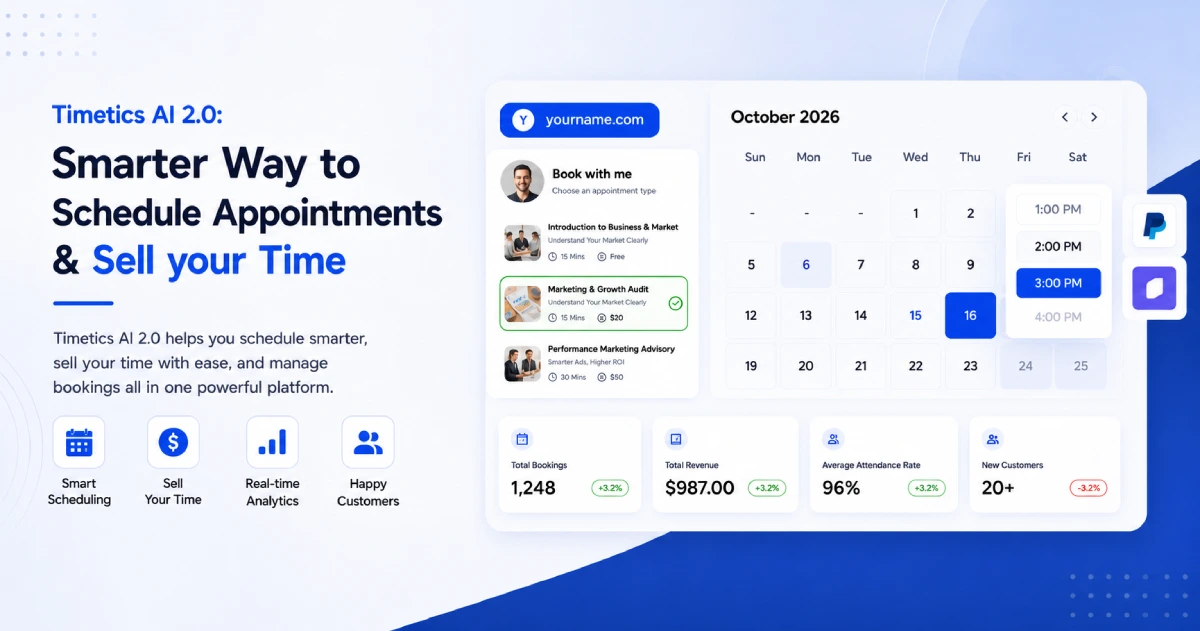
Timetics AI is an appointment booking platform for individual professionals, teams, and service businesses. Its booking pages can show more than a list of available times.
A business can display its services, prices, appointment lengths, images, customer reviews, videos, and frequently asked questions.
Timetics also provides a visual booking page builder. Users can add and arrange content without writing code. This makes it possible to create a booking page that feels more like a complete service page.
Important Timetics features include:
- Service-based appointments
- Custom booking pages
- Full or partial payments
- Custom booking questions
- Extra services and add-ons
- Buffer time and booking limits
- Recurring appointments
- Calendar connections
- Automated reminders and follow-ups
- An AI scheduling agent
The Timetics AI Agent can create booking calendars, change availability, find settings, and provide setup instructions through simple written commands.
For example, a user can write: Create a 30-minute business consultation calendar.
The AI Agent can create the calendar, set the meeting type, add the duration, and generate a booking page.
Timetics is a strong option for consultants, coaches, freelancers, tutors, agencies, and other businesses that want to explain and sell services through their booking pages.
Calendly
Calendly is widely used for scheduling meetings without long email conversations.
A user creates an event type, adds their available times, and shares a booking link. Visitors can then choose a suitable time from the available options.
Calendly is commonly used for:
- Sales calls
- Product demonstrations
- Job interviews
- Customer support meetings
- Team meetings
- One-to-one appointments
- Group meetings
Calendly also offers website embeds. This allows visitors to schedule a meeting without leaving the business’s website.
Its Routing Forms can ask visitors questions and send them to the correct booking page. This is useful for sales teams that need to match a potential customer with the right person.
Calendly is a strong option for individuals and teams that want a simple way to schedule meetings. It is especially useful when routing, team coordination, and software connections are important.
Acuity Scheduling
Acuity Scheduling is built for businesses that manage services, appointments, classes, and detailed client information.
It allows a business to create several appointment types. Each appointment type can have its own name, description, duration, price, and image.
Acuity also allows businesses to group related appointments into categories. This can help visitors find the correct service more easily.
Important Acuity features include:
- Appointment types and categories
- Intake forms
- Classes and group sessions
- Recurring appointments
- Packages and subscriptions
- Full payments and deposits
- Calendar connections
- Automated confirmations and reminders
- Custom colors and fonts
- Website booking embeds
Acuity’s intake forms can collect information from a client during the booking process. Different appointment types can use different forms.
Acuity is a strong option for salons, wellness businesses, fitness professionals, tutors, and other businesses that manage several appointment types or need detailed client forms.
Timetics vs. Calendly vs. Acuity at a Glance
| Area | Timetics AI | Calendly | Acuity Scheduling |
| Main focus | Service-based booking and AI-assisted scheduling | Simple meeting scheduling and routing | Detailed appointment and client management |
| Booking-page content | Custom blocks, videos, reviews, FAQs, and service details | Event information and scheduling flow | Appointment details, images, categories, and custom styling |
| Qualification | Custom booking questions | Routing Forms | Detailed intake forms |
| Payments | Full payments and deposits | Stripe and PayPal connections | Full payments, deposits, tips, and pay-later options |
| Automation | AI Agent, reminders, and workflows | Routing, reminders, and follow-ups | Confirmations, reminders, and client workflows |
| Best for | Consultants, coaches, freelancers, agencies, and service businesses | Individuals, sales teams, recruiters, and larger teams | Salons, wellness providers, classes, and appointment-based businesses |
Each tool can create a useful appointment-booking process. The best choice depends on what the business wants to achieve.
Timetics may be a better fit when the booking page must explain and sell a service. Calendly may be a better fit for fast meeting scheduling and team routing. Acuity may be a better fit for businesses with detailed appointment types and client forms.
Is Timetics Better Than Calendly or Acuity?
Timetics can be better for professionals who want to explain and sell services through their booking page. However, it is not better for every business. The right choice depends on what you need from your booking tool.
Timetics AI is a strong option for consultants, coaches, freelancers, agencies, and service businesses. Its page builder lets you add service details, prices, images, videos, reviews, and frequently asked questions around the booking form. You can also collect payments, ask clients questions, and manage availability.
Timetics also has an AI scheduling agent. You can use simple instructions to create a booking calendar, change your availability, or find a setting. This can save time when managing appointments.
Calendly may be a better choice if you mainly need a simple way to schedule meetings. It is useful for sales calls, interviews, product demos, and team meetings. Its routing tools can also send visitors to the correct team member.
Acuity may be a better choice if you manage many appointment types, classes, packages, or detailed client forms. It is often suitable for salons, fitness professionals, tutors, and wellness businesses.
Timetics is not always the best option. It is the better option when its features match the way your business sells and manages services.
What Booking Page Optimization Mistakes Should You Avoid?
The most common booking page mistakes are unclear service details, too many choices, long forms, hidden prices, poor mobile design, and missing trust signals. These problems can confuse visitors and stop them from completing a booking.
Using an Unclear Headline
A headline such as “Book a Call” does not explain what the visitor will receive. Use a clear headline that names the service, its purpose, and the intended customer.
For example, “Book a 60-Minute Business Strategy Session” is clearer than “Schedule With Me.”
Offering Too Many Choices
A long list of services can make it difficult to choose. Keep the options focused and explain the difference between them. If one service is the best starting point, show that clearly.
Hiding Important Information
Visitors should not have to search for the price, duration, meeting format, or cancellation policy. Show these details before they select a time.
Clear information helps people decide whether the service is right for them.
Asking Too Many Questions
A long booking form can feel like hard work. Ask only for information that helps you confirm, prepare for, or qualify the appointment.
You can collect less important details after the booking is complete.
Ignoring Mobile Visitors
A booking page may look good on a computer but be difficult to use on a phone. Test every step on a real mobile device.
Make sure the text is readable, buttons are easy to tap, and the date and time options work correctly.
Adding Weak or Unrelated Trust Signals
Do not fill the page with random badges or unclear reviews. Use real testimonials, relevant qualifications, clear policies, and secure payment information.
Trust signals should help the visitor feel safe and confident.
Measuring Only the Number of Bookings
A large number of bookings does not always mean the page is successful. Some people may cancel, fail to attend, or be a poor fit.
Track completed bookings, attended appointments, qualified clients, and booking revenue. This gives you a clearer view of the page’s real performance.
Avoiding these mistakes can make your booking page easier to understand and use. It can also help you receive fewer unsuitable bookings and more valuable appointments.
Frequently Asked Questions
What should a booking page include?
A booking page should show the service, price, duration, available times, meeting format, and next steps. It should also include relevant trust signals and clear policies.
Should I show prices on my booking page?
Show the price when your service has a fixed cost. For custom services, display a starting price or explain how you prepare a quote.
How many questions should a booking form have?
Ask only the questions needed to confirm, prepare for, or qualify the appointment. Collect less important information after the booking is complete.
Is it better to embed a booking page or share a link?
An embedded page keeps visitors on your website and creates a smoother experience. A shared link is easier to set up and works well in emails, messages, and social profiles.
What is a good booking page conversion rate?
There is no single good rate for every business. Your result will depend on the service, price, traffic source, and whether payment is required.
Can AI improve a booking page?
AI can help create calendars, update availability, find settings, and reduce manual work. However, people must still decide the offer, pricing, message, and ideal customer.