Why Service Businesses Outgrow Calendly: 7 Switching Reason


Table of Contents
Calendly is a useful tool for booking meetings. It helps businesses share their availability and reduce back-and-forth emails. For simple scheduling, it can work very well.
But service businesses often need more as they grow.
They may need to accept payments, manage teams, offer different services, control staff schedules, and handle customer information. They may also want a booking page that matches their brand. When these needs increase, a basic scheduling tool may no longer be enough.
This does not mean Calendly is a bad platform. It simply means that the needs of a growing service business can change.
In this guide, we will explain seven common reasons businesses switch from Calendly. We will also look at who should consider switching, how to move without losing bookings, and whether Timetics AI could be a better fit.
Why Do Businesses Leave Calendly?
Businesses often leave Calendly when they need more than simple appointment scheduling.
Calendly is designed to make meeting booking easier. A user shares a link, and a customer chooses an available time. This process works well for many individuals and small teams.
However, service businesses usually have more complex needs. They may need to manage several services, staff members, locations, payments, and customer details in one place. They may also want stronger control over branding and the full booking experience.
Using separate tools for these tasks can create extra work. Staff may need to move information between different platforms. Customers may also face more steps when booking a service.
As the business grows, these small problems can become larger. This is often the point when a company starts looking for a Calendly alternative that supports its complete booking process.
What Are the Seven Main Reasons Businesses Leave Calendly?
Businesses usually leave Calendly when scheduling becomes only one part of a larger service process. The seven main reasons are rising costs, advanced team needs, complex service bookings, limited control over the booking experience, dependence on other tools, operational complexity, and the need for deeper business data.
1. The Cost Grows With the Team
Calendly charges paid plans by seat. This means the total cost can rise as more employees join.
Calendly currently lists its Standard plan at $10 per seat per month and its Teams plan at $16 per seat per month when billed yearly. Some businesses may also need extra tools for payments, customer management, or service delivery. This can increase the full cost of their booking system.
2. Important Team Features Require Higher Plans
Small businesses may start with a simple plan. However, growing teams often need round-robin booking, lead routing, advanced controls, and staff permissions.
Calendly offers many of these features. However, some are available only on its Teams or Enterprise plans. A business may consider switching if it needs these features but cannot justify the higher cost.
3. Service Bookings Become More Complex
A meeting is usually simple. It has a host, a guest, and a time.
A service booking can be more complicated. It may involve a staff member, a room, equipment, a location, a service duration, and a payment. For example, a salon may need to assign both a stylist and a treatment room.
Businesses may switch when they need a system built around complete service bookings rather than meetings alone.
4. The Business Wants More Control Over Its Brand
Customers often see the booking page before they meet the business. That page is part of the customer experience.
Calendly allows users to customize booking pages and remove Calendly branding on eligible paid plans. However, some businesses want greater control over the layout, service details, colors, checkout process, and customer journey.
They may prefer a booking platform that feels like a natural part of their own website.
5. Too Many Extra Tools Are Needed
Calendly connects with many popular tools. It also supports payments through Stripe and PayPal, reminders, workflows, and several business integrations.
However, a service business may still use separate platforms for customer records, staff management, payments, and other daily tasks. Moving information between these tools can take time and create mistakes.
Some businesses switch because they want fewer tools and a simpler workflow.
6. Managing Staff, Services, and Locations Gets Harder
A growing service business may have many employees, services, schedules, and branches.
Each employee may offer different services. Prices and working hours may also change by location. Managing these details can become difficult when the booking system is mainly designed around meeting types and individual calendars.
At this stage, the business may need a platform with stronger service, staff, and location management.
7. The Business Needs More Useful Customer and Booking Data
Basic booking data shows when a meeting will happen and who will attend.
Service businesses may need more information. They may want to know which services earn the most money, which staff members receive the most bookings, when customers cancel, and how often customers return.
Clear reports can help owners make better decisions. If the current system does not provide the right view of the business, switching may become necessary.
These pressures do not mean Calendly is a poor product. Calendly remains a strong scheduling platform with payments, workflows, routing, integrations, and team features.
The problem begins when a business needs a complete service-booking system instead of a meeting scheduler.
📚 Related reading: How to Reduce Low-Intent Bookings Without Losing Qualified Clients
Which Businesses Are Most Likely to Feel These Pressures?
Service businesses with many staff members, services, locations, or booking rules are most likely to outgrow Calendly. They often need to manage more than a meeting time.
Salons, Spas, and Wellness Businesses
These businesses may offer many services with different prices and durations. They may also need to assign a staff member, room, or piece of equipment to each booking.
Coaches and Consultants
Coaches and consultants may sell paid sessions, packages, or group programs. They often need payments, client details, reminders, and repeat bookings in one smooth process.
Healthcare and Fitness Providers
Clinics, therapists, gyms, and personal trainers may manage several providers and appointment types. They may also need intake questions, group sessions, recurring bookings, and strict cancellation rules.
Tutors and Training Businesses
Tutors, language schools, and training centers may offer private lessons and group classes. They often need to manage instructors, students, course schedules, and payments.
Professional Service Firms
Law firms, accounting firms, agencies, and financial advisers may need to send each customer to the right specialist. Simple calendar links may become difficult to manage as the team grows.
Businesses With Multiple Locations
A business with several branches must manage staff and availability at each location. Customers should be able to choose the correct service, branch, employee, and time without confusion.
Businesses That Manage Rooms or Equipment
Some services need more than an available employee. They may also require a meeting room, treatment room, desk, vehicle, or other resource.
These businesses often feel pressure when they must use several tools to complete one booking. A specialized booking platform may offer a simpler experience for both staff and customers.
Is Calendly Still the Better Choice for Some Businesses?
Yes. Calendly can still be a good choice for freelancers, sales teams, and recruiters. It works well when the main goal is to schedule simple meetings, interviews, demos, or calls. It is easy to set up, connect with a calendar, and share using a booking link.
However, if a business needs to manage multiple services, collect payments, use AI capabilities, and create a complete service journey before and after each booking, it may need more than Calendly.
Using several extra tools for these tasks can also make daily work more difficult. It may create more steps for both customers and staff.
So, it is fair to say that Calendly is not a bad option. However, service-based businesses that want to manage the complete booking process and boost revenue through bookings may need a more complete solution.
How Do You Switch From Calendly Without Disrupting Bookings?
Switching from Calendly does not mean it is a poor scheduling tool. Calendly remains excellent for sharing availability and arranging meetings. A switch makes sense when your business needs a complete service-booking workflow-including service pages, intake questions, payments, add-ons, recurring appointments, teams, or multiple locations.
For these needs, Timetics AI is a practical option because it combines scheduling, service presentation, payments, customer information, and booking automation in one system.
Make the switch gradually:
- List your Calendly event types, future appointments, integrations, payment settings, and public booking links.
- Recreate only your essential workflows in Timetics AI, beginning with your most valuable service or consultation.
- Connect your calendars and test availability, payments, reminders, cancellations, rescheduling, and meeting links.
- Keep existing Calendly appointments active while directing new customers to Timetics AI.
- Update booking links across your website, email signatures, social profiles, CRM, and campaigns.
- Monitor both platforms until all existing Calendly appointments are completed.
Cancel or downgrade Calendly only after Timetics AI is working reliably and customers can complete the new booking journey without confusion.
Is Timetics AI a Better Alternative When Calendly Stops Fitting?
Calendly is popular for good reason: it makes scheduling simple, reliable, and familiar. Timetics AI becomes a stronger alternative when a business needs more than a meeting link- especially when appointments involve services, pricing, intake, payments, add-ons, teams, or multiple locations.
| Capability | Calendly | Timetics AI |
| One-to-one scheduling | ✓ | ✓ |
| Calendar and video-meeting integrations | ✓ | ✓ |
| Group and team bookings | ✓ | ✓ |
| Automated reminders | ✓ | ✓ |
| Stripe and PayPal payments | ✓ | ✓ |
| Deposits, discounts, and coupons | ✓ | ✓ |
| AI scheduling assistance | ✓ | ✓ |
| Visual, service-specific booking-page builder | ✕ | ✓ |
| Native service categories and add-ons | ✕ | ✓ |
| Separate workspaces for brands or clients | ✕ | ✓ |
| Service-business-first booking structure | ✕ | ✓ |
Calendly may remain the better choice for enterprise sales routing, recruiting, mobile access, or teams that depend on its larger integration ecosystem.
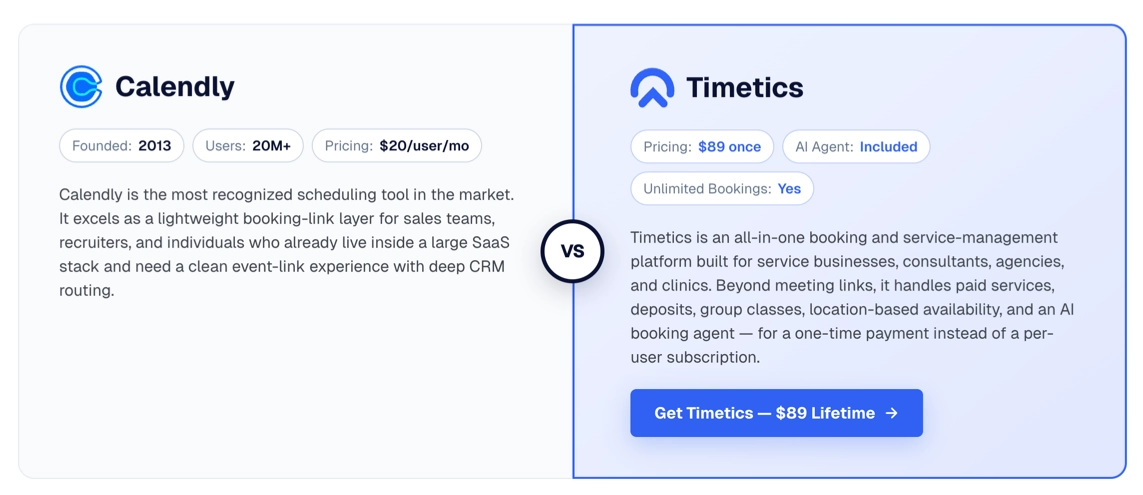
Timetics AI is more suitable when the booking page must also present and sell services. It combines service pages, intake questions, scheduling, payments, customer information, add-ons, and team controls in one platform. This can reduce the need to purchase and connect separate landing-page, form, scheduling, and service-management tools.
The smarter decision is therefore not based on popularity. It depends on whether the business is arranging meetings or managing a complete service-booking journey.
📚 Related reading: Calendly vs. Timetics: A Side-by-Side Comparison
Should Your Business Leave Calendly?
If Calendly still handles your meetings efficiently, keeping it may be the smartest decision. However, if appointments are central to how you sell and deliver services, Timetics AI deserves a closer look.
Its service-focused booking experience brings scheduling, payments, customer intake, add-ons, team controls, and AI-assisted setup into a more unified workflow.
Calendly charges $10 per person per month, which can become expensive as your team grows. If you need multiple users or advanced scheduling workflows, these recurring costs may add up quickly.
Timetics AI offers the same core scheduling features- and, in many areas, even more advanced service-booking capabilities, for a one-time payment of only $89/lifetime.
Before committing, recreate one important booking journey in Timetics AI and test it with real customers.
Frequently Asked Questions About Leaving Calendly
Why do businesses switch from Calendly to Timetics AI?
Businesses often switch when they need dedicated service pages, add-ons, payments, workspaces, and AI-assisted scheduling in one platform.
Is Calendly good for service businesses?
Yes. Calendly works well for straightforward scheduling, while Timetics AI is more focused on businesses selling and managing multiple services.
Does Calendly support payments?
Yes. Calendly supports Stripe and PayPal payments. Timetics AI connects payments more closely with service pages, pricing, add-ons, and booking workflows.
Is Timetics AI better than Calendly?
It depends on your needs. Timetics AI may be better for service-focused booking, while Calendly remains strong for simple scheduling and enterprise meeting workflows.
Can I switch from Calendly to Timetics AI without losing existing appointments?
Yes. Keep existing Calendly appointments active while directing new customers to Timetics AI, then complete the transition gradually.
What should I look for in a Calendly alternative?
Look for service management, customized booking pages, payments, automation, team controls, integrations, a simple customer experience, and transparent pricing.