What is Account Settings?
Account Settings is your personal account page in Timetics AI, where you manage your profile information, profile image, password, and account deletion. It belongs to you rather than to a workspace, so it stays the same in every workspace you use. Open it from Admin Console → Account Settings.
Workspace-specific settings such as branding, permissions, currency, and booking page appearance are managed under Workspace Settings instead.
Why Do You Need It?
- Host Identity: Manage the name guests see on bookings.
- Contact Number: Manage your phone number for integrations.
- Login: Set or change your password.
- Personal Settings: Your account settings remain the same across workspaces.
If you switch between multiple workspaces, Account Settings stays the same because it belongs to your personal account rather than the current workspace.
How to Update Your Account
To update your account-
- Go to Admin Console → Account Settings.
- Update your Full Name and Phone Number from the Profile Information section.
- Your Email is read-only and cannot be changed here.
- To change your password, enter your Old Password and New Password.
- Click Save Changes to save your profile updates.
- Upload a profile image from the Profile Image section. Use JPG, GIF, or PNG files up to 500 KB.
- Click Delete Account, review the confirmation message, and confirm to permanently delete your account and associated data. You’ll be signed out and redirected to the Sign In page.
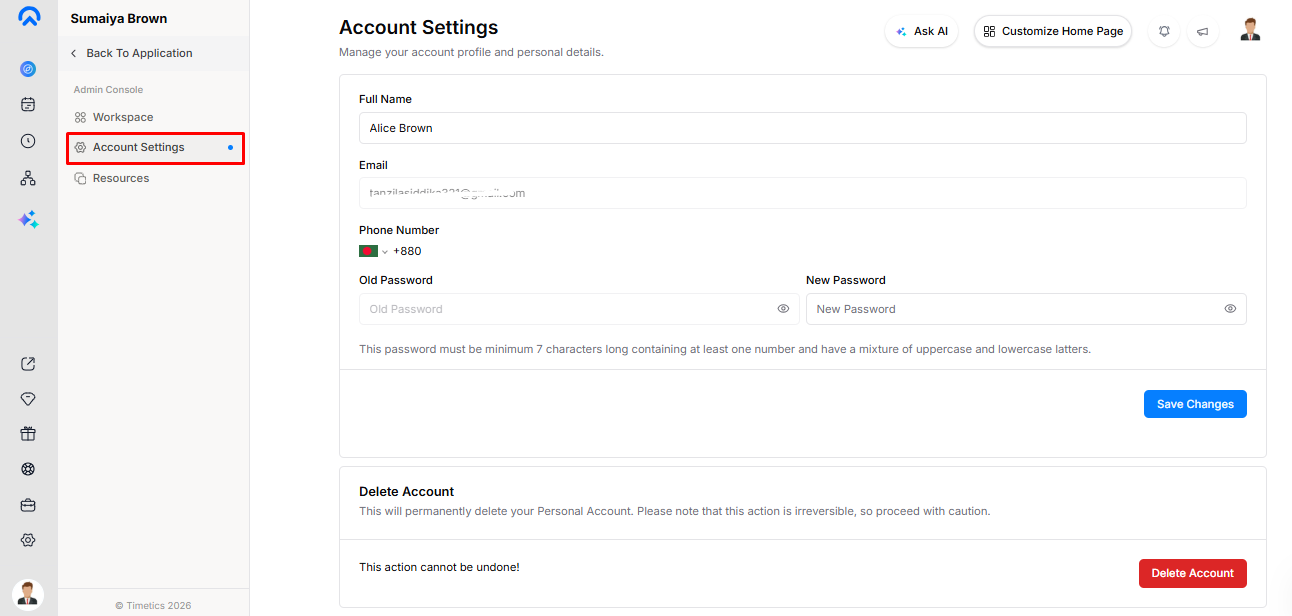
Account deletion is permanent and cannot be undone.
Key Functionality
- Profile Information: Full Name, Phone Number, and password changes are saved together.
- Profile Image: Uploads separately as soon as you select an image.
- Account Deletion: Takes effect immediately after confirmation and cannot be undone.
Validation Rules
- Full Name must contain between 3 and 60 characters.
- Email cannot be edited from Account Settings.
- New Password should contain at least 8 characters to satisfy the server requirement.
- The password should contain at least one number and a mix of uppercase and lowercase letters.
- If the Old Password is incorrect, the whole Profile Information submission fails.
- Profile images must be JPG, GIF, or PNG.
- Profile images must be no larger than 500 KB.
Important Notes
- Account Settings applies across all your workspaces.
- Your email cannot be changed from this page.
- Keep your Phone Number updated if you use SMS integrations.
- Account deletion is permanent and separate from workspace deletion.